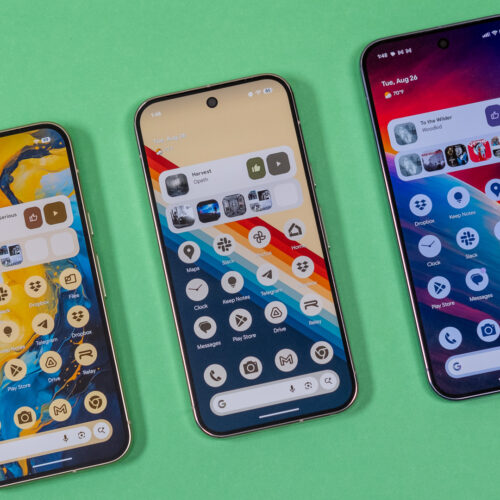

Google has officially rolled out its Material 3 Expressive UI design language to a wider range of Pixel devices, bringing a fresh visual overhaul to millions of Android phones. Originally debuted alongside the Pixel 10 series, the updated interface is now reaching Pixel 6 and newer models through the latest Pixel Feature Drop.
What Is Material 3 Expressive UI?
Material 3 Expressive represents the next evolution of Google’s design philosophy. While standard Material You focused primarily on dynamic color theming based on your wallpaper, Expressive UI goes several steps further with more pronounced typography, richer surface treatments, and bolder use of color across system apps.
The update introduces several visual refinements:
- Richer Color Palettes: Expanded accent color options that go beyond the standard wallpaper extraction, offering curated combinations designed by Google’s Material Design team.
- Updated Typography: Google Sans has been refined with improved readability at different sizes, and heading hierarchies are now more distinct across system UI elements.
- New Surface Treatments: Cards, dialogs, and sheets now feature more expressive shadows, rounded corners, and depth effects that make the interface feel more layered and tactile.
- Animated Transitions: Smoother and more purposeful animations when opening apps, switching between tasks, and interacting with notifications.
Which Devices Are Getting the Update?
As of the latest Pixel Feature Drop, Material 3 Expressive UI is rolling out to:
- Google Pixel 6 and Pixel 6 Pro
- Google Pixel 7 and Pixel 7 Pro
- Google Pixel 8 and Pixel 8 Pro
- Google Pixel 9 and Pixel 9 Pro
- Google Pixel 10 and Pixel 10 Pro
- Google Pixel Fold and Pixel Tablet
Other Android manufacturers, including Samsung and OnePlus, are expected to adopt elements of Material 3 Expressive in their custom Android skins later this year, though the full experience remains exclusive to Google’s Pixel lineup for now.
How to Get Material 3 Expressive UI
If you own a supported Pixel device, the update arrives automatically through the standard Pixel Feature Drop mechanism. To check if it’s available for your device:
- Go to Settings > System > System Update on your Pixel device.
- Tap Check for Update.
- If available, download and install the latest Feature Drop.
- Once installed, you can customize Material 3 Expressive settings under Settings > Wallpaper & Style.
Why This Matters for Android Users
Material 3 Expressive UI is more than just a visual refresh. It signals Google’s commitment to making Android feel more cohesive and premium across the board. For users holding onto older Pixel devices like the Pixel 6 or 7, this update breathes new life into hardware that might otherwise feel dated, offering software polish that rivals the latest flagship offerings.
The rollout also demonstrates Google’s strategy of extending new software features to older hardware rather than reserving them exclusively for new devices. This is a welcome shift for users who prefer to keep their phones for three or more years.
Final Verdict
Material 3 Expressive UI is one of the most meaningful visual updates Google has delivered to the Pixel lineup in years. The combination of richer colors, refined typography, and smoother animations makes day-to-day Android usage feel noticeably more polished. If you haven’t received the update yet, keep an eye on your system settings — it’s worth the wait.


