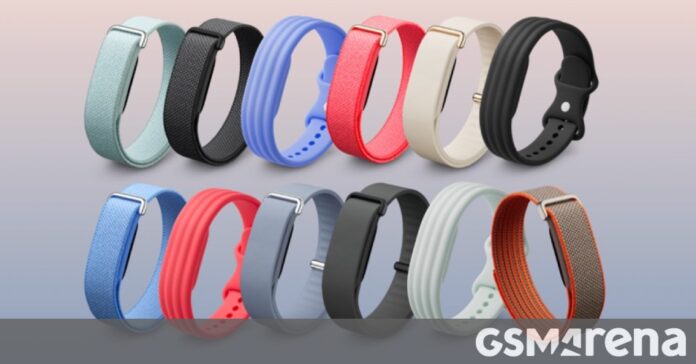

Google’s $99 Fitbit Air fitness tracker only hit store shelves recently, but it’s already picking up momentum with a clever new feature for the maker community. Google has officially released the complete Fitbit Air design reference — including precise dimensions, tolerance margins, and 2D CAD drawings — allowing anyone with a 3D printer to create custom bands and accessories.
This move taps into the growing DIY wearable culture, where personalization is just as important as functionality. Instead of being limited to off-the-shelf band options, Fitbit Air owners can now design, print, and share their own custom bands in any color, texture, or style they can imagine.
What the Design Files Include
The released documentation is surprisingly thorough. Google has published PDFs containing exact mating dimensions, tolerance specifications, and the force requirements for both attaching and detaching bands. This level of detail ensures that third-party bands will fit securely and function reliably — no wobbling, no accidental detachment.
The Fitbit Air has a two-part construction: the “pebble,” which houses the sensors, battery, and core electronics, and the “sleeve,” which wraps around the pebble and connects to the bands. The design files cover both components, meaning you can create everything from minimalist snap-on bands to elaborate protective sleeves.
Design Constraints to Keep in Mind
Google’s documentation includes several important design requirements. Any custom bands or sleeves must maintain proper clearance around the heart rate and SpO2 sensors. The optical sensors need an unobstructed path to the skin to deliver accurate readings, which means the band design can’t interfere with the sensor window on the underside of the pebble.
Google also recommends designing for consistent skin contact. If the band allows the tracker to shift or lift during movement, you’ll get erratic heart rate data. The company further suggests using skin-friendly materials — think flexible TPU, silicone, or medical-grade plastics — to avoid irritation during extended wear.
A Win for the DIY Community
This isn’t Google’s first foray into open hardware documentation. The company has released reference designs for various products over the years, but the Fitbit Air files are notably comprehensive. For the 3D printing community, this opens up a world of possibilities: sports bands with integrated sweat channels, fashion-forward designs with embedded patterns, or even utility bands with built-in card holders.
The timing is strategic. By releasing these files early in the product’s lifecycle, Google encourages a third-party accessory ecosystem to develop organically. More band options mean more reasons to buy a Fitbit Air — and the community does the design work for free.
How to Get Started
The CAD files are available as PDFs from Google’s official Fitbit Air resources page. You’ll need a 3D printer with reasonable precision — standard FDM printers should work fine for basic designs, though SLA/resin printers will produce smoother finishes. For materials, TPU filament is the go-to for wearable bands because it’s flexible, durable, and comfortable against the skin.
If you’re new to 3D printing wearables, start with the provided reference models. Print a simple band first to check the fit and tolerances, then experiment with your own designs. The community is already sharing files on platforms like Printables and Thingiverse, so you don’t have to start from scratch.
The Fitbit Air design release is a smart play from Google — and a win for anyone who wants their fitness tracker to look as individual as they are.


