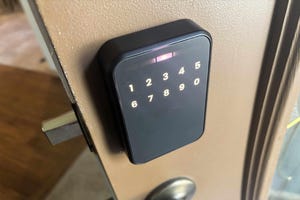

When people ask me for home security recommendations, a smart lock is always near the top of my list. Sure, your door already has a lock — probably a standard deadbolt — but upgrading to a smart lock does so much more than just secure your entry. It adds genuine convenience, gives you peace of mind, and makes daily life just a little bit smoother.
At techkyskills.com, we’ve been testing smart locks of all kinds for over a decade. From household names like August, Yale, and Schlage to rising contenders pushing the envelope, we’ve seen it all. Here are our top picks for 2026 — the locks that nail the balance between security, convenience, and smart home integration.
What’s the Best Overall Smart Lock?

While my list is packed with excellent choices — including the Schlage Encode Plus and Lockly Visage — my top pick this year is the Yale Assure Lock 2. Even if not every model includes fingerprint scanning, this lock does just about everything right in an impressively compact design. Apple Home/HomeKit support, easy digital passes, multiple finish options, and compatibility with home security systems make it the most well-rounded smart lock on the market. In testing, it delivered focused, reliable performance with a rock-solid build.
Best Smart Locks of 2026 — Full List
Yale Assure Lock 2
Best overall smart lock
Price: Around $240
Why we love it: Compact, sturdy, with a fantastic app and broad smart home support including Apple Home/HomeKit, Alexa, and Google Assistant. It does everything a modern smart lock should without the bulky footprint some competitors suffer from. Apple Home Key and digital pass support are cherries on top. Multiple style options let you match your door’s aesthetic.
Pros: Sleek design, voice assistant support for Alexa/Google/Siri, options for codes/fingerprints and more, works with Airbnb app and ADT Plus
Cons: Can get pricey, not all models include fingerprint entry
Best for: First-time smart lock buyers, Apple/Siri users, ADT Plus customers, anyone tired of bulky retrofits
Ultraloq U-Bolt Pro
Best budget smart lock
Price: Around $100
Why we love it: Smart locks aren’t exactly known for being cheap — decent ones tend to sit well above $100. This Ultraloq model hits a sweet spot between affordability and features, with a solid keypad and built-in fingerprint sensor. Our tests also revealed excellent Wi-Fi range, making it a fantastic choice for rentals, guest houses, or Airbnb properties.
Pros: One of the most affordable smart lock brands, keypad + fingerprint, easy “eKey” passcodes, high IP65 weather resistance
Cons: No Apple/Siri support, the entry pad design isn’t for everyone
Best for: Budget-conscious buyers, landlords, rental property owners
August Smart Lock (4th Gen)
Best retrofit smart lock
Price: Around $146
Why we love it: The August lock has been an Editor’s Choice for good reason. As a retrofit model, it fits over your existing deadbolt — no need to replace the whole thing. You control it via app or voice assistant. August keeps slimming down the hardware, and this generation is the sleekest yet. Features like auto-lock, DoorSense open/close notifications, and activity logging cover all the bases.
Pros: Easy retrofit design, comprehensive locking and monitoring, Alexa/Google/Apple compatibility, slimmer and more affordable than ever
Cons: Still a bit bulky, no full Matter support yet
Best for: Renters, anyone who loves their current deadbolt, budget-conscious upgraders
Schlage Encode Smart Wi-Fi Lever
Best smart lock handle
Price: Around $240
Why we love it: Not every door has a deadbolt — and not everyone wants one. Schlage’s smart Wi-Fi lever replaces your standard door handle while still delivering full smart lock functionality. Built-in Wi-Fi lets you set up to 100 entry codes, customize notifications, review activity logs, and schedule auto-locking. Works with Alexa and Google Assistant too.
Pros: Beautiful handle design as an alternative to deadbolts, customizable notifications, up to 100 entry codes, Alexa/Google support
Cons: Pricey, no biometrics
Best for: Doors without deadbolts (garage side doors, etc.), code-entry fans
Level Lock Touch
Best invisible smart lock
Price: Around $350
Why we love it: At a glance, nobody would guess this is a smart lock. The Level Lock looks like a traditional deadbolt but hides app support, a contactless fob, and Apple Home/Home Key capabilities inside. Installation is refreshingly simple without the bulky add-ons most smart locks require.
Pros: Compact design hides smart features, Matter support, built-in contactless fob
Cons: No fingerprint reader, expensive
Best for: Minimalists who want a smart lock that doesn’t look like one, Apple Home/Home Key fans
Schlage Sense Expert
Best high-end smart lock
Price: Around $400
Why we love it: Schlage’s latest is not only one of the best-looking lock designs I’ve seen, but it’s also packed with cutting-edge tech. UWB (Ultra-Wideband) lets the lock sense when someone is approaching and from which direction. Apple Home Keys integrate seamlessly, and NFC support means virtually anyone with a modern phone can use it. Upcoming Aliro certification will add digital key capabilities across more platforms.
Pros: High-tech and beautiful design, UWB, Matter support, digital passes, easy installation, extra features like alarms and release warning lights
Cons: Very expensive at $400, no fingerprint sensor, needs a Matter hub (like Apple TV or HomePod) for full features
Best for: Future-proof buyers, Apple users who want the absolute best
Yale Smart Lock with Matter
Best for Google users
Price: Around $150
Why we love it: Yale’s Matter-compatible lock works with Alexa and Apple Home, but it offers the most value for Google Home users. You can quickly set up the lock and access all its settings directly. Features include customizable auto-locking, guest passes, vacation mode, and more — making it one of the most versatile locks I’ve tested.
Pros: Affordable design that’s great for Google users, streamlined app with useful customization, easy deadbolt replacement install
Cons: Battery cover feels a bit flimsy
Best for: Google Home users, budget-conscious buyers wanting Matter compatibility
Smart Locks Compared
| Model | Price | Type | Unlock Methods | Voice Assistants |
|---|---|---|---|---|
| Yale Assure Lock 2 | $240 | Deadbolt | App, keypad, Apple Watch | Alexa, Google, Siri |
| Ultraloq U-Bolt Pro | $100 | Deadbolt | App, keypad, fingerprint | Alexa, Google |
| August 4th Gen | $146 | Retrofit | App, key | Alexa, Google, Siri |
| Schlage Encode Lever | $240 | Lever | App, keypad, backup key | Alexa, Google |
| Level Lock Touch | $350 | Deadbolt | Key, app, Bluetooth, fob | Alexa, Google, Siri |
| Schlage Sense Expert | $400 | Deadbolt | NFC, Apple Home Key, UWB | Alexa, Google, Siri |
| Yale Matter Lock | $150 | Deadbolt | Bluetooth, app, keypad | Alexa, Google, Siri |
Other Smart Locks We’ve Tested
Nuki Smart Lock: I genuinely love Nuki’s compact retrofit design — it’s the most compact retrofit I’ve tested. The downside: you need to detach the lock or use a battery pack to charge it via magnetic cable. If Nuki updates its battery solution, it’ll be the retrofit to beat.
Level Lock Plus: The older Plus model used to hold a spot here, but it’s outclassed in nearly every way by the Level Lock Touch. Prices are similar, though you can still find the Plus at a discount.
Aqara Smart Lock U200: Aqara’s lock has plenty to love — full Matter/Thread support and a compact keypad. If you need full Matter smart home compatibility, it’s worth a look.
Yale Approach: Yale’s retrofit lock is excellent if you want to keep your existing deadbolt intact. It offers a keypad add-on, which most retrofits don’t have.
Kwikset Halo Touch: A straightforward fingerprint lock with built-in Wi-Fi and Alexa/Google support, but no Apple compatibility and the $179 price feels a bit high.
Wyze Smart Lock: Incredibly affordable, but for around $30 more, the Ultraloq offers significantly more. Wyze has also faced security concerns that give us pause.
Aqara U100: We were fans, but it’s been outclassed by the latest wave of more compact locks that don’t need an additional hub.
Lockly Flex Touch: The fingerprint sensor worked great in testing, but the interior feels cheap and you need an $80 add-on Wi-Fi hub for remote control.
How We Test Smart Locks
The CNET team has spent years testing and reviewing smart locks. For our most recent round, we tested several new models in real homes and on mock door setups. We give each lock at least a few days of real-world use.
We start by evaluating design and installation process. Most installations just need a Phillips-head screwdriver, but the experience still matters. From there, testing is hands-on: we listen for motor noise, assess app quality, check smart home compatibility, and measure real-world responsiveness.
We pay special attention to entry methods: keypads for sharing access, Bluetooth auto-unlock for convenience, biometrics for speed. We also spend serious time with each companion app, testing geofencing, auto-lock timing, and code management.
What to Consider When Buying a Smart Lock
Full Deadbolt vs. Retrofit
Most smart locks replace your entire existing lock. Retrofits like the August work with some of your existing hardware — a great option for renters.
Entry Methods
Keypads are great for sharing codes. Biometrics (fingerprint scanners) are fast and personal. NFC and Apple Home Key let you unlock with a wave of your phone or watch. Think about what fits your daily routine.
Platform Compatibility & Matter
Matter is the new smart home standard backed by Apple, Google, Amazon, and others. Future-proof your purchase by choosing a lock with Matter support.
Security & Privacy
Smart locks use encryption to secure wireless communications. Look for two-factor authentication support and regular firmware updates. Also check the ANSI/BHMA grade — Grade 2 or higher is ideal for exterior doors.
Design & Power
Your lock sits on your front door — choose something you’ll enjoy seeing every day. Most run on AA batteries (expect 6–12 months of life), while some use rechargeable packs.
Frequently Asked Questions
Are smart locks secure?
Yes — from major brands like Yale and Schlage, smart locks are very secure. Just like a traditional lock, they’re only as secure as your habits. A weak PIN code isn’t much better than hiding a key under the mat. That said, smart locks can be more secure than traditional ones: you can’t lose your fingerprint.
Do smart locks work without power?
Most smart locks include a traditional keyhole or an emergency power port (often a 9V battery contact) for backup.
Why are smart locks so expensive?
You’re paying for physical hardware (the lock mechanism), smart components (radios and chips), and software security (encryption). Finding a good one under $100 is genuinely a solid deal.
Can smart locks be hacked?
Like any connected device, it’s theoretically possible. But reputable brands encrypt all communications, making it extremely difficult. And remember: burglaries are crimes of convenience. An unlocked window is a far more likely entry point.


