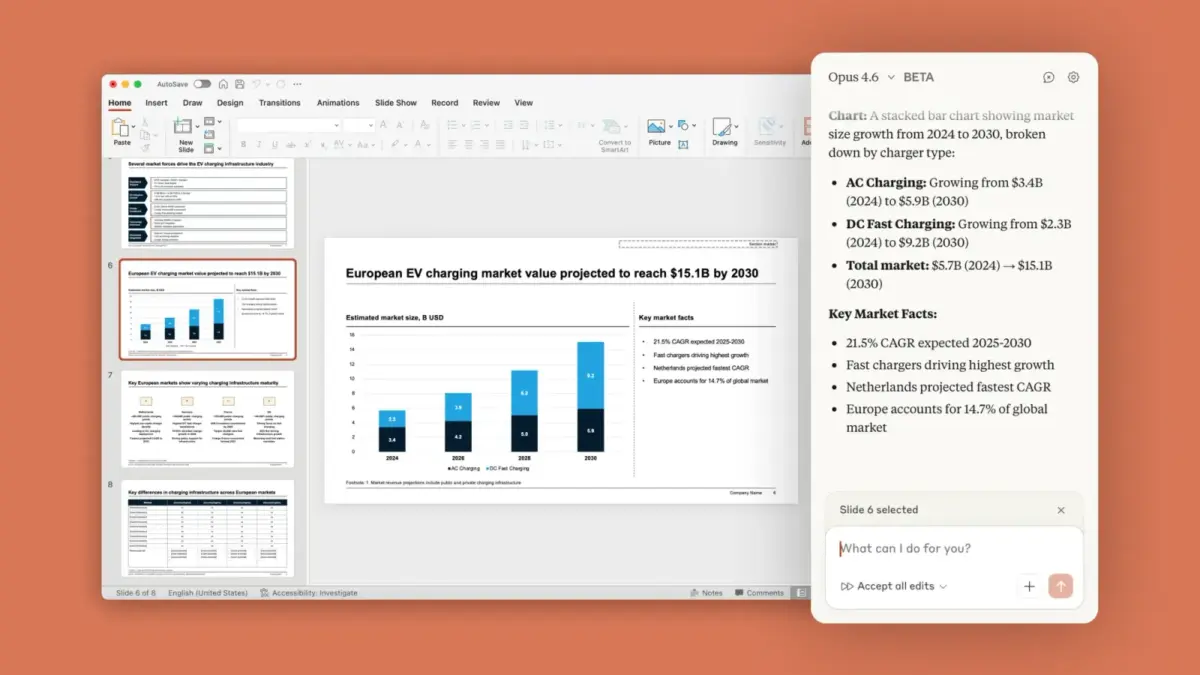

The Slide Whisperer: Claude AI Lands Inside PowerPoint
Have you ever spent hours wrestling with PowerPoint, battling formatting gremlins while racing a deadline? Enter Claude in PowerPoint – Anthropic’s revolutionary add-in that embeds its AI assistant directly into Microsoft’s presentation software. Rolling out as a research preview for Pro, Team, and Enterprise users, this tool promises to transform slide decks from static documents into dynamic creations guided by natural language. With professionals spending up to 30% of their workweek on presentationspanel (McKinsey), Claude’s contextual intelligence could reclaim countless hours while ensuring brand consistency. The key innovation? It doesn’t just generate content – it understands your deck’s DNA.
Decoding the Mechanics: Claude’s Slide Craftsmanship
At launch, Claude handles three core workflows, each anchored in respecting your existing design ecosystem:
- Generating Slides On-Demand: Prompt “Create competitive analysis slide using Q3 data” and Claude builds it within your template, fonts, and colors.
- Editing Mentioned Elements: Highlight text asking “Simplify bullet points on slide 7” or “Convert market stats into a bar chart“.
- Outlining Complete Decks: Describe “10-slide fintech industry overview” for Claude to scaffold structured content.
Crucially, charts aren’t static images – they’re native PowerPoint objects editable post-creation. This contrasts starkly with AI tools exporting JPEGs that break when modified. Anthropic confirmed Claude cross-references slide masters before generating content – an architecture preventing visual reunification nightmares.
Users can toggle between Anthropic’s Sonnet 4.5 (faster, ideal for light edits) and Opus 4.6 (complex restructuring). Independent benchmarks highlight Opus outperforms GPT-4 on presentation coherence taskspanel (Stanford HAI, 2023), though Anthropic avoids prescribing model rules.
Excel-to-PowerPoint: The Data Visualization Pipeline
This launch isn’t standalone. Claude in PowerPoint follows Anthropic’s Excel integration, enabling a closed-loop workflow:
- Analyze financials using Claude in Excel (pivot tables, conditional formatting)
- Instantly transform that verified data into PowerPoint visuals
- Maintain continuity without manual chart recreation
For quarterly reports, this slashes repetitive tasks. Imagine updating an Excel revenue model; Claude then regenerates all linked PowerPoint charts at one click. As enterprise analyst Sarah Kim notes, “The 80/20 rule dominates presentations – 80% layout labor for 20% insights. Tools that automate scaffolding free strategists for high-value work.”
Constraints and Caveats: The Beta Fine Print
Despite its ambitions, Claude in PowerPoint carries significant beta limitations:
| Feature | Current Limitation | Enterprise Impact |
|---|---|---|
| Session History | Not saved between uses | Lost context during revisions |
| Compliance | Missing audit logs & compliance APIs | Risk for regulated industries |
| Data Governance | Custom retention policies don’t apply | Potential data sprawl concerns |
Anthropic explicitly warns of prompt injection risks – malicious code in templates could hijack Claude to expose data. Their mitigation? Restrict usage to trusted files “>
(Rand Corporation, 2024). This echoes broader AI security challenges where plugins expanding access collide with attack surface expansion.
The tool also lacks support for advanced PowerPoint features likeある morph transitions or complex animations – reminders that human designers aren’t obsolete yet.
Access and Evolution
Availability remains exclusive: Claude Pro subscribers and higher tiers via Microsoft AppSource. Anthropic hasn’t committed to public rollout timelines, emphasizing the add-in is a “research preview” undergoing security and feature maturation. Enterprise admins note compliance gaps must close before full deploymentpanel (Gartner), especially in finance and healthcare sectors.
Redefining the Presentation Workflow
Claude in PowerPoint signals a shift from AI chatbots to workflow collaborators. Unlike Copilot’s generalist approach, Claude leverages file-specific context – understanding your brand’s visual language rather高强度 than applying default theming.
Yet its success hinges on Anthropic’s navigation of two deception:
- Complexity management: Over-automation risks sterile, templatized outputs
- Security: Enterprise clients need ironclad compliance by launch
If executed thoughtfully, this could elevate presentations from design chores to strategic storytelling. The real win? Letting teams focus on what matters instead of pixel-pushing. Tools like Claude don’t replace creativity – they fuel it by handling tactical drudgery.
What’s your take – will embedded AI assistants redefine PowerPoint mastery, or are key human skills still irreplaceable? Drop your perspective below!


