
Apple mostly steered clear of the big, flashy AI announcements at WWDC 2026 — you know, the AI jukeboxes, avatar generators, and virtual try-on tools that make headlines but aren’t all that practical in daily life.
OK, Apple did have some “look at this!” AI moments — photo retouching tools that can wipe groups of people out of the frame and a revamped Image Playground app. But the company also unleashed a series of smaller Apple Intelligence and Siri AI features coming this fall that genuinely look useful day-to-day. Here are five favorites.
1. Visual Intelligence for splitting restaurant bills. When the check arrives, scan it with your iPhone’s camera. The new AI-enhanced Siri picks up all the items, saves them in a list, and lets you select what you ordered (portions supported). Add a tip and send your share via Apple Cash. Simple, elegant, and solves a genuinely awkward social moment.
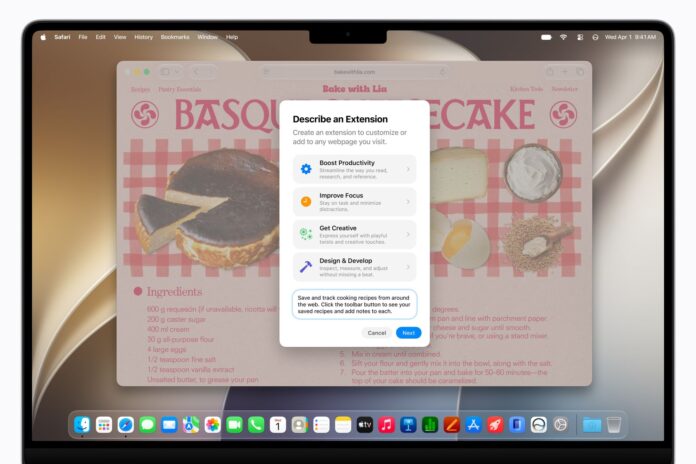
2. Describe an Extension for Safari. Using natural language prompts, Safari users will be able to create browser extensions on the fly. Ask Safari to build an extension that saves and tracks cooking recipes, and Apple Intelligence makes it happen. It’s vibe-coding for the rest of us.
3. Create a Pass in Apple Wallet. This tiny feature is brilliant. With Visual Intelligence, you can create an instant Apple Wallet pass from membership cards, tickets, and anything with a barcode or QR code. Just point your camera, scan, and boom — a digital pass is generated on the spot.
4. Automatically Fix Passwords. Apple barely mentioned AI agents during the keynote, but it slipped in a powerful one. The Automatically Fix Passwords feature uses AI agents to log into websites and upgrade your weakest passwords, powered by Apple’s Private Cloud Compute architecture. It does the boring-but-critical work of password hygiene for you.
5. Call Context. On a call with customer service and need to find your account number? Call Context enables Apple Intelligence to automatically surface account numbers, confirmation codes, and other relevant information while you’re on a call. No more awkward pauses while you dig through your inbox.


