
From Clutter to Curated: How Spotify’s Smart Filters Are Reorganizing Your Library
Ever stared blankly at your Spotify library, overwhelmed by thousands of saved songs and podcasts but unable to find the perfect vibe for right now? If your answer is a resounding yes, you’re not alone. Modern music streaming users navigate vast digital libraries, a blessing that often turns into a curse of indecision. Recognizing this universal listener challenge, Spotify introduces its Smart Filters – a potent new tool designed to instantly categorize your saved content by activity, mood, or genre. Currently rolling out to Premium subscribers in Australia, Canada, Ireland, New Zealand, South Africa, the UK, and the US, this feature isn’t just a minor UI tweak; it represents a significant leap in personalized content access and reflects Spotify’s deepening commitment to curating individualized listening journeys. Its strategic deployment within the crucial ‘Your Library’ section signals how central user organization has become in the battle for streaming dominance.
Decoding the Smart Filters Functionality: Your Library, Instantly Refined
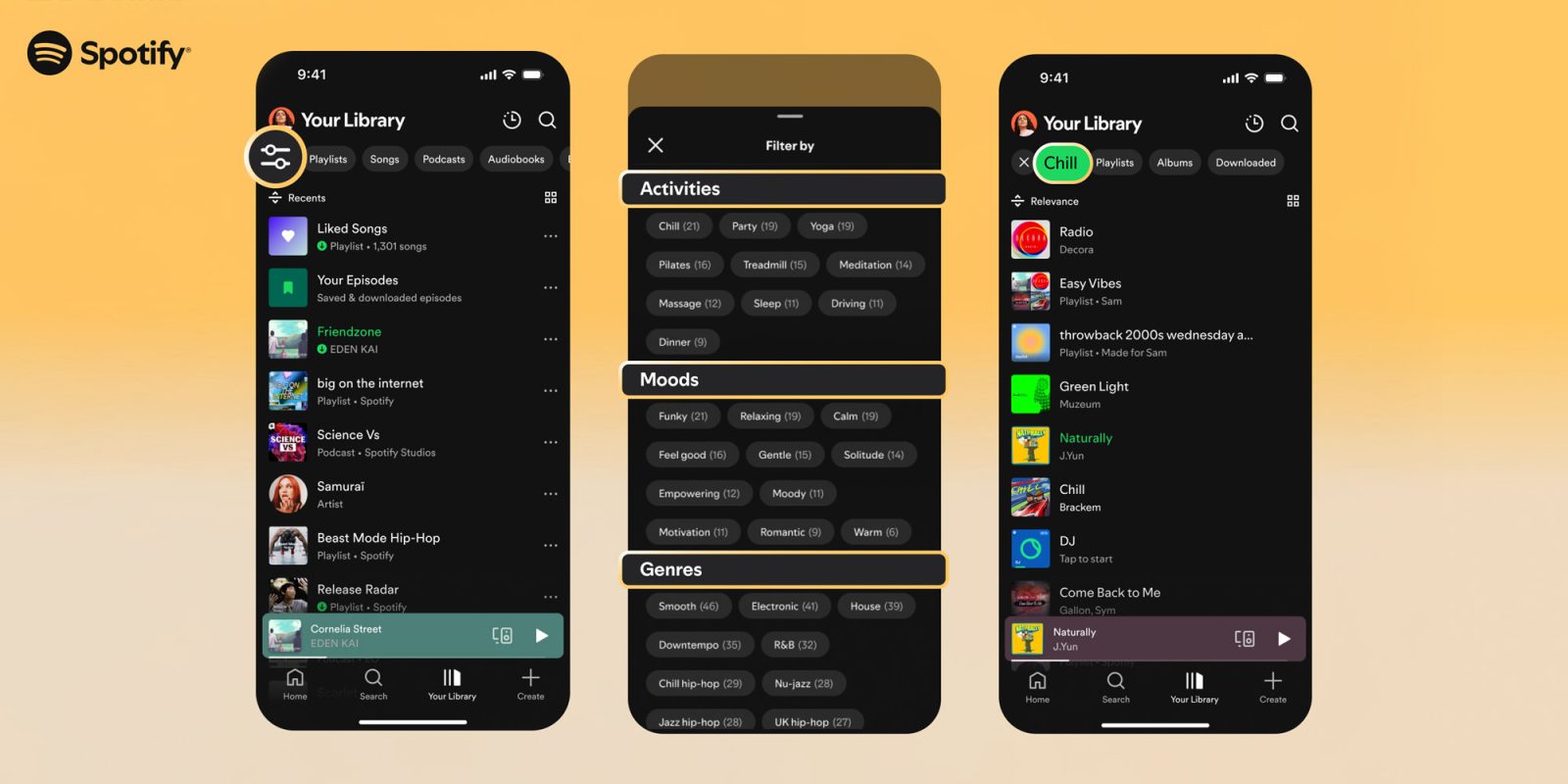
The beauty of Spotify Smart Filters lies in its immediate, accessible simplicity paired with deep personalization. Nestled conveniently within ‘Your Library’, the feature puts powerful sorting literally at users’ fingertips:
- Access: Users trigger the feature by tapping a dedicated filter icon located prominently in the top-left corner of their ‘Your Library’ view on mobile or tablet apps.
- Categorization: Upon tapping, a menu unfolds dynamically, presenting options meticulously organized into three core pillars:
- Mood: Options like “Funky,” “Relaxing,” or “Solitude” cater to emotional states or desired atmospheres. This taps directly into the well-established connection between music and human affect, leveraging Spotify’s sophisticated audio analysis capabilities. Research on the psychology of music consistently demonstrates how tempo, key, and timbre directly influence listener mood (Krumhansl, 2002, Psychological Science).
- Activity: Filters like “Party,” “Yoga,” or “Dinner” align music with life moments. This contextual understanding moves beyond passive listening to active integration, recognizing that audio often serves as a backdrop or enhancer for daily tasks and social gatherings.
- Genre: Categories such as “Smooth,” “Downtempo,” or the intriguingly specific “Jazz hop-hop” offer traditional genre-based sorting. Interestingly, these labels often blend familiar classifications with Spotify’s unique sonic identifiers, reflecting evolving listener habits and genre fluidity.
- Customization: Crucially, the specific filter options presented adapt to each user’s unique collection. Someone deeply invested in heavy metal won’t see irrelevant filters dominating their choices. The algorithm quickly assesses your saved content and surfaces the most applicable mood, activity, and genre tags. This personal relevance is key to its utility.
- Result: Selecting any filter instantaneously refreshes the ‘Your Library’ view, displaying only the songs, playlists, podcasts, or audiobooks tagged or algorithmically matched with that specific criterion. It’s a live, personalized slice of your library.
The Feature Universe: More Than Just Filtering
Spotify smartly positioned Smart Filters within a broader narrative of enhanced user control revealed in its blog announcement:
- Track Snoozing: Temporarily exile overplayed or disliked tracks from playlists or mixes for 30 days.
- Custom Cover Art: Personalize playlists visually to enhance identification and emotional connection.
- Hide Song: Permanently remove specific unwanted tracks from algorithmic recommendations or playlists they appear in.
Collectively, these features form an arsenal empowering users to exert unprecedented granular control over their audio environment. Smart Filters act as the organizational backbone, while the others refine content and aesthetic preferences.
Beyond Convenience: The Strategic Depths of Spotify’s Smart Filters
On the surface, Spotify’s improved filtering offers simple clutter reduction. However, its introduction carries substantial strategic weight for the platform:
- Addressing the “Library Paralysis” Problem: Spotify has aggressively encouraged saving content for years – songs, albums, playlists, podcasts, audiobooks. This led to unwieldy libraries where beloved tracks often vanish into a digital abyss (Library of Alexandria Syndrome). Smart Filters provide immediate, dynamic pathways to rediscovery, enhancing perceived value of saved content and increasing engagement within the library itself, potentially reducing churn.
- Leveraging Advanced AUD-Tech: The effectiveness of Mood filtering relies heavily on Spotify’s vast investment in Audio Technology. Its algorithms constantly analyze tracks for “audio features” (e.g., energy, danceability, acousticness, valence). Classifying a song as “Relaxing” or “Energetic” isn’t random; it’s based on sophisticated sonic fingerprinting developed through years of machine learning and human annotation. This data infrastructure gives Spotify a unique edge in contextual organization.
- Putting Taxonomy Power in User Hands: Traditionally, Spotify used its algorithmic understanding primarily to push curated content (“Made For You,” Discover Weekly). Smart Filters represent a shift, providing tools for users to actively pull organized content on their own terms. This empowers listeners and reduces reliance on passive algorithmic feeds for rediscovery.
- Differentiation in a Crowded Market: The user experience gap is widening. While deep personalization is Spotify’s forte, competitors often lag significantly in providing intuitive, multi-category library filtering. This feature showcases Spotify’s user-centric development and technical prowess in a tangible way.
- Monetization & Retention Synergy:
- Spotify Premium Upsell: Smart Filters are a Premium-only feature, reinforcing the value proposition for paid subscriptions.
- Increased Library Usage: More frequent and productive engagement with saved content discourages browsing elsewhere.
- Podcast & Audiobook Boost: By including non-music content in the filtering, Spotify incentivizes saving and organizes diverse listening, encouraging consumption across its entire platform. Audiobooks, a key growth area, benefit significantly from easy rediscovery amidst potentially lengthy audiobook libraries.
Comparison: How the Major Players Approach Library Filtering
| Platform | Primary Library Filter Options | Mood & Activity Filters? | Applies Beyond Music? (Podcasts, Audiobooks)| Personalizes Filter Content? | Access Tier |
| :—————- | :———————————————— | :———————-: | :—————————————–: | :————————–: | :————– |
| Spotify (New) | Mood, Activity, Genre, Custom | YES | YES | YES | Premium Only |
| Apple Music | Playlist, Artist, Album, Genre (basic) | NO | Podcasts Only (separate app/lib) | NO | All Users |
| YouTube Music | Playlists, Uploads, Downloads, Songs, Artists | Very Limited (e.g., “Chill”) | Videos/Music only | Limited | Premium options |
| Amazon Music U/P | Playlists, Artists, Albums, Songs | Basic Moods (Official Playlists) | Audiobooks (usually separate area) | NO | Paid Tiers |
The Real-World Impact: Shaping How We Listen
For end-users navigating the daily reality of mega-libraries, the promise of Spotify Filters is transformative:
- Micro-Moments Met: Forgot that perfect “Focus” playlist? Use the ‘Activity’ filter for “Work” or “Study.” Need to unwind instantly? The “Mood” filter with “Calm” or “Solitude” reshapes your library instantly. Getting dinner ready? Filter by “Cooking” activity.
- Genre Deep Dives & Discovery: Passionate about a specific niche like ‘Jazz hop-hop’? Filtering unlocks all saved tracks fitting that hybrid genre, regardless of playlist origin, enabling targeted exploration within known preferences.
- Podcast & Audiobook Clarity: No more endless scrolling past songs to find the saved podcast episode. Filtering by ‘Podcasts’ or relevant moods/activities specific to podcasts (“Learning,” “Sleep,” “Comedy”) brings non-music content to the forefront efficiently.
- Contextual Re-engagement: Rediscover music saved months ago instantly. Suddenly that song tagged with “Epic” mood fits perfectly for a workout session. Filters bridge the gap between long-term saving and immediate contextual need.
- Personalization Overload vs. User Control: While critics raise valid concerns about filter bubbles and algorithmic bias (echoing broader internet discussions – see Wikipedia: “Filter Bubble”), Smart Filters are distinct. They apply only to explicitly user-saved content. The listener chooses what to save, and the filter simply reorganizes their conscious choices, offering control rather than opaque algorithmic enforcement. It complements rather than replaces broader discovery mechanisms.
Future Horizons: Where Could Smart Filters Go Next?
Spotify has laid a foundational upgrade. Future iterations could include:
- Combined Filters: Selecting both “Party” and “2000s,” or “Chill” and “Jazz.”
- Algorithmic Playlist Creation: “Make a playlist from my saved songs using these filters.”
- Decade & Artist Filters: Expanding beyond the initial three categories.
- Enhanced Podcast Mood/Activity Tagging: Refining taxonomy for non-music content.
- Multi-device Sync: Including desktops and potentially connected devices.
Listen Smarter, Stream Better
Spotify’s deployment of Smart Filters Premium in key English-speaking markets signals a critical evolution in content navigation. Moving beyond simple alphabetical or recently-added sorting, its Mood, Activity, and Genre columns offer a deeply intuitive and personally relevant way to slice through the chaos of vast saved libraries. It leverages years of audio intelligence not just to recommend new things, but to help users instantly rediscover loved things in contexts that matter. While the rollout is geographically limited and Premium-bound, its impact on those eligible subscribers is significant – transforming ‘Your Library’ from a passive archive into a dynamically organized, instantly accessible audio toolkit for any moment.
Paired with other personalized tools like snoozing tracks and custom art, the message is clear: Spotify is doubling down on giving users granular control over their unique audio universe. Whether it’s finding the perfect focus track, the ideal dinner party playlist, or an audiobook to wind down with, Smart Filters aim to make the right audio just a tap away. This isn’t just an organizational tool; it’s an enhancement to the listening experience itself. Have you gained access to Smart Filters yet? How is it reshaping your relationship with your saved favorites? Share your experience below!


