
Is Your Investment Portfolio a Chaotic Mess? “Profit” Could Be the Solution
Do you juggle multiple brokerage accounts, struggle to keep track of your gains and losses, and worry about the privacy of your financial data? For many investors, managing diverse portfolios across various platforms can quickly become overwhelming. Enter Profit, a new indie app designed to simplify investment tracking with a focus on privacy and a clean, native interface. This article will explore how Profit offers a unique approach to portfolio management on iOS and macOS, allowing users to maintain a detailed overview of their investments without compromising their sensitive information. This comprehensive Profit review will explore its features, benefits, and how it stacks up against the competition.
A Deep Dive into Profit: The Indie Investment Tracking App
Profit is designed to be a user-friendly and private alternative to traditional investment tracking apps. Its core principles revolve around native design and prioritizing user privacy, making it a compelling option for those seeking more control over their financial data. Let’s examine the app’s key features and functionalities.
Prioritizing Privacy: A Key Differentiator
One of the most significant selling points of Profit is its commitment to privacy. Unlike many investment tracking apps that require account syncing and store data on remote servers, Profit operates entirely offline. This means:
- No Logins Required: You don’t need to create an account or provide any personal information to start using the app.
- No Data Syncing: Your financial data remains exclusively on your device, eliminating the risk of data breaches or unauthorized access.
- Full Control: You have complete control over your data and can be confident that it’s not being shared with third parties.
This privacy-focused approach sets Profit apart from many popular investment tracking apps like Mint or Personal Capital, which aggregate financial data from various sources but require users to grant access to their accounts. While these apps offer convenience, they also introduce potential privacy risks. For investors who prioritize data security, Profit offers a welcome alternative.
Manual Tracking for Granular Control
Profit employs a manual tracking system, which might seem less convenient than automatic syncing at first glance. However, this approach offers several advantages:
- Enhanced Accuracy: You have complete control over the data entered, ensuring accuracy and eliminating the risk of errors caused by automatic data imports.
- Detailed Customization: You can add specific details about each investment, such as purchase dates, prices, and commissions, providing a comprehensive record of your trading activity.
- Support for Diverse Assets: The manual tracking system allows you to track a wide range of assets, including stocks, options, and cryptocurrencies, regardless of whether they are supported by automatic syncing services.
While the manual tracking process requires more effort, it ultimately provides a more detailed and accurate representation of your investment portfolio. This is particularly useful for investors who trade in complex instruments or have assets that are not easily tracked through traditional methods.
Key Features: What Can You Track?
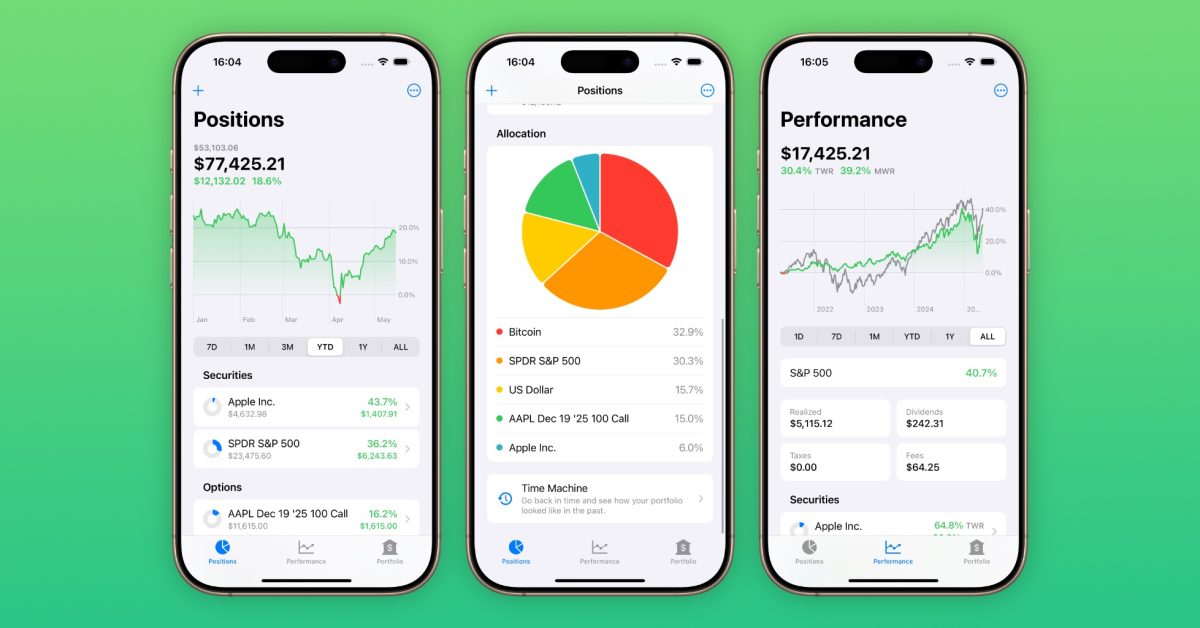
Profit offers a comprehensive set of features for tracking and analyzing your investments:
- Account Setup: You can create individual accounts within the app to represent your various brokerage accounts or investment portfolios.
- Asset Tracking: You can add individual assets to each account, specifying the purchase price, date, and quantity.
- Gains and Losses Tracking: The app automatically calculates your gains and losses based on the current market price of each asset.
- Support for Stocks, Options, and Cryptocurrencies: Profit supports a wide range of asset types, allowing you to track your entire investment portfolio in one place.
- Stock Split Tracking: The app automatically adjusts your holdings to account for stock splits, ensuring accurate tracking of your portfolio performance.
- Beautifully Designed Interface: Profit boasts a native design, making it visually appealing and easy to use on both iOS and macOS.
Is Manual Tracking Really That Tedious?
The question of whether manual tracking is too tedious depends on your individual investment style and preferences. Here’s a breakdown of the pros and cons:
Pros:
- Greater Accuracy: Manually entering data allows you to verify the information and correct any errors.
- Detailed Insights: You can add notes and details about each trade, providing valuable context for your investment decisions.
- Privacy Focused: Your financial data remains private and secure on your device.
- Flexibility: Track any asset, regardless of platform support.
Cons:
- Time-Consuming: Manually entering data can be time-consuming, especially for investors with large portfolios.
- Requires Discipline: You need to be disciplined about updating your portfolio regularly to ensure accuracy.
For investors who value accuracy, privacy, and detailed insights, the manual tracking approach of Profit is well worth the effort. However, if you prioritize convenience and are comfortable sharing your financial data with third-party services, automatic syncing apps may be a better fit.
Profit vs. the Competition: A Quick Comparison
| Feature | Profit | Mint | Personal Capital |
|---|---|---|---|
| Data Syncing | Manual | Automatic | Automatic |
| Privacy | High | Medium | Medium |
| Asset Types | Broad (Manual Entry) | Limited (Platform Dependent) | Limited (Platform Dependent) |
| Ease of Use | High | Medium | Medium |
| Cost (Unlimited) | $3.99/month | Free | Paid (Financial Advisory) |
Understanding Profit’s Pricing Structure
Profit offers a free version with limited functionality, allowing you to try the app before committing to a subscription. For full access to all features, including unlimited tracking, you can subscribe to Profit Pro. The pricing options are:
- $3.99/month
- $34.99/year
- $69.99 Lifetime
The lifetime subscription offers the best value for long-term users, while the monthly and annual subscriptions provide flexibility for those who prefer to pay as they go. The pricing is competitive with other premium investment tracking apps, especially considering Profit’s focus on privacy.
Compatibility and System Requirements
Profit is currently available for iOS 18 and macOS 15 Sequoia or later. This means that you’ll need to be running the latest versions of Apple’s operating systems to use the app. Make sure your devices are up-to-date before downloading Profit from the App Store.
Conclusion: Is Profit Right for You?
Profit presents a compelling alternative to traditional investment tracking apps, especially for users who prioritize privacy and accuracy. While the manual tracking approach requires more effort, it offers greater control over your data and ensures a more detailed representation of your investment portfolio. The app’s native design and user-friendly interface make it easy to use, and the support for stocks, options, and cryptocurrencies allows you to track your entire investment portfolio in one place.
If you’re looking for a private and accurate way to track your investments, Profit is definitely worth considering. Download the free version from the App Store and see if it’s the right fit for your needs.
What do you think about Profit’s approach to investment tracking? Do you value privacy over convenience when it comes to managing your finances? Comment below and share your thoughts!
Sources & Further Reading:
Original article at 9to5mac.com


