
The Hidden Superpower Every PC User Should Know About
Do you know your processor model offhand? Could you list your RAM specs without peeking? For most everyday users, peering inside the seemingly inscrutable black box of a computer feels daunting. You rely on that faded Intel or AMD sticker as gospel, blissfully unaware of the intricate symphony of silicon orchestrating your digital life… until something goes wrong. Imagine trying to upgrade your RAM blindly or diagnose overheating without knowing what components you actually own – a scenario frustratingly common for many users and tech helpers alike. This fundamental disconnect fuels my constant recommendation: Speccy, the unassuming diagnostic tool from Piriform (creators of CCleaner). It transforms hardware ignorance into actionable knowledge quickly and for free.
Beyond Stickers: Demystifying Your Machine
Other diagnostic utilities exist, like the deeply powerful HWiNFO. However, for the average user needing core information without drowning in data, Speccy strikes the perfect balance. Its brilliance lies in selective detail. Instead of bombarding you with hundreds of sensor readings and obscure technical jargon, it focuses sharply on answering the most crucial questions:
- What components are installed? (CPU, RAM, Motherboard, GPU, Storage)
- How are they performing? (Especially temperatures)
- Where can I find key identifiers? (Model numbers, BIOS versions)
Downloads are straightforward: grab the installer from Piriform’s official site or hunt down the self-contained portable version via trusted repositories like PortableApps.com. I always carry the portable edition on a USB – it’s indispensable for quick in-person diagnostics or guiding friends remotely without requiring prior installation on their systems.
Launching Speccy reveals the stellar Summary page, your instant hardware dashboard. At a single glance, you see:
- Your operating system version and build.
- Processor details including model, speed, and crucially, its current temperature.
- Physical RAM installed sizes and available memory.
- Motherboard manufacturer and model.
- Graphics card variant (GPU) details.
- Displays connected.
- Storage drives (HDDs/SSDs) with model, capacity, and SMART health status (if supported), often including temperatures.
- Basic audio device identification.
This consolidated overview solves probably 75% of common inquiries instantly.
Digging Deeper: Power Under the Hood
Speccy’s power extends far beyond the Summary tab. Each category on the left unveils meticulously organized detail relevant to its domain:
- Operating System: Installation date, Windows serial number (key distinction), firewall status active power plans, scheduled tasks, plus deep insight into Windows files and devices.
- CPU: Real-time clock speeds, bus speed, core utilization percentages, fan speeds (if monitored), voltage readings, and specific instruction set support. Essential for spotting bottlenecks or verifying performance claims.
- RAM: Detailed breakdown of installed modules – including manufacturer, capacity per stick, speed (DDR type and MHz), timings, and slot allocation. This is pure gold for RAM upgrades, instantly answering “How many slots are used?” and “What speed RAM should I buy?”.
- Motherboard: Manufacturer, model, chipset, BIOS version/release date, PCIe slot information. Vital for verifying BIOS updates or clearing compatibility questions when adding hardware.
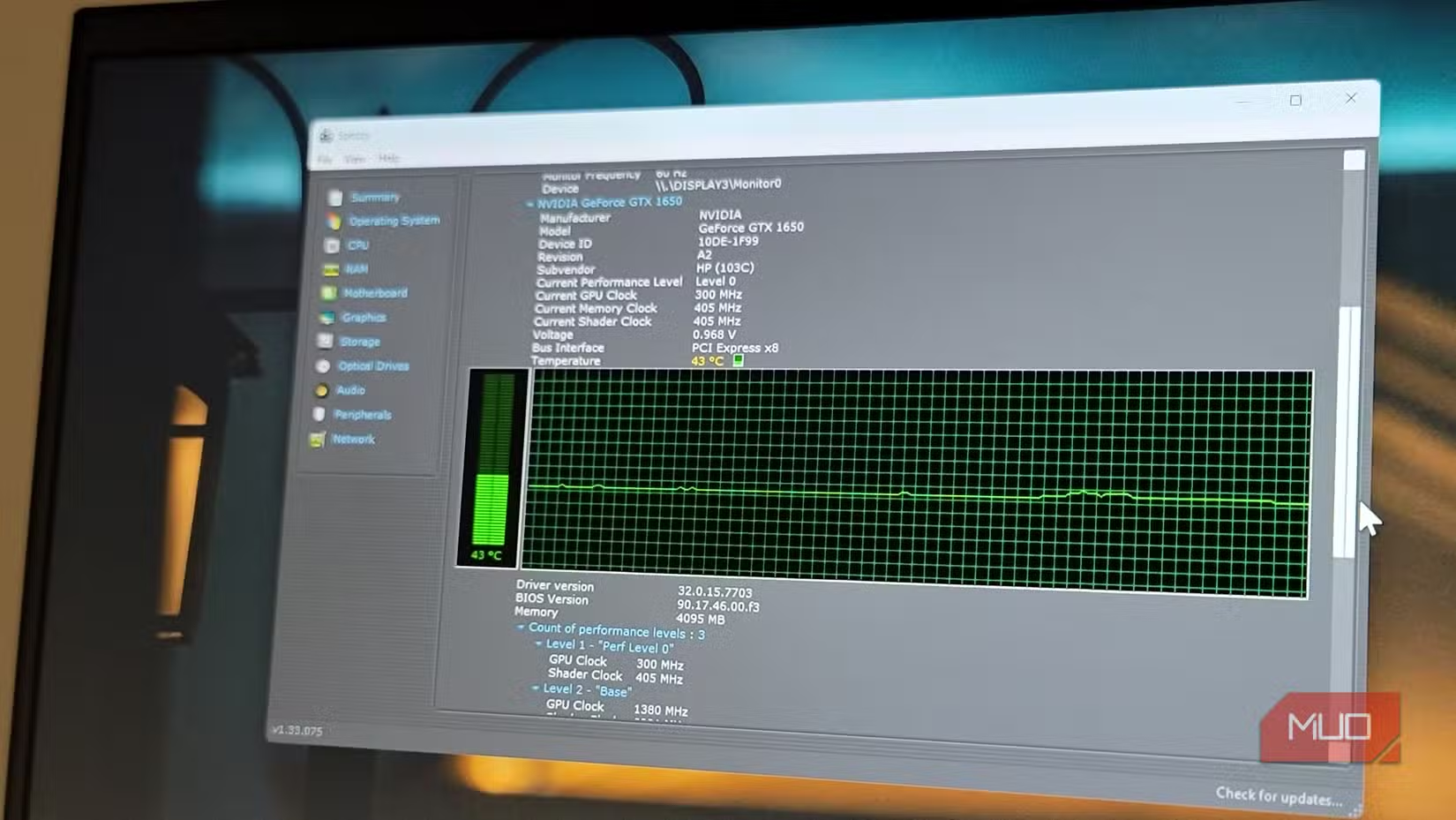
- Graphics: Discrete GPU model, VRAM amount, driver version, associated displays, GPU temperature monitoring. Helps debugging display glitches or evaluating gaming performance potential.
- Storage: Drive models, firmware versions, health status via S.M.A.R.T. attributes (when supported), some temperatures, connection interfaces (SATA, PCIe), and read/write activity.
A particularly useful feature surfaces when components report temperature. Click the miniature graph icon next to any temperature reading, and Speccy plots a real-time temperature graph. This visualizes thermal behavior, letting you correlate spikes directly with specific activities – like noticing CPU temps skyrocket during video encoding or games. It’s indispensable for overheating diagnostics or assessing cooling solution effectiveness.
The Game-Changer Sharing Feature
Speccy’s “Snapshot” is the crown jewel, transforming collaborative troubleshooting and technical support. Historically, conveying precise specs about unbranded (“whitebox”) systems or assisting remotely involved tedious Q&A: “What motherboard is it?”… “Where does it say that?”… “Check BIOS?”. Speccy eradicates this friction entirely.
- Creating & Saving: Click
File > Save Snapshot. This generates a.SPCfile containing a frozen-in-time profile of your entire system configuration. Reload it anytime later usingLoad Snapshot. - Publishing & Sharing: Choose
File > Publish Snapshot. Speccy uploads the snapshot to its cloud and generates a unique URL. Share this URL – the recipient instantly sees the same detailed information you see. Perfect for remote helper-agent scenarios. - Alternative Exports: Need an editable report? Export as plain text. Building automation? Export the structured XML data. Or print directly to PDF using a virtual printer driver.
Forcing someone through dxdiag or deciphering screenshot fragments is obsolete. As a remote troubleshooter, I instruct users: “Install Speccy Free, publish a snapshot, send me the link.” Minutes replace hours, and accuracy replaces confusion.
Absolute Limitations (Know Before You Trust!)
No tool is flawless. Speccy excels at mainstream diagnosis but has acknowledged gaps:
- Storage Temperature Shortcomings: While Drives tab displays temperatures for some SATA SSDs/HDDs, my testing confirms NVMe drives can remain invisible. A Samsung 970 EVO NVMe and Crucial MX500 SATA SSD both showed no temp readings in Speccy, relying on manufacturer tools like Samsung Magician instead. Consider Speccy unreliable for critical NVMe thermal monitoring.
- Windows Serial vs. Product Key: Under Operating System, Speccy prominently shows “Serial Number” (aka Hardware ID). Users often misinterpret this as their activation product key, leading to panicked searches when attempting reinstallation. They appear identical to the untrained eye! Recovering the Windows product key requires distinct methods (commonly third-party tools or command prompts like
wmic path softwarelicensingservice get OA3xOriginalProductKey). - Development Pace: Despite being actively maintained, Speccy hasn’t received major updates since July 2024. While stable and fully operational on Windows 10/11, anticipate incremental bug fixes rather than revolutionary new functionality.
Speccy: The Essential First Tool in Your Digital Toolkit
Stop fumbling with case manuals or strained guesses about your PC’s heart and soul. Speccy delivers instant clarity: What components power your machine? Are they working within safe thermal limits? It translates obscure technicalities into understandable information anyone can grasp. The streamlined Summary page offers crucial insights immediately, while the deep dives satisfy most upgrade, compatibility, and diagnostics needs. Its frictionless SNAPSHOT feature fundamentally changes how technical help is delivered remotely, eliminating ambiguity.
Yes, experts might gravitate towards HWiNFO’s deep sensor data or stress testers like Prime95. But for everyday awareness – checking RAM slots before an upgrade, verifying BIOS versions, identifying a motherboard model for driver downloads, diagnosing overheating failures, or simply satisfying curiosity about your machine’s guts – Speccy remains uniquely potent in its simplicity and directness. Engaging complex tools shouldn’t be prerequisite knowledge just to understand what you own.
Why spend a dime or sweat deciphering intimidating interfaces? Get Speccy, install it (or run it portably), and truly meet your computer within minutes. Knowledge is power; Speccy hands you the keys. How will you use your newfound understanding? Will Speccy become your go-to tech ambassador too, or does the quest for deeper data pull you elsewhere? Share your experiences below!


