
NVIDIA App Update: Global DLSS Overrides and Smooth Motion Explained
Tired of tweaking DLSS settings for every single game you own? NVIDIA has heard the cries of gamers everywhere! The tech giant recently announced a significant update to its NVIDIA app, streamlining the way users manage their graphics settings and introducing a new feature called Smooth Motion for RTX 40 series GPUs. This update, arriving first as a beta, promises to simplify the DLSS experience and enhance visual fidelity across a wider range of games. Let’s dive into the details of these exciting new features and what they mean for PC gamers.
Global DLSS Overrides: Streamlining Your Gaming Experience
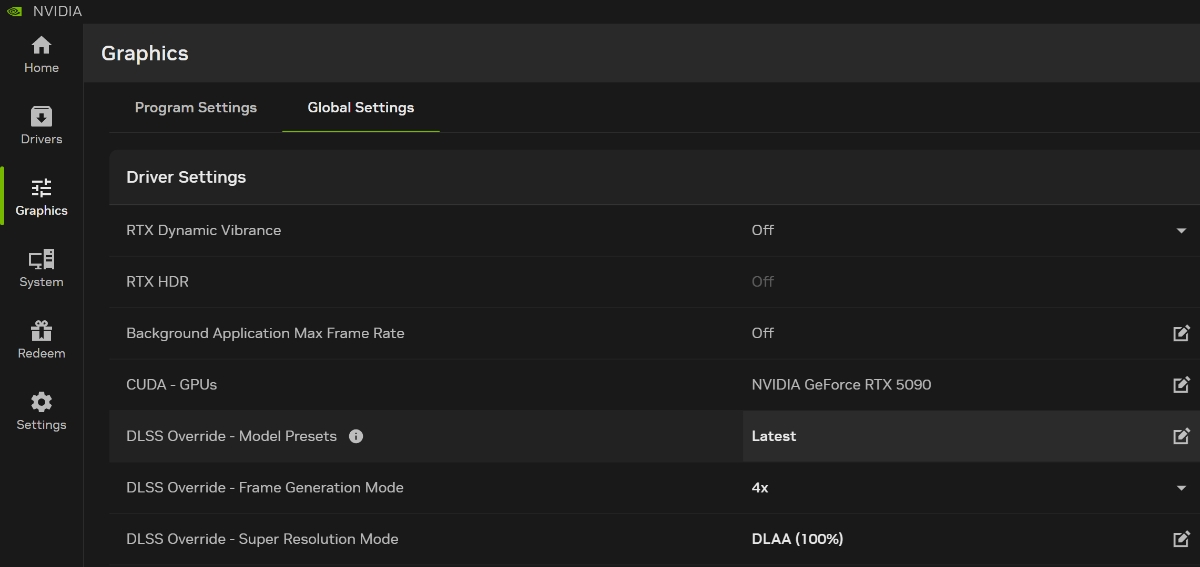
One of the most welcomed additions is the introduction of global DLSS overrides. Previously, adjusting Deep Learning Super Sampling (DLSS) settings meant navigating to the Graphics > Program Settings section within the NVIDIA Control Panel and manually configuring the desired level of DLSS for each individual game. This was a tedious and time-consuming process, especially for gamers with large libraries.
The Old Way vs. The New Way: A Comparison
| Feature | Old Method | New Method (Global Overrides) |
|---|---|---|
| Setting Changes | Game-by-game | Global, applied to all supported games |
| Complexity | Cumbersome, repetitive | Simplified, one-time configuration |
| Time Investment | High, especially for large libraries | Low, quick setup |
| Future Game Support | Manual configuration required | Automatically applied to new games |
Now, with the global DLSS override setting, users can enable DLSS Multi Frame Generation, DLSS Super Resolution, and other related options directly from the Graphics > Global Settings section. This means you configure your preferred DLSS settings once, and they will be automatically applied to all supported games, including those you install in the future.
Customizing the In-Game Overlay
The NVIDIA app overlay, accessible via the Alt + Z hotkey, offers further customization. Under Statistics > Statistics View > DLSS, you can configure the overlay to display the status of the DLSS override. Using the Alt + R hotkey, you can quickly check whether DLSS is active and how it’s performing within the game you’re playing. This provides real-time feedback and allows you to fine-tune your settings for optimal performance and visual quality.
Benefits of DLSS
DLSS, at its core, leverages the power of artificial intelligence to boost frame rates while maintaining, or even improving, image quality. NVIDIA DLSS uses deep learning to render games at a lower resolution and then intelligently upscale the image to a higher resolution, resulting in a performance boost without a significant visual compromise. This is particularly useful for demanding games or when aiming for higher refresh rates on high-resolution monitors. There are different DLSS modes to consider.
- Quality: Prioritizes image quality, offering the best visual fidelity.
- Balanced: Strikes a balance between image quality and performance.
- Performance: Prioritizes performance, offering the highest frame rate gains.
- Ultra Performance: Offers the most significant performance boost, but may result in a slight decrease in image quality.
The new global overrides make it simpler than ever to experiment with these different modes and find the sweet spot for your individual games and hardware configuration.
NVIDIA Smooth Motion: Frame Generation for Non-DLSS Games
Another exciting feature included in this update is NVIDIA Smooth Motion, designed to bring the benefits of frame generation to games that do not natively support DLSS Frame Generation.
What is Frame Generation?
Frame generation is a technique that uses AI to create entirely new frames, inserting them between existing frames rendered by the GPU. This effectively doubles the frame rate, resulting in a smoother and more responsive gaming experience. While DLSS Frame Generation is integrated directly into certain games, Smooth Motion aims to extend this capability to a broader range of titles.
How Smooth Motion Works
NVIDIA Smooth Motion is a driver-based AI model that operates independently of in-game DLSS support. It can be used with games running at native resolution, using DLSS Super Resolution, or with other scaling techniques. This provides flexibility and allows users to tailor their settings to their specific preferences and hardware capabilities.
Enabling Smooth Motion
To enable NVIDIA Smooth Motion, navigate to the Graphics > Program Settings section within the NVIDIA Control Panel, scroll down to the “Driver Settings” section, and enable the option labeled “Smooth Motion”. The feature is supported in games that utilize DirectX 11, DirectX 12, or Vulkan. This makes it compatible with a vast library of games.
RTX 40 Series Only (For Now?)
Currently, NVIDIA Smooth Motion is exclusive to GeForce RTX 40 Series GPUs. It was initially an RTX 50 series feature, but it has now arrived on the RTX 40s. However, the announcement does not explicitly state whether the feature will be available for older graphics cards such as the RTX 30 and RTX 20 series. While there’s no confirmation, the possibility remains open, and future driver updates could potentially extend support to older GPUs.
Availability and Beta Access
NVIDIA’s announcement states that these new features will be available via a beta update, along with a new driver. Users can opt into the beta from the Settings > About section within the NVIDIA app. A non-beta version is expected to be released the following week.
This beta period allows NVIDIA to gather feedback from users and address any potential issues before the wider release. It’s an excellent opportunity for enthusiasts to test out the new features and contribute to their refinement.
The Impact on Gaming
These updates represent a significant step forward in simplifying the DLSS experience and expanding the benefits of frame generation to a wider audience. Global DLSS overrides streamline the configuration process, making it easier for gamers to optimize their settings. NVIDIA Smooth Motion, while currently limited to RTX 40 series GPUs, holds the potential to improve performance and visual fidelity in a broader range of games.
These improvements contribute to a more seamless and enjoyable gaming experience, allowing players to focus on the game itself rather than wrestling with complex settings. As NVIDIA continues to refine these technologies, we can expect even greater improvements in performance, visual quality, and overall usability.
Conclusion
The NVIDIA app update, featuring global DLSS overrides and Smooth Motion for RTX 40 series GPUs, is a welcome change for gamers seeking to optimize their performance and visual fidelity. The streamlined settings management and the introduction of frame generation for non-DLSS games contribute to a more seamless and enjoyable gaming experience. Keep an eye out for the beta release and subsequent public release to experience these improvements firsthand. What do you think about these new features? Comment below!
Sources & Further Reading:
Original article at www.ghacks.net


