
Why Does an Operating System Feel Like Home? Meet Linux Mint 22.3 “Zena”
Does familiarity breed contentment? In the realm of operating systems, Linux Mint consistently ranks among the most popular distributions – often praised for its intuitive interface and stability. On January 13, 2026, the final iteration of its Ubuntu 24.04 LTS-based series arrived: Linux Mint 22.3 “Zena”. This isn’t merely an update; it’s a culmination of refinements built upon three prior releases, delivering practical enhancements without abandoning Mint’s core philosophy of user-centric reliability. Targeting desktops and laptops, Zena refines workflows through a redesigned application launcher, smarter system tools, file management advancements, and thoughtful tweaks that prioritize genuine usability over chasing trends. For existing users or curious newcomers, Zena represents the current pinnacle of Mint’s comfortable pragmatism.
A Complete Reimagining of Navigation: The Mint Menu Evolved
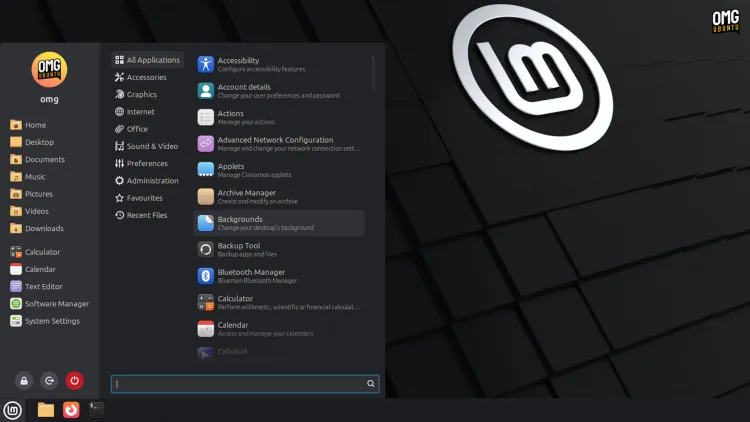
The Linux Mint 22.3 welcome screen instantly reveals its most noticeable change: a completely redesigned Mint Menu. Replacing its predecessor, the Cinnamon desktop’s cornerstone application launcher boasts a sleek, full-height sidebar. This sidebar integrates your user account picture, application category icons (now symbolic by default, prioritizing clarity), app descriptions, and session action buttons arranged horizontally at the bottom. While retaining the familiar three-column core layout, the critical search bar shifts position – now conveniently anchored at the bottom for easier keyboard-centric access alongside session controls. Crucially, Mint avoids imposing rigidity.
Customization takes center stage:
- Positional Freedom: Move the search bar back to its traditional top location if preferred.
- Visibility Control: Hide application descriptions for a cleaner, denser view.
- Simplified Favorites: Eliminates redundancy – favorites displayed in the menu no longer duplicate shortcuts already pinned to your panel, replacing doubles with handy utilities like Text Editor or Calculator.
- Visual Preference: Restore full-color category icons for those missing the vibrant cues.
This evolution exemplifies Mint’s philosophy: Changes aren’t arbitrary top-down decrees but responses to how users actually interact with the system. As noted in the Linux Mint Blog, “[The new menu] isn’t the sort people switch distro over,” but eliminating minor annoyances like duplicate favorites demonstrates deep attentiveness to genuine workflow friction. For users unsettled by the redesign, the breadth of configuration options ensures it adapts to you, rarely necessitating a third-party menu replacement – a testament to Mint’s commitment to keeping users within its thoughtfully crafted ecosystem.
Optimizing Mixed Displays: Fractional Scaling Flexibility
Working across monitors? HiDPI displays have long presented scaling challenges, especially when paired with standard-resolution external monitors. Linux Mint 22.3 introduces finer control over fractional scaling behavior. Previously, enabling fractional scaling followed a single method (“scale down”). Now, users can actively choose:
| Scaling Method | How It Works | Ideal For |
|---|---|---|
| Scale Down | Renders content at higher resolution, shrinks for display (traditional method). | Sharp |


