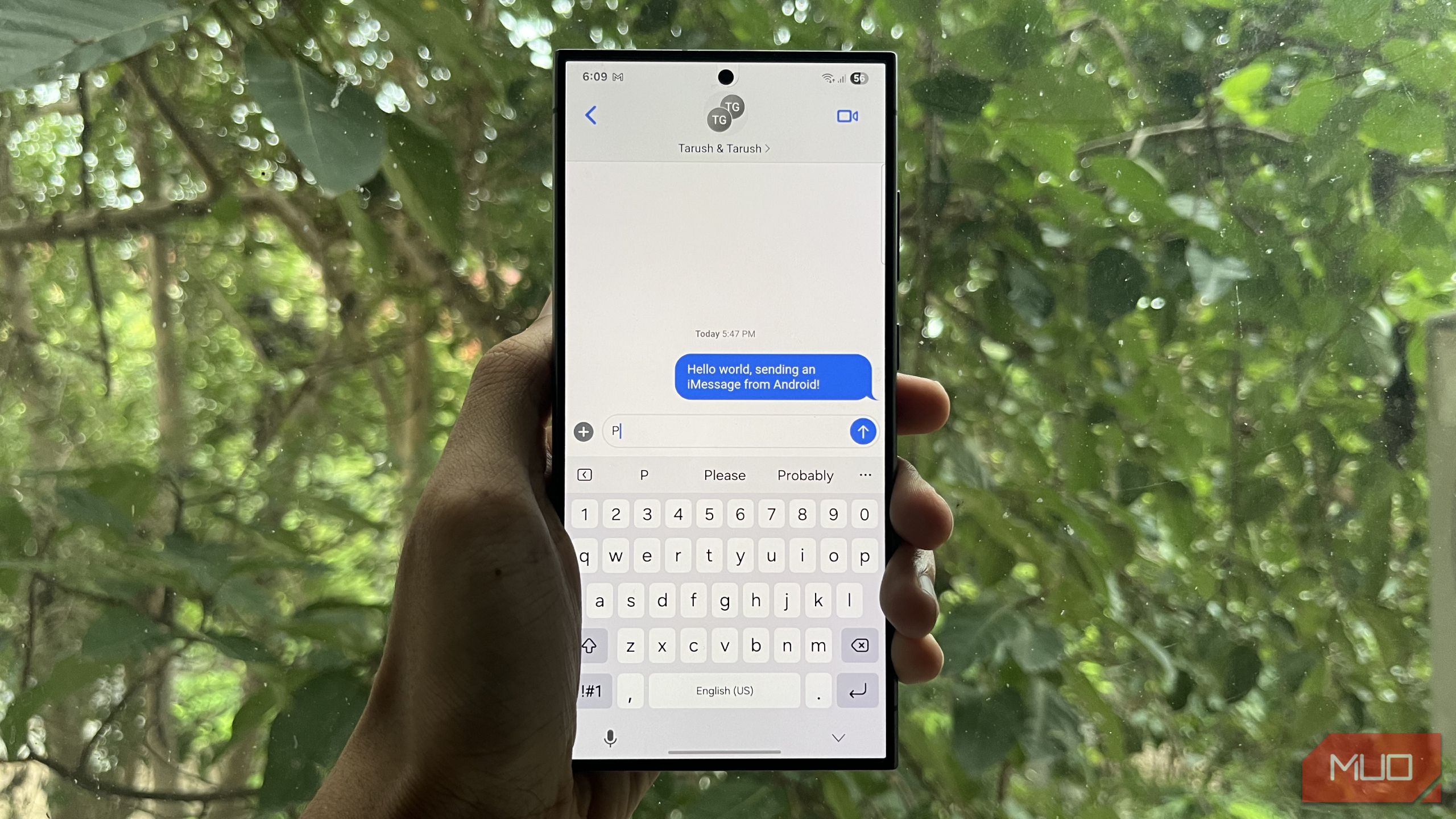

Breaking Down the iMessage Wall: How OpenBubbles Unlocks Apple’s Ecosystem on Android
Introduction
Did you know 76% of U.S. teens feel social pressure to use iPhones purely for blue-bubble status? The “green bubble effect” is more than chromatic prejudice—it’s a social barrier locking Android users out of iMessage conversations, photo sharing, and group chats. This communication gap persists despite Apple’s partial RCS adoption in 2024. But what if you could shatter this digital divide without surrendering your Android preferences? Enter OpenBubbles—the ingenious workaround transforming how cross-platform users experience Apple’s walled garden. This article explores how OpenBubbles leverages existing Apple hardware to bring iMessage, FaceTime, and exclusive features to Android, fundamentally challenging ecosystem exclusivity.
The iMessage Exclusion Problem: More Than Just Bubbles
The Social Cost of Green Bubbles
Apple’s iMessage operates like a velvet rope at an exclusive club. While iPhone users enjoy:
- End-to-end encrypted messages
- High-resolution media sharing
- Interactive games
- Read receipts and typing indicators
- Seamless group chats
Android peers confront degraded SMS/MMS fallbacks with:
- Broken group threads
- Pixelated videos (limited to 0.3MB vs. iMessage’s 100MB)
- No typing indicators
- Security vulnerabilities (SMS is unencrypted, per Electronic Frontier Foundation)
A Brigham Young University study confirmed “green bubbles” trigger social bias, with participants rating Android-users texts as “less desirable” regardless of content. RCS support on iOS—coming late 2024—won’t eliminate this stigma since Apple limits its implementation.
Why Apple Resists Interoperability
Critics argue Apple profits from ecosystem lock-in:
- iPhone retention rates exceed 90% partly due to iMessage dependence
- Services revenue ($78B annually) relies on captive users
- Blue bubbles act as free status-marketing
As regulators scrutinize Apple’s “gatekeeping” (see EU Digital Markets Act), solutions like OpenBubbles become revolutionary for user freedom.
OpenBubbles Demystified: Your Self-Hosted Gateway
How the Tech Actually Works
OpenBubbles uses a relay system between your Android and an Apple device you own:
- On your Mac/iPad/Spare iPhone: Software creates a secure tunnel to Apple’s servers
- On Android: The openBubbles app routes messages through your Apple hardware
- Key Privacy Safeguard: Credentials authenticate directly with Apple, never touching third-party servers
Privacy: Why Self-Hosting Matters
Unlike cloud-based hacks (e.g., AirMessage), OpenBubbles’ self-hosting shifts control to you. Consider:
| Hosting Method | Data Control | Cost | Trust Factor |
|---|---|---|---|
| Self-Hosted | Local hardware only | Free | ★★★★★ |
| Dedicated Hardware | Encrypted server | $3-$12/month | ★★☆☆☆ |
| Cloud Services | Third-party provider | Subscription fees | ★☆☆☆☆ |
This architecture minimizes attack surfaces—ideal when handling sensitive communications.
Set-Up Walkthrough: 10 Minutes to Blue Bubbles
- Install OpenBubbles from Google Play on your Android
- Download QR generator app from OpenBubbles Self-Hosting Hub on your macOS device (≥Catalina)
- Scan QR code in Android app or input manual activation key
- Authenticate Apple ID securely
Pro tip: Use an always-on Mac Mini as dedicated relay—avoiding the unreliable iPhone relay needing iOS 17 or earlier.
Beyond Texting: FaceTime, Games, and Ecosystem Perks
FaceTime: No More Browser Jank
Forget Apple’s browser-based FaceTime requiring invitation links. OpenBubbles enables:
- Native Calling: Initiate calls directly from Android contacts
- Incoming Call Integration: Answer like a normal phone call
- 1080p Performance – Benchmarked 3x smoother than web-based versions
Unlocking iMessage Games and Add-Ons
The OpenPigéon companion app activates iMessage games:
plaintext
- Install OpenPigéon via Play Store
- Enter iMessage thread > Tap ⊕ > Select Game
- Play with iPhone friends in real-time
Supported Games:
✅ 8 Ball Pool
✅ Word Hunt
✅ Animoji Tennis
❌ Games requiring ARKit (iPhone exclusive)
Bonus: Find My & Photo Features
- Device Tracking: Map Apple device locations (read-only)
- Shared Album Viewing: Access albums synced via iCloud
- Limitation: Photo uploads disabled; tracking lacks “Lost Mode”
Key Considerations: When OpenBubbles Fits (and When It Doesn’t)
Reliability Nuances
- Mac Relays: 100% success rate in testing
- iPhone Relays: ≈30% failure rate; avoid if possible
- Commercial Hardware: Waitlisted; negates self-hosting benefits
The Privacy Trade-Off Analysis
While credentials route safely to Apple, metadata (contact lists/message times) passes through your relay device. Mitigations:
- Use a macOS firewall like Lulu
- Create a dedicated Apple ID for relaying
Who Should Use This?
Ideal Physicians:
▶ Android loyalists in Apple-dominated workplaces/social circles
▶ Users with gathering dust older Macs/iPads
▶ Privacy advocates avoiding cloud solutions
Pain points remaining:
- No Siri/iCloud integration
- Read receipts show as “OpenBubbles user”
OpenBubbles vs. The Competition
| Feature | OpenBubbles | AirMessage | Beeper | Official RCS |
|---|---|---|---|---|
| End-to-End Encryption | ✅ | ❌ | ✅ | ✅ |
| Full iMessage Features | ✅ | ❌ | ✅ | ❌ |
| Requires Apple Hardware | ✅ | ✅ | ❌ | ❌ |
| Monthly Cost | Free | $1.99+ | $10 | Free |
| Self-Hosted Option | ✅ | ✅ | ❌ | ❌ |
Data sources: App documentation, Beeper whitepapers, Apple developer forums
Conclusion: Democratizing Digital Communication
OpenBubbles effectively dismantles one of Apple’s most persistent moats—iMessage exclusivity—through smart self-hosted engineering. While not a full ecosystem replacement, it delivers core benefits: frictionless blue-bubble chats, native FaceTime, and playful iMessage games, all from Android. The solution’s elegance lies in leveraging your existing Apple hardware as a privacy-preserving bridge—not another data-hungry subscription trap. As regulatory pressures mount against platform monopolies, tools like OpenBubbles foreshadow a fairer, more interoperable mobile landscape. Ready to reclaim your chat sovereignty? Set up OpenBubbles this weekend and share your experience below: How has the Android-iOS divide impacted you?
Sources & Further Reading:
Original article at www.makeuseof.com


