
Heroic Games Launcher Reverses Controversial Proton Change: What Linux Gamers Need to Know
Are you a Linux gamer struggling to optimize your game performance? A recent update to the Heroic Games Launcher stirred up quite a bit of controversy in the Linux gaming community. The update, version 2.18.0, initially hid non-GE-Proton versions by default, limiting users’ choices for compatibility layers. This change, intended to streamline the user experience, unintentionally caused frustration. Luckily, Heroic Games Launcher has listened to the community and rolled back this change in the latest hotfix. This article dives into the details of the update, the backlash, and the subsequent fix, explaining what it means for you and your Linux gaming experience.
Understanding Proton and its Importance for Linux Gaming
Proton is a compatibility layer developed by Valve, built upon Wine, that allows users to run Windows-based games on Linux operating systems. It’s a crucial tool for Linux gamers, bridging the gap between the predominantly Windows-focused gaming industry and the open-source world. Proton’s integration into SteamOS has made Linux a viable platform for gaming, and it continues to evolve with regular updates and improvements.
What is GE-Proton?
While Valve develops and maintains the main Proton branch, the open-source nature of the project has led to numerous forks and spin-offs. One of the most popular is GE-Proton, maintained by GloriousEggroll. GE-Proton often includes bleeding-edge fixes, specific game patches, and additional codecs not found in the official Valve Proton. Many Linux gamers swear by GE-Proton for its enhanced compatibility and performance in certain titles.
Why Are There Different Proton Versions?
The beauty (and sometimes frustration) of the Linux gaming ecosystem is the variety of options available. Different games often perform better with different versions of Proton. Some older titles might require older Proton versions, while newer games may benefit from the latest experimental builds with cutting-edge fixes. There’s no one-size-fits-all solution, and experimenting with different Proton versions is often necessary to achieve optimal performance.
This variability stems from the ongoing development and refinement of Proton, as well as the unique dependencies and requirements of individual games. Factors like DirectX versions, specific libraries, and even anti-cheat systems can influence which Proton version is best suited for a particular title.
The Heroic Games Launcher and Proton Selection
The Heroic Games Launcher is an open-source game launcher that provides access to games from GOG and the Epic Games Store on Linux. It’s an alternative to the official launchers, offering features and customization options tailored for the Linux environment. A key feature of Heroic Games Launcher is its ability to select a specific Wine version, including various Proton versions, on a per-game basis.
Why Per-Game Proton Selection Matters
This granular control over the compatibility layer is essential for Linux gamers. It allows them to:
- Optimize Performance: Choose the Proton version that provides the best framerate, stability, and overall performance for each game.
- Bypass Compatibility Issues: Work around bugs or glitches that might arise with certain Proton versions by selecting an alternative.
- Access Unsupported Games: Potentially run games that are not officially supported by Steam or other launchers by experimenting with different Proton configurations.
- Take Advantage of Custom Builds: Utilize specialized Proton versions like GE-Proton or Proton-CachyOS, which may offer specific enhancements or fixes for certain games.
The Controversy: Hiding Non-GE-Proton Versions
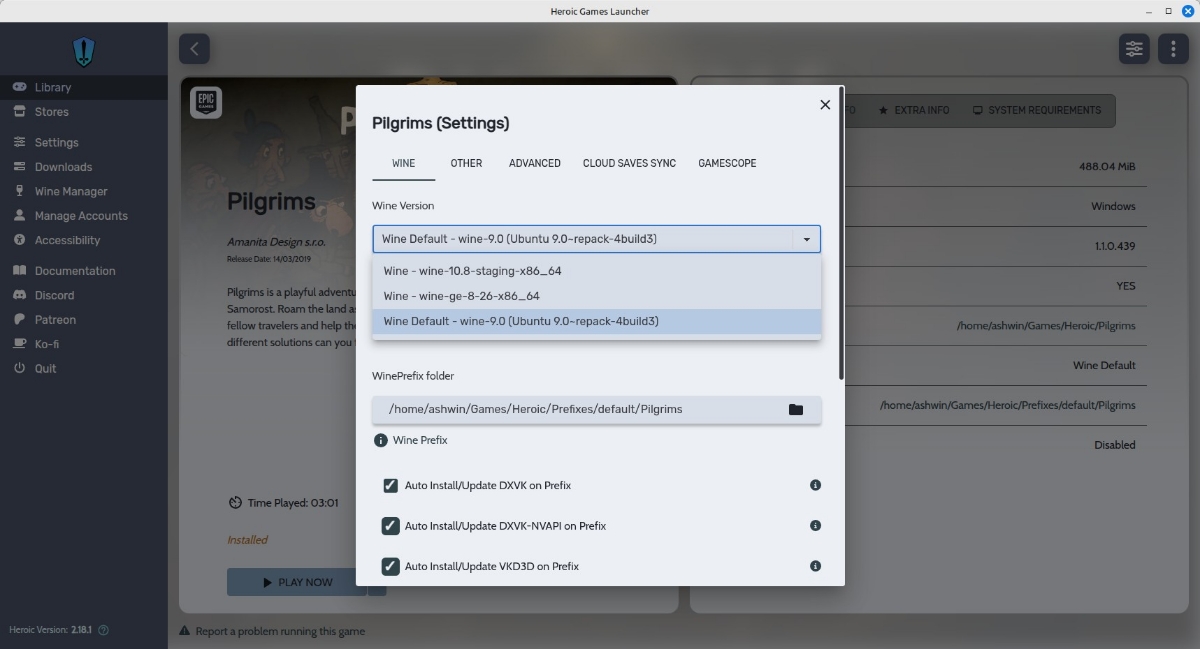
The Heroic Games Launcher version 2.18.0 introduced a change that, by default, hid all non-GE-Proton versions from the Wine version selection menu. This meant that users could only readily choose between Wine, Wine GE, and Wine Staging. While a warning was placed beneath the menu informing users that non-GE-Proton versions were ignored and could be enabled in the advanced settings, the change sparked controversy for several reasons:
- User Confusion: Many users, especially those new to Linux gaming or unfamiliar with the nuances of Proton, were confused by the limited selection and unaware of the option to re-enable the hidden versions.
- Limited Choice: The change restricted access to potentially better-performing or more compatible Proton versions for certain games.
- Unnecessary Complexity: Hiding options that some users rely on added an extra step to the configuration process, hindering the user experience.
The core of the issue was that the change was implemented as an opt-out rather than an opt-in feature. Users who wanted to utilize the full range of Proton versions were forced to manually adjust the settings, adding unnecessary friction.
Examples of Affected Proton Versions
The hidden Proton versions included a wide range of options, such as:
- Proton Hotfix: Provides quick fixes for specific game issues.
- Proton Experimental: Includes the latest, often unstable, features and fixes.
- Older Proton Versions: Sometimes required for compatibility with older games.
- Proton-CachyOS: A Proton build optimized for the CachyOS Linux distribution.
- Proton-EM: A Proton build focused on emulation-related improvements.
- Proton-Sarek: Another community-driven Proton build with specific enhancements.
The Fix: Heroic Games Launcher 2.18.1 Hotfix #1
Responding to community feedback, the developers of Heroic Games Launcher released version 2.18.1 Hotfix #1 to address the issue. The key change in this hotfix is the reversal of the previous behavior. Now, instead of hiding all non-GE-Proton versions by default, it optionally hides Valve’s Proton versions.
Opt-In vs. Opt-Out
Crucially, the setting to hide Valve’s Proton versions is now opt-in. This means that users who prefer to see all available Proton versions, including Valve’s official builds, can do so without having to dig into the advanced settings. Users who do want to declutter the menu by hiding Valve’s Proton can still do so through the Settings > Advanced page. This change strikes a better balance between simplifying the interface for some users while retaining full control and flexibility for others.
Key Takeaways from the Hotfix
- Reinstated Visibility: All Proton versions (including Proton Hotfix, Experimental, older versions, Proton-CachyOS, Proton-EM, and Proton-Sarek) are now visible by default.
- Opt-In Hiding: Users can now choose to hide Valve’s Proton versions via the advanced settings.
- Improved User Experience: The hotfix restores the previous level of control and flexibility for Linux gamers.
Conclusion: A Win for the Linux Gaming Community
The initial change in Heroic Games Launcher 2.18.0, while perhaps intended to simplify the user experience, ultimately limited user choice and caused confusion within the Linux gaming community. The swift response from the developers with the 2.18.1 Hotfix #1 demonstrates their commitment to listening to user feedback and providing a flexible and customizable experience.
By reverting the default hiding of non-GE-Proton versions and making the hiding of Valve’s Proton versions an opt-in feature, Heroic Games Launcher has reaffirmed its dedication to empowering Linux gamers with the tools they need to optimize their gaming experience. The ability to choose from a wide range of Proton versions remains a crucial aspect of Linux gaming, and this hotfix ensures that users retain full control over this important setting. What do you think about this update? Let us know your thoughts in the comments below!
Sources & Further Reading:
Original article at www.ghacks.net


