
Google Chat Gets Stickier: Desktop Users Rejoice with New Sticker Integration
Have you ever felt words just weren’t enough to express your reaction in a Google Chat conversation? Well, good news for desktop users! Google Chat is rolling out a new feature that promises to add a touch of fun and personality to your digital communications. The latest update brings sticker integration to the desktop interface, allowing users to inject some visual flair into their messages. This enhancement, which is automatically enabled, is currently exclusive to the web interface, offering a playful alternative to text-based communication. This article will delve into the details of this update, exploring its features, availability, and implications for Google Chat users.
New Sticker Integration for Google Chat: A Detailed Look
Google Chat is evolving beyond its primarily functional role, incorporating elements that enhance user experience and foster more engaging conversations. The introduction of stickers is a testament to this shift. Here’s a comprehensive breakdown of what this update entails:
Accessing the Sticker Picker in Google Chat
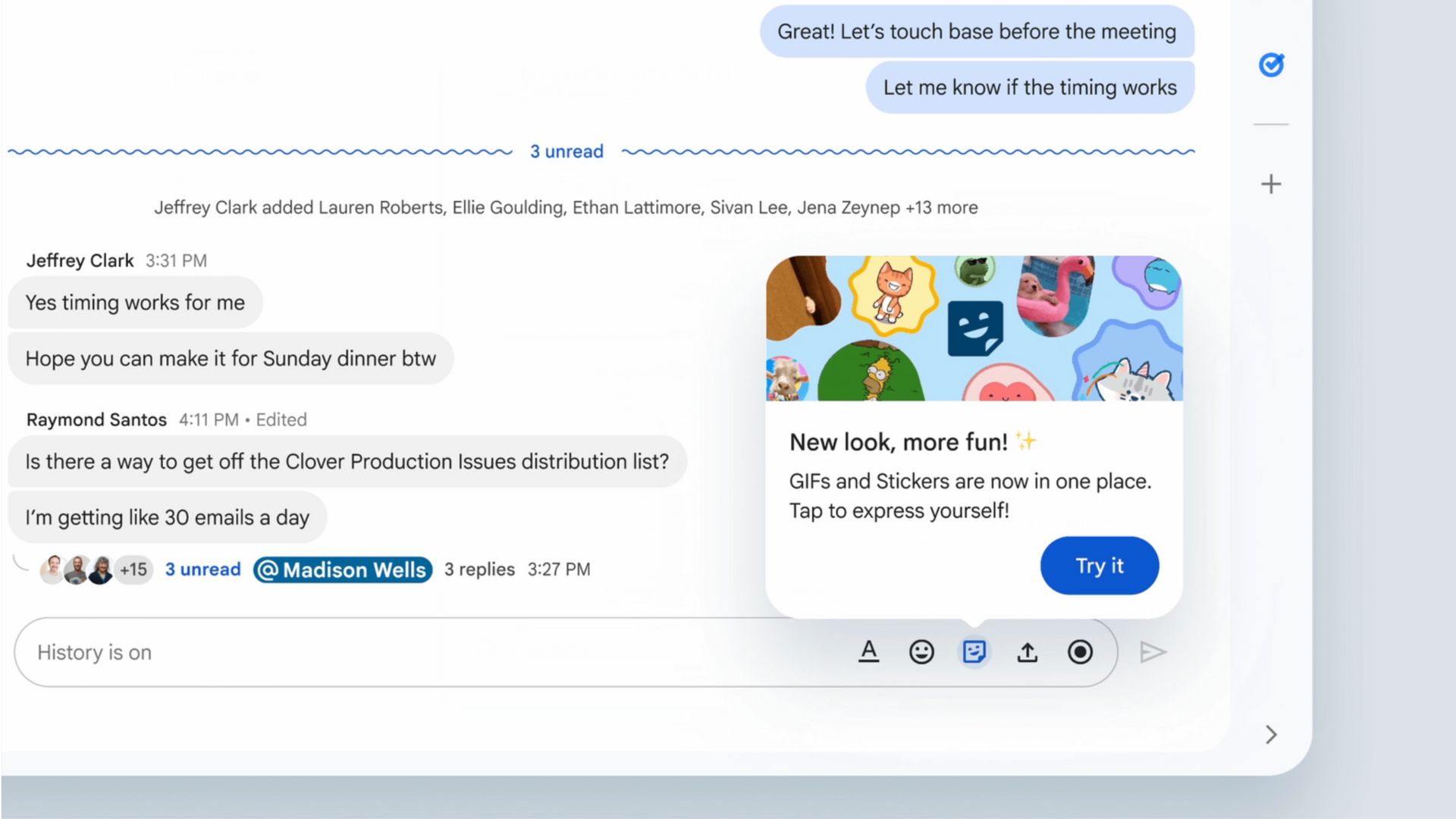
The sticker functionality is seamlessly integrated into the existing Google Chat interface. To access the sticker picker, users simply need to look for the new sticker icon located within the message field. This icon now serves as a hub for both stickers and GIFs, consolidating visual communication options in one convenient location. This design promotes ease of use and makes it simple for users to find and utilize the new feature.
Sticker Availability and Rollout Timeline
According to Google’s announcement, the sticker feature is being rolled out to all Google Chat users. The rollout commenced recently and is expected to take approximately 15 days to reach all users. Importantly, no action is required from individual users or workspace administrators to enable this feature; it will be automatically implemented. This simplified process ensures a smooth and hassle-free transition for everyone.
Desktop-Exclusive Feature (For Now): Google Chat on the Web
Currently, the sticker functionality is exclusive to Google Chat’s web-based desktop interfaces. This includes both the dedicated chat.google.com website and the Google Chat tab within Gmail. While mobile users won’t have a dedicated sticker picker within the Google Chat app, they can still insert stickers using their phone’s keyboard. The focus on the desktop experience likely stems from the feature being designed for longer, more interactive conversations common on desktop platforms.
Integrating Gemini into Google Chat
Beyond stickers, Google Chat has also recently integrated Gemini, Google’s AI model, to help users “refine” their messages. This AI-powered feature, also currently exclusive to the web interface, allows users to leverage artificial intelligence to improve the clarity and conciseness of their writing within Google Chat. Gemini integration showcases Google’s commitment to enhancing both the fun and functional aspects of its communication platform.
Why Stickers? Understanding the Value Proposition
The inclusion of stickers in Google Chat might seem like a minor addition, but it addresses a fundamental aspect of online communication: emotional expression.
- Enhancing Emotional Expression: Stickers provide a visual medium for conveying emotions and reactions that text alone often struggles to capture.
- Adding Personality: Stickers allow users to inject their personality into conversations, making interactions more engaging and relatable.
- Facilitating Informal Communication: In more relaxed work environments, stickers can help foster a more informal and friendly atmosphere.
Stickers vs. Emojis: A Subtle Difference
While emojis have been a staple of digital communication for years, stickers offer a unique advantage:
| Feature | Emojis | Stickers |
|---|---|---|
| Size | Small, typically inline with text | Larger, more prominent |
| Design | Simple, standardized designs | More detailed, diverse artistic styles |
| Emotional Range | Basic emotions, objects, symbols | Wider range of emotions, characters, themes |
| Customization | Limited | Often part of themed packs, more variety |
Stickers offer a more expressive and visually appealing way to communicate emotions compared to standard emojis. They are often more elaborate and can convey nuances that emojis might miss.
Impact on Workplace Communication
The addition of stickers raises interesting questions about its potential impact on workplace communication. While some might see it as a frivolous addition, others may appreciate the opportunity to inject more personality into their interactions.
- Potential Benefits: Fosters team bonding, creates a more relaxed atmosphere, aids in quick emotional responses.
- Potential Drawbacks: Could be perceived as unprofessional in certain contexts, potential for overuse and distraction.
Ultimately, the effectiveness of sticker integration in the workplace will depend on the company culture and the way employees choose to utilize the feature.
Companies might even want to set some parameters for the usage of stickers for professional communications.
Looking Ahead: Future Developments for Google Chat
The addition of stickers and Gemini integration highlights Google’s commitment to continuously improving Google Chat. What can we expect in the future?
- Mobile Sticker Integration: The most obvious next step is to bring the dedicated sticker picker to the mobile apps.
- Custom Sticker Creation: Allowing users to create their own custom stickers would further enhance personalization.
- Expanded Gemini Features: Integrating Gemini more deeply into Google Chat could lead to even more powerful AI-assisted communication tools.
Google Chat’s ongoing evolution positions it as a versatile communication platform that caters to both professional and personal needs.
Conclusion
The introduction of sticker integration in Google Chat’s desktop interface is a welcome addition for users seeking to add a touch of personality and emotional expression to their conversations. While currently limited to the web interface, this update represents a step towards a more engaging and dynamic communication experience. By offering a visual alternative to text-based communication, Google Chat is evolving into a more versatile platform that caters to a wider range of user needs.
What do you think about the new sticker integration in Google Chat? Will you be using stickers in your conversations? Share your thoughts in the comments below!
Sources & Further Reading:
Original article at www.androidauthority.com


