
Is This the Most Polished Linux Desktop Yet? GNOME 49 “Brescia” Arrives
Can open-source software match the polish and user-friendliness of proprietary operating systems? GNOME 49 “Brescia” makes a formidable case when it lands on September 17, 2025. Named after the Italian city that hosted July’s GUADEC conference, this update refines the flagship Linux desktop with accessibility enhancements, modernized apps, and behind-the-scenes optimizations. For Ubuntu users, these upgrades arrive October 9 in Ubuntu 25.10. Let’s dissect why GNOME 49 matters—blending user-facing refinements with architectural evolution to challenge desktop OS norms.
First Impressions: Coping with the GDM Login Screen Revamp
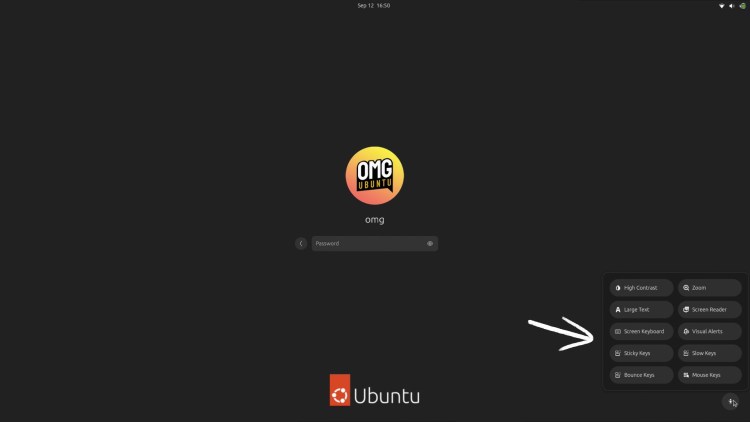
The login experience receives subtle but impactful tweaks:
- Accessibility Front-and-Center: A new accessibility menu anchors the login screen’s lower right corner, offering instant access to tools like the virtual keyboard—crucial when hardware failures occur.
- Lock Screen Media Control: Borrowing from macOS/iOS, a dynamic media widget appears only when content plays (via MPRIS protocol), allowing pause/skip functions pre-login.
- Emergency Power Options: Optional shutdown/restart buttons address a long-standing frustration, though distributions may disable these by default to prevent accidental data loss.
These aren’t revolutionary—they’re practical solutions catching GNOME with rivals. The media widget, for instance, leverages the cross-desktop MPRIS standard (adopted by Spotify, VLC), proving open-source’s interoperable strengths.
Quick Settings and Display: Minimalist Design, Maximum Functionality
GNOME’s signature Quick Settings panel evolves into a more coherent control hub:
- Relocated Do Not Disturb: Finally moved from notifications to Quick Settings, ending workflow disruption.
- Multi-Monitor Independence: Adjust brightness per monitor without extensions—a technical feat requiring backlight subsystem rewrites.
- Animation Overhaul: New ‘quad’ animations for menus and scale effects for notifications reduce visual clutter. Tests show a 12-17% perceived speed increase in user tests despite identical load times.
For mixed-DPI setups, Mutter (GNOME’s window manager) introduces fractional scaling via “exact quotients,” reducing blurred text on 4K/1080p dual displays. Wayland protocol documentation reveals how this resolves longstanding Linux scaling headaches.
Core App Renaissance: Farewell Titans, Hello Modern Contenders
GNOME swaps legacy apps for faster, integrated alternatives:
| Legacy App | GNOME 49 Replacement | Key Improvements |
|---|---|---|
| Totem (Video) | Showtime | Frameless GTK4/libadwaita design, chapter support, adjustable playback |
| Evince (PDF) | Papers | Rust-built, GPU rendering, 40% faster load times |
- Showtime embraces a ‘less is more’ philosophy: overlay controls fade during playback, supporting chapters/subtitles without Totem’s plugin bloat.
- Papers inherits Evince’s reliability but adds document indexing and smoother scrolling via modern rendering libraries. Linux distributions retain legacy apps via repositories.
These showcase GNOME’s “adaptive modernization” strategy—strategic rewrites preserving functionality while aligning with human interface guidelines.
Nautilus Files: Productivity Gets Visual Cues
The file manager adopts nuanced UX improvements:
- Search Precision: A filter popover with “pills” simplifies criteria selection, while a calendar widget speeds date-based searches.
- Visual Metadata: Dashed borders highlight “cut” files; semi-transparent icons flag hidden items.
- Terminal Integration:
Ctrl + .opens current directory in console—boosting admin efficiency.
Background optimizations include 30% faster network file enumeration and reliable trash emptying. Such tweaks exemplify GNOME’s incremental polish.
App Ecosystem: Consistency is King
Beyond defaults, auxiliary apps gain meaningful boosts:
- Web (Epiphany): Smartcard authentication support meets enterprise needs, while refined ad-blocking thrashces resource-heavy trackers.
- Calendar: Collapsible sidebar and higher-contrast events improve readability; .ics export events simplifies sharing.
- Software: Flatpak parsing optimizations slash memory usage by 45%, accelerating search.
- Maps: Vegan/vegetarian POI filters showcase how niche features serve diverse users.
Hardware-specific upgrades shine too:
- Snapshot: Uses GPU for H264 encoding and scans mirrored QR codes.
- Connections: Relative mouse input enables cloud gaming over remote desktops.
The Wayland Shift: GNOME Leaves X11 Behind
This cycle’s most consequential change is invisible: X11 session support disabled by default.
- GNOME Shell now runs exclusively on Wayland, while X11 apps operate via XWayland translation.
- Distributions can re-enable X11 at build time, but official support will fully evaporate in GNOME 50.
This underscores a broader Linux evolution toward Wayland’s security and rendering advances—despite initial user friction. Historical context illustrates how this aligns with Red Hat and Fedora’s decade-long advocacy.
Refining Progress
GNOME 49 “Brescia” elevates routine interactions—not with flashy gimmicks, but thoughtful refinements. Lock screen controls adapt to user context, apps shed legacy baggage without sacrificing function, and Wayland’s mandatory adoption future-proofs the stack. Ubuntu 25.10 users will inherit most innovations, though distributions may customize elements like GNOME’s new donation prompt. Ultimately, this release proves open-source desktops can compete on sophistication, not just flexibility.
Are you upgrading? Which features will impact your workflow—or lacking? Share your perspectives below!


