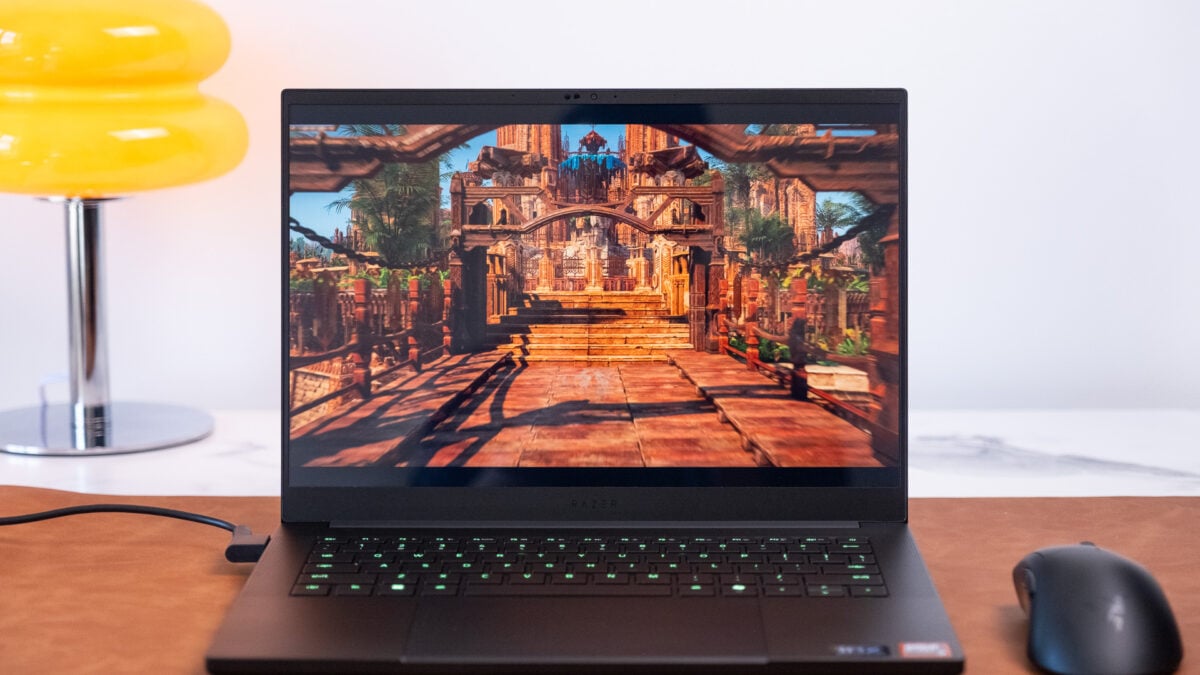

The Razer Blade 14 (2025): A Compact Gaming Laptop Worth the Hype?
Are you tired of lugging around a behemoth of a gaming laptop just to get your fix on the go? The promise of a powerful, portable gaming experience is increasingly alluring, and the 14-inch gaming laptop category is leading the charge. However, achieving this perfect balance of performance and portability comes at a price. The Razer Blade 14 (2025) is a prime example, showcasing cutting-edge design and powerful components, but also a steadily increasing price tag. Is this compact gaming laptop worth the investment? Let’s dive deep into the features, performance, and potential drawbacks of the Razer Blade 14 (2025).
Razer Blade 14 (2025) Review: A Deep Dive into the Gaming Laptop
The Razer Blade 14 (2025) attempts to deliver a no-compromise gaming experience in a small form factor. Let’s explore what makes this machine tick, and whether it justifies its premium positioning in the market.
Design and Portability: Slim, Sleek, and Smudge-Prone
The Razer Blade 14 (2025) continues Razer’s tradition of sleek, minimalist design. At just 0.66 inches thick and weighing around 3.59 pounds, it’s undeniably portable. This makes it a significant improvement over larger 16- and 18-inch gaming laptops. Slipping it into a backpack is a breeze, offering true mobility for gamers on the go.
However, the anodized aluminum matte black finish, a signature of Razer laptops, is a notorious smudge magnet. The lid, palm rests, and keys quickly accumulate fingerprints and smudges, requiring frequent cleaning to maintain a pristine look. While the aesthetics are appealing, the practical implications of this design choice might frustrate some users.
Performance and Benchmarks: Power in a Compact Package
The reviewed model of the Razer Blade 14 (2025) features an AMD Ryzen AI 9 365 CPU and an Nvidia GeForce RTX 5070 GPU with 115W TGP (Total Graphics Power). This combination delivers impressive performance for its size.
- CPU: The AMD Ryzen AI 9 365, based on the Strix Point Zen 5 architecture, is designed for efficiency in smaller laptops.
- GPU: The Nvidia GeForce RTX 5070 offers substantial graphical horsepower. It enables high frame rates in many games.
In synthetic benchmarks, the Blade 14 (2025) outperforms its 2024 small-frame competitors, especially in Geekbench 6 and Cinebench 2024 multi-core tests. While it can’t match the performance of larger laptops with high-end Intel Core Ultra HX series CPUs, it still provides a very capable gaming experience.
Here’s a breakdown of its performance in real-world scenarios:
- Gaming: Handles most games well, with the sweet spot being ray tracing on low settings and DLSS (Deep Learning Super Sampling) set to auto. Games like Cyberpunk 2077 can achieve around 65 FPS with these settings.
- Content Creation: The RTX 5070 excels in tasks like video editing and 3D rendering. Blender tests showed that its discrete GPU rendered scenes approximately three times faster than the GPU in a 14-inch MacBook Pro with M4.
Display and Audio: Immersive Visuals and Sound
The Razer Blade 14 (2025) sports a 14-inch OLED display with a 2,880 x 1,800 resolution and a 120Hz refresh rate. While some might expect a higher refresh rate given the price, the display strikes a good balance between speed and visual quality. The OLED technology delivers deep blacks, vibrant colors, and excellent contrast. The bezels are slim, further enhancing the immersive experience.
However, the screen is somewhat reflective, which can be distracting in brightly lit environments. The audio performance is impressive, thanks to its six speakers with THX spatial audio support. The sound is clear, accurate, and loud enough to provide an immersive gaming and multimedia experience. Minimal fan noise also contributes to a more enjoyable overall experience.
Keyboard and Trackpad: A Mixed Bag
The keyboard on the Razer Blade 14 (2025) offers a decent typing experience. It features a good amount of separation between the keys to prevent accidental presses. The feedback response is better than some competitors, such as the HP Omen Max 16. Overall, it’s a comfortable keyboard for both gaming and typing.
The trackpad, however, is a major point of contention. The large, flat panel is effective at palm rejection, but the interior is sloped toward the user, making it difficult to click towards the top. This design flaw can be frustrating, especially when scrolling or performing tasks that require precise clicks.
| Feature | Razer Blade 14 (2025) | Potential Improvement |
|---|---|---|
| Keyboard | Decent typing | Could benefit from more “clacky” sound and increased travel |
| Trackpad | Flat, palm rejection | Redesign to allow consistent clicks across the entire surface |
Connectivity and Ports: A Comprehensive Selection
The Razer Blade 14 (2025) offers a comprehensive selection of ports for connectivity. These include:
- USB 4 Type-C ports on both sides
- USB-A ports on both sides
- HDMI 2.1 port
- microSD card slot
- Headphone jack
- Proprietary charging port
This variety ensures compatibility with a wide range of peripherals and devices, making the laptop versatile for both gaming and productivity tasks. The inclusion of a microSD card slot is especially useful for content creators who need to transfer files quickly.
Battery Life and Thermals: Trade-offs for Performance
Battery life remains a challenge for gaming laptops, and the Razer Blade 14 (2025) is no exception. In typical usage scenarios, such as web browsing, it can last for around four hours on a single charge. Gaming, of course, will drain the battery much faster. The included 200W power brick can charge the laptop from 20% to almost full in under 40 minutes.
Despite its powerful components, the Razer Blade 14 (2025) manages heat effectively. During extended gaming sessions, the surface temperature near the screen can reach around 103 degrees Fahrenheit, but the palm rest stays relatively cool at around 85 degrees. This ensures comfortable gameplay, even during intense sessions.
Cost and Competition: A Premium Investment
The Razer Blade 14 (2025) starts at $2,300 for the model with an Nvidia GeForce RTX 5060 and $2,600 for the RTX 5070 model. This positions it at the higher end of the 14-inch gaming laptop market.
Its main competitor is the ASUS ROG Zephyrus G14. The Zephyrus G14 offers similar performance and features, often at a slightly lower price point. Other alternatives include the ASUS TUF Gaming A14, which can be found for under $2,000.
| Feature | Razer Blade 14 (2025) | ASUS ROG Zephyrus G14 | ASUS TUF Gaming A14 |
|---|---|---|---|
| Starting Price | $2,300 | ~$2,000 | < $2,000 |
| GPU | RTX 5060/5070 | RTX 5070 Ti | Varies |
| CPU | AMD Ryzen AI 9 | AMD Ryzen AI 9 | Varies |
| Portability | Excellent | Excellent | Good |
| Overall | Premium, sleek | Strong performance/value | Budget-friendly |
Addressing Potential Issues and Concerns
The review also mentions potential issues and concerns reported by some users regarding the Razer Blade 16, such as buggy hardware and software. The reviewer experienced some crashes initially, but these were resolved by updating the firmware. It’s essential to ensure that all drivers and firmware are up to date to avoid any potential problems.
Final Verdict: Is the Razer Blade 14 (2025) Worth It?
The Razer Blade 14 (2025) is a compelling option for gamers who prioritize portability and performance in a sleek, compact package. It offers impressive processing power, a vibrant OLED display, and a comprehensive selection of ports. However, its high price tag, smudge-prone finish, and problematic trackpad are significant drawbacks.
Ultimately, whether the Razer Blade 14 (2025) is worth the investment depends on individual needs and priorities. If portability, design, and a strong brand are paramount, and you’re willing to overlook the trackpad and higher cost, then it’s an excellent choice. However, those on a tighter budget or seeking better value might consider the ASUS ROG Zephyrus G14 or the ASUS TUF Gaming A14.
What do you think about the Razer Blade 14 (2025)? Is its premium price justified, or are there better alternatives in the market? Share your thoughts and experiences in the comments below!
Sources & Further Reading:
Original article at gizmodo.com


