
The Silent Shift: How ChatGPT’s New Look Redefines AI Writing
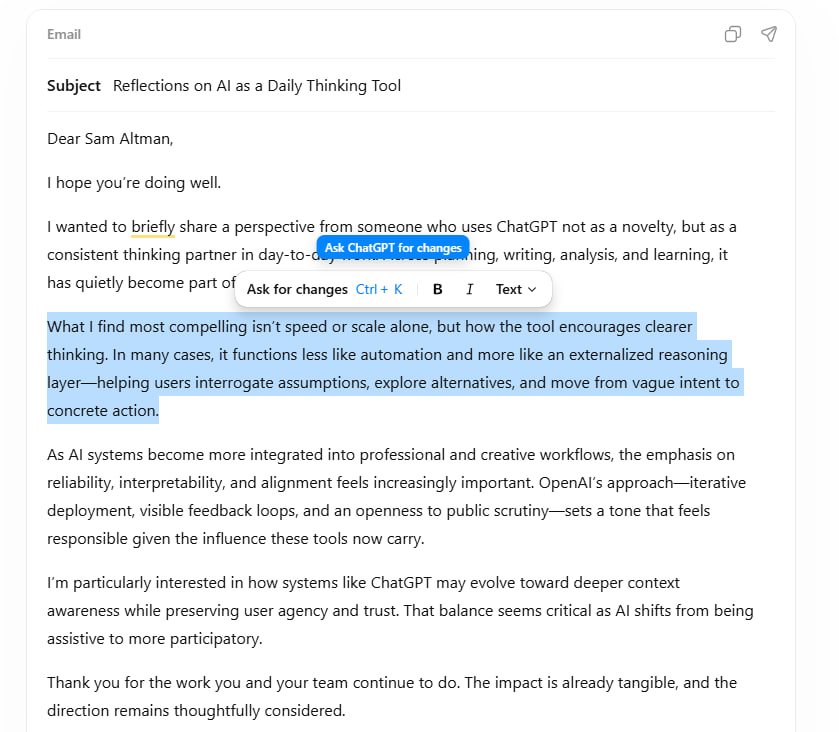
Ever logged into ChatGPT expecting the familiar chat bubbles, only to find your email draft displayed like a miniature document editor? If so, you’ve encountered OpenAI’s newest experiment: formatting blocks. This subtle interface tweak signals a fascinating evolution in how users interact with AI, prioritizing seamless editing for writing tasks without changing the bot’s core intelligence. For countless professionals relying on ChatGPT for daily content creation, this seemingly small update addresses a major pain point: the clunky back-and-forth between generative AI and traditional editing tools. Does streamlining modification workflows mark a bigger shift towards task-specific AI interfaces?
OpenAI has deliberately kept this rollout low-key. Formatting blocks appear dynamically for prompts detected as “writing-oriented” – think crafting emails, drafting reports, penning social media captions, or composing structured content. When triggered, the response replaces the standard chat bubble with a bordered, focused block resembling a snippet from Google Docs or Microsoft Word. The real magic happens when you highlight text within this block. Instantly, a small contextual toolbar emerges, offering familiar formatting options:
- Bold
- Italic
- Underlining
Code Snippets- Bullet Points and Numbered Lists
Critically, ChatGPT’s core text generation remains unchanged. The AI isn’t suddenly writing differently formatted code; it’s the presentation layer that’s smarter. This distinction is vital for users concerned about erratic updates altering AI behavior. The goal, as evidenced by the implementation, is clear: reduce friction. Why force users to generate an email draft, copy it entirely, paste it into their email client, and then format it, when they can do significant editing right within ChatGPT? This workflow optimization is particularly potent for:
- Busy professionals: Quickly refine meeting notes or client communications.
- Content creators: Structure blog posts or scripts before export.
- Students: Format research summaries or assignment drafts.
Unpacking the Triggers and Rollout Transparency
Currently, formatting blocks are surfacing within ChatGPT’s newer rich-text response framework, deployed via a gradual, phased rollout. OpenAI hasn’t released comprehensive documentation detailing which prompts exactly trigger the blocks or a concrete timeline for universal availability. User reports suggest:
- Common Triggers: Phrases like “Draft an email to [X] about [Y]”, “Write a press release for…”, “Create a structured outline for…”
- Variable Support: It doesn’t activate for all writing tasks consistently yet. Simpler, shorter outputs often remain in chat bubbles.
- Platform Specificity: Early observations hint it might appear differently or sooner in the web interface versus mobile apps.
(Table: Traditional Output vs. Formatting Block Experience)
| Feature | Traditional Chat Bubble | New Formatting Block |
|---|---|---|
| Visual Appearance | Embedded in conversation flow | Distinct bordered “task” area |
| Editing Workflow | Text copied out for edits elsewhere | Basic formatting done in-place |
| Toolbar Access | None | Formatting buttons on text selection |
| Focus | Conversational context | Content-task focus |
| Ideal For | Q&A, brainstorming, quick replies | Drafting structured documents/emails |
The lack of an official detailed list creates temporary ambiguity – a trade-off for OpenAI’s iterative deployment approach. They likely monitor engagement and gather user feedback on this enhanced interface before wider standardization.
Navigating Preferences: Avoiding the Embellishment
Not everyone welcomes this visual departure. Users who favor ChatGPT primarily as a conversational companion or for rapid information retrieval might find these blocks disruptive or unnecessary clutter. Sensing this need for flexibility, OpenAI designed bypass mechanisms:
- Explicit Instructions: Adding directives like “Please respond in plain text” or “Output plain text only” often suppresses formatting block generation.
- Prompt Framing: Phrasing queries conversationally (“Can you tell me how to respond to this client?”) rather than document-focused (“Draft a response to this client”) influences the response format.
- Conciseness: Very brief outputs usually avoid the formatted view.
- (Potential Future?) Toggle: While unavailable now, persistent user feedback requesting an off-switch could spur OpenAI to add a dedicated setting.
This adaptability respects diverse workflows, allowing users to retain the familiar chat interface when preferred.
Beyond Convenience: Implications for ChatGPT’s Trajectory
The introduction of formatting blocks transcends mere cosmetic change. It’s a calculated step enhancing ChatGPT’s utility in practical, productivity-focused scenarios. By integrating basic editing functions directly into the interface for relevant outputs, OpenAI achieves several objectives:
- Reduced App Switching: Minimizes friction, aligning with known productivity drains like context switching identified in studies [Source: APA – The Cost of Interrupted Work]. Users stay longer within ChatGPT to finalize tasks.
- Positioning as a Creation Hub: It nudges ChatGPT closer to dedicated document editors and note-taking apps. Features like Notion or Google Docs offer richer functionality, but ChatGPT becomes a more viable all-in-one starting point.
- Competitive Edge: As AI writing assistants proliferate (Gemini, Claude, Microsoft Copilot), refining the user experience for common tasks like email drafting becomes crucial. UI polish fosters user retention. Platforms offering superior document-like editing within conversational AI gain an edge. A study by Asana highlights workers juggling 10+ apps daily, craving consolidation [Source: Asana Work Innovation Report – General industry data point reflecting common pain point]. This tackles that pain.
- Contextual Intelligence: Embedding formatting tools right where generative content appears leverages context optimally. The AI generates and you refine in the same mental and visual space.
- Workflow Segmentation: It implicitly acknowledges different interaction modes – conversational vs. compositional – signaling a more nuanced understanding of user goals.
Notably, this bridges functionalities, potentially increasing adoption among users hesitant to jump between standalone writing aids. Could future iterations integrate even deeper with cloud storage? Features allowing direct saves to Google Drive or OneDrive formatted outputs feel inevitable. Enhanced collaboration tools within these blocks might follow.
Looking Ahead: Observations and Adaptations
Early user feedback paints a mixed picture. Writing-focused users appreciate the convenience, while conversationalists mostly see minor disruption. Its success hinges on intelligent trigger detection: applying the blocks where genuinely useful without becoming intrusive technical jargon prompts. Wider availability could also push developers creating GPTs to optimize their tools for similar integrated workflows, enhancing specialized AI agents’ capability.
ChatGPT’s formatting blocks represent a calculated lean into productivity, prioritizing seamless editing for content creators without disrupting conversational flows. This interface evolution reflects OpenAI’s subtle shift: enhancing ChatGPT not through radical LLM changes, but by optimizing how users interact with its outputs for common tasks. It acknowledges that generative AI’s value amplifies when integrating into familiar workflows – reducing friction points like formatting transfers offers tangible efficiency gains. While rollout specifics and user controls need refinement, the core proposition is potent: streamlining the journey from AI-generated draft to polished output.
Will this nudge towards tool-like integration enhance your ChatGPT experience, or do you prefer its pure conversational nature? Share your thoughts on this evolving UI below!


