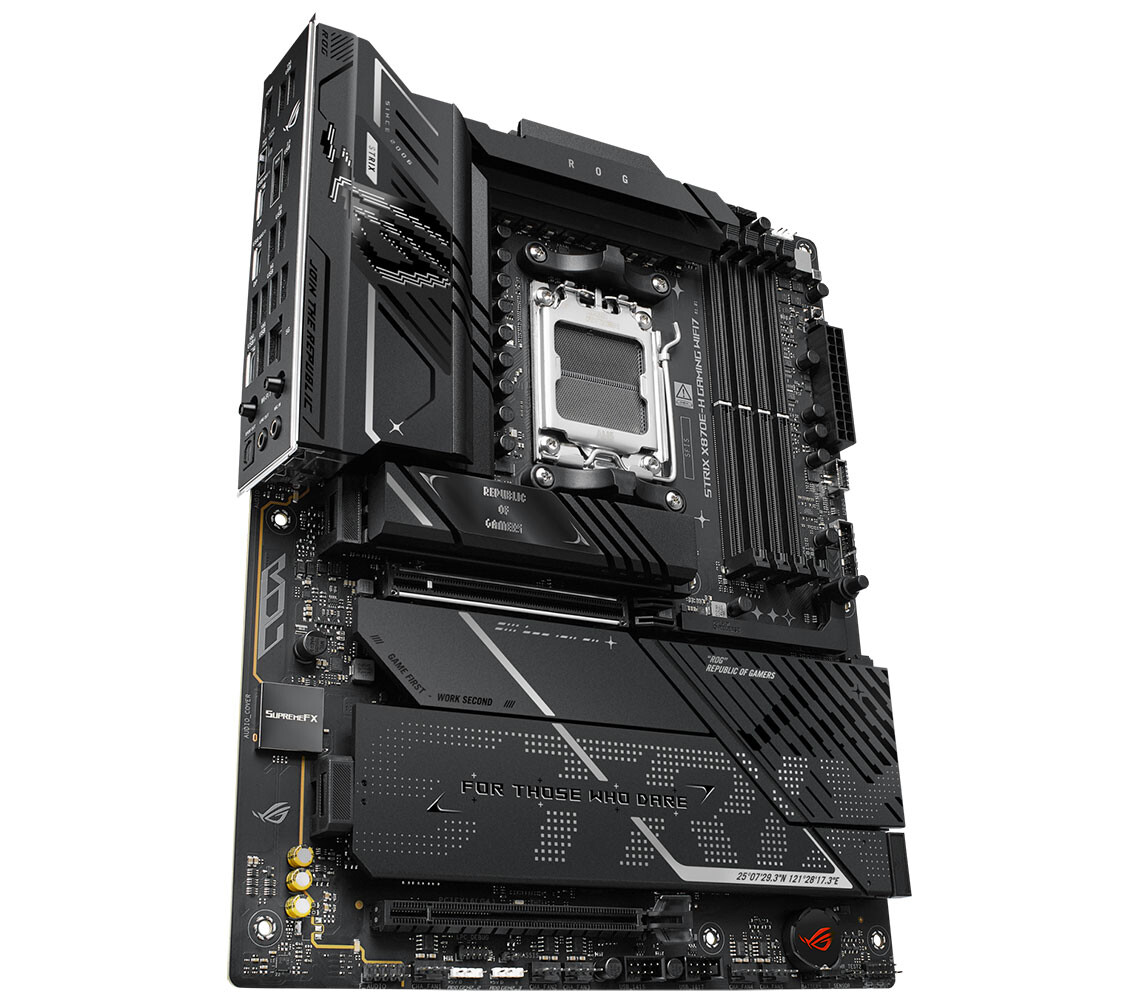

The AM5 Power Play: Does ASUS’s New ROG Strix X870E-H Gaming WiFi7 Redefine Connectivity-First Motherboards?
Is the relentless pursuit of raw power and flashy aesthetics overshadowing what truly matters for high-performance PC builds? As AMD’s Socket AM5 platform matures and demands shift beyond just core count, motherboard manufacturers face a critical question: how do they balance bleeding-edge potential with practical, future-proof features without breaking the bank? ASUS answers emphatically with the strategic expansion of its ROG Strix lineup – the introduction of the ROG Strix X870E-H Gaming WiFi7. This isn’t just another motherboard; it marks the debut of the “Hero” tier within Strix for AMD’s powerful 800-series chipsets, specifically designed to offer exceptional connectivity, robust power delivery, and a focused aesthetic at a potentially sweeter spot on the price-to-performance curve. Let’s dissect why this AM5 motherboard deserves serious consideration for savvy builders prioritizing versatility alongside performance.
Demystifying the Strix Hierarchy: Where the X870E-H Fits
ASUS’s ROG Strix branding isn’t monolithic. Understanding its internal tiers is crucial to grasping the X870E-H’s positioning:
- Strix-E (Extreme): Traditionally the flagship, maximizing features, overclocking potential, and often elaborate aesthetics (like heavy RGB).
- Strix-F (Formula): The high-performance mainstream contender, balancing features with value, previously found even on premium chipsets.
- Strix-H (Hero): A new addition for AMD AM5 800-series. Positioned above Strix-F but below Strix-E. Key differentiator: strategic focus on premium features like connectivity, while potentially de-emphasizing extreme overclocking muscle or extravagant lighting compared to Strix-E.
- Strix-G (Gene): Micro-ATX focused, packing features into a smaller form factor.
- Strix-I (Impact): Mini-ITX focused, the pinnacle of space-constrained performance.
- Important Distinction: ROG Crosshair (e.g., Crosshair Hero) sits above the entire Strix family as ASUS’s ultimate AMD enthusiast platform.
Crafting the Hero: Design Philosophy & Core Power
Stepping away from the RGB-drenched designs common on even lower Strix tiers like the F-series, the X870E-H adopts a cleaner, more utilitarian aesthetic. This aligns with its “Hero” mission – substance over spectacle. Built on the standard ATX form factor, its bedrock is a robust power infrastructure:
- Power Input: 24-pin ATX + dual 8-pin EPS connectors ensure ample power delivery overhead for potent Ryzen 7000/9000 series CPUs, especially important for multi-core behemoths and overclocking.
- VRM: A 16+2+1 phase design handles CPU power. Crucially, the 16 V-Core phases employ potent 80 A DrMOS components.
- VS. Strix X870E-E: The premium Strix-E model boasts an 18+2+2 phase VRM with higher-rated 110 A DrMOS, offering greater overclocking headroom for extreme enthusiasts.
- Reality Check: For the vast majority of high-end Ryzen processors (even the Ryzen 9 7950X/9950X), the X870E-H’s VRM is exceptionally robust and unlikely to be a bottleneck under normal or even aggressive overclocking scenarios. The 80A DrMOS are high-quality components, far exceeding the needs of stock operation. It prioritizes cost-effective sufficiency over ultimate excess.
Unpacking Expansion: Memory, Storage, and PCIe
The X870E-H leverages the inherent strengths of the AMD X870E chipset and AM5 socket to deliver impressive flexibility:
- Memory: Four DDR5 DIMM slots support the latest high-speed DDR5 RAM with EXPO profiles, crucial for unlocking Ryzen performance.
- Primary GPU Slot: A dedicated PCIe 5.0 x16 slot caters to next-gen graphics cards, featuring ASUS’s convenient “Easy Eject” mechanism – a small but welcome ergonomic upgrade.
- M.2 Storage Bonanza: This is a major standout:
- Total Slots: Four dedicated NVMe SSD slots.
- Speeds: Two PCIe 5.0 x4 slots offer blistering speeds for the latest SSDs (potential sequential reads/writes exceeding 14,000 MB/s). Two PCIe 4.0 x4 slots provide excellent high-speed storage.
- Lane Sharing Note: One of the Gen 4 slots shares bandwidth with an open-ended PCIe x16 slot (electrically x4). This means using that specific PCIe slot will disable the corresponding M.2 Gen 4 slot. Careful planning is needed if using multiple add-in cards alongside all M.2 drives.
- Comparative Advantage: This dense M.2 configuration is a significant win over many competitors and even ASUS’s own X870 (non-E) based boards.
Networking: Cutting-Edge Wireless and Blazing Wired
Connectivity is a core “Hero” pillar, and the X870E-H doesn’t disappoint, embracing emerging standards:
- Wi-Fi 7 & Bluetooth 5.4: Driven by a Realtek RTL8922AE controller supporting the new 320 MHz channels and 4K-QAM modulation of Wi-Fi 7. This translates to potentially more than double the peak speeds of Wi-Fi 6E (think potential speeds approaching 5 Gbps+), lower latency, and better multi-device handling. A crucial feature for future-proofing networking. Wikipedia: Wi-Fi 7 provides a good overview.
- Wired Networking: Features a 5 Gigabit Ethernet (5GbE) port driven by a Realtek RTL8126 PHY. This offers 5x the bandwidth of standard Gigabit Ethernet, ideal for NAS enthusiasts, content creators moving large files, or homes with multi-gig internet plans becoming increasingly common.
USB: An Embarrassment of Riches
The rear I/O panel transforms into a connectivity powerhouse, clearly demonstrating the X870E-H’s “Hero” ethos in facilitating diverse peripherals and fast data transfer:
- USB4 (x2): Bottleneck-free 40 Gbps Thunderbolt compatibility (certification pending). Perfect for ultra-fast external storage, high-resolution displays, and docking stations.
- High-Speed USB-C: One 10 Gbps USB 3.2 Gen 2 Type-C port with 30W Power Delivery, useful for charging laptops or tablets conveniently.
- High-Speed USB-A: Three 10 Gbps USB 3.2 Gen 2 Type-A ports for fast drives and peripherals.
- Versatile USB: Six 5 Gbps USB 3.2 Gen 1 ports and two trusty USB 2.0 ports for keyboards, mice, and legacy devices.
- Front Panel Flexibility: A 20 Gbps USB 3.2 Gen 2×2 header offers insanely fast front-panel access. Two 5 Gbps USB 3.2 Gen 1 headers and four USB 2.0 headers ensure extensive front-panel connectivity potential, surpassing many rivals.
Audio: Premium Carryover
ASUS wisely retained its proven SupremeFX audio solution from higher-end Strix boards:
- Core: Realtek ALC1220P codec known for its 120 dB SNR (Signal-to-Noise Ratio), providing clean audio output.
- Amplification: Savitech SV3H712 amplifier specifically boosts the front-panel headphone jack, capable of driving demanding high-impedance headphones common among audiophiles and competitive gamers.
Strategic Positioning & Value Proposition
The absence of a Strix-F model based on the X870E chipset is telling. ASUS instead offers the Strix-F on the slightly less feature-rich X870 (non-E) platform. This makes the X870E-H Gaming a fascinating proposition:
- VS. Strix X870-F Gaming: While possibly priced slightly higher, the X870E-H delivers significant upgrades: an extra high-speed M.2 slot (4 vs likely 3), PCIe 5.0 connectivity (vs potentially only Gen 4 on non-E chipsets beyond the GPU slot), the superior X870E chipset’s native USB capabilities, and often more premium build/VRM components.
- VS. Strix X870E-E Gaming: Sacrifices the ultimate VRM (18+2+2 w/ 110A vs 16+2+1 w/ 80A), likely some additional overclocking-focused features (like more robust thermal solutions or diagnostic tools), and potentially more elaborate aesthetics/RGB. But, it retains the crucial X870E connectivity core – Wi-Fi 7, USB4, plentiful M.2 Gen5/Gen4 – at a significantly lower price point. For users prioritizing real-world versatility over extreme overclocking records, this puts the H-series firmly in a value sweet spot.
Summary of Key Connectivity
| Feature | ROG Strix X870E-H Gaming WiFi7 | Impact |
|---|---|---|
| M.2 Slots | 4 Total | Amplifies high-speed storage |
| 2x PCIe 5.0 x4 | Future-proof for bleeding-edge SSDs | |
| 2x PCIe 4.0 x4 | Excellent high-performance storage | |
| USB Rear Panel | 2x USB4 (40 Gbps) Type-C | Thunderbolt speeds, video, docks |
| 1x USB 3.2 Gen 2 (10Gbps) Type-C (30W PD) | Fast charging/data | |
| 3x USB 3.2 Gen 2 (10Gbps) Type-A | High-speed peripherals/drives | |
| 6x USB 3.2 Gen 1 (5Gbps) | Versatile connectivity | |
| 2x USB 2.0 | Keyboards, mice, legacy devices | |
| Networking | Wi-Fi 7 + Bluetooth 5.4 | Cutting-edge wireless, low latency |
| 5 Gigabit Ethernet | 5x faster than standard Gigabit | |
| Front USB | 1x USB 3.2 Gen 2×2 (20Gbps) header | Ultra-fast front-panel access |
| 2x USB 3.2 Gen 1 (5Gbps) headers | Convenient front connectivity | |
| 4x USB 2.0 headers | Extensive accessory support |
Conclusion: The Connectivity-Centric Champion Emerges
The ASUS ROG Strix X870E-H Gaming WiFi7 isn’t merely an addition to the AM5 lineup; it’s a strategic declaration. By establishing the Strix-H “Hero” tier focused squarely on delivering an exceptional density of cutting-edge connectivity – Wi-Fi 7, USB4, plentiful PCIe 5.0/4.0 storage, and multi-gig networking – ASUS caters to the growing faction of users whose demands extend beyond just overkill VRMs. Coupled with robust 80A-phase power delivery sufficient for flagship Ryzens, high-quality audio, and a refined design stepping back from pure RGB spectacle, the X870E-H carves out a compelling niche. It offers a significant step up in features and future-proofing over the X870-based Strix-F, while avoiding the premium cost of the maxed-out Strix X870E-E. For builders striving for a versatile, I/O-rich foundation for their Ryzen 7000 or upcoming 9000 series powerhouse, who value modern connectivity as much as core performance, the ROG Strix X870E-H Gaming WiFi7 emerges as a remarkably well-considered AM5 motherboard contender. It redefines the mid-to-high-tier value proposition, proving that being a “Hero” is about enabling possibilities, not just brute force. What’s your priority: ultimate overclocking headroom, or unmatched versatility and speed? Let us know your thoughts on ASUS’s strategy below!
Sources & Further Reading:
Original article at www.techpowerup.com


