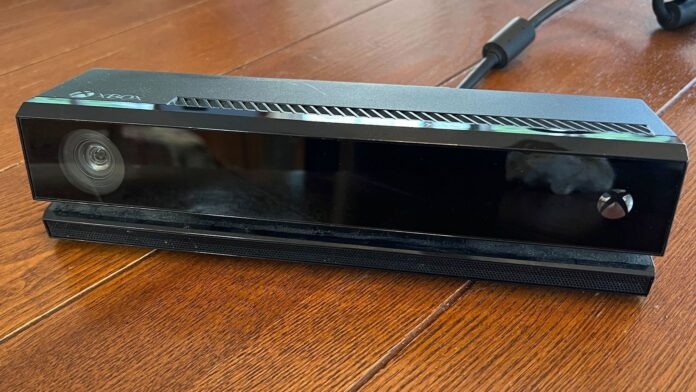

Microsoft’s Xbox Kinect was once a pioneering attempt at motion and gesture-controlled gaming, launching around the same time as the PlayStation Move and the Nintendo Wii’s revolutionary Wii Remote. While the Wii gained a significant head start, the Kinect represented cutting-edge technology for 2010 that Microsoft struggled to market effectively.
After discontinuing Kinect for Xbox One in 2017, we’ve had nearly a decade to reflect on this innovative peripheral. However, through upcycling, you can give your old Kinect camera a fresh new purpose – if you still have one sitting in storage.
Create Your Own Surveillance Device
Kinect Is a Camera, After All
Both versions of the Xbox Kinect (v1 for Xbox 360, v2 for Xbox One) can be repurposed as a security camera for your home or business. Thanks to the Kinect’s infrared technology and depth sensing, it can also function as a motion detector with audio recording capabilities. After all, you’ve got that microphone array to put to good use, too!
This project requires some technical expertise and access to a PC running at least Windows 10. If you’re using the Xbox One Kinect, you’ll need a Microsoft Kinect Adapter as well. Software-wise, you’ll need to obtain Kinect SDK 1.8 (for v1) or Kinect SDK 2.0 (for v2).
Both SDK versions provide the tools necessary to access your Kinect’s video feed, depth sensor, and various detection features. You can then combine OpenCV with either Python or C# programming to use the Kinect’s depth sensing to detect movement changes. Part of your custom script can also command the Kinect to save motion-triggered frames and notify you when they’re captured.
If coding isn’t your strength, you can continually use tutorials (like this one) to find user-created tools that will turn your Kinect into a 24/7 security guard for your home or business.
Turn It Into Something Scholastic
Let the Kids Lead the Way
Who said repurposing the Kinect had to be all serious? Sure, a security camera is a peace-of-mind device nobody wants to be without, but what about transforming that old Xbox accessory into a fun and interactive coding lesson for children and teens?
With platforms like Kinect2Scratch, youngsters can pull back the curtain on motion-sensing technology. They can create custom games that double as lessons on gesture-based control mapping, such as a jump-and-run platformer requiring hand swipes for navigation or a simple IFTTT executable that plays and pauses music when motion is detected.
Older kids and teens can also dive into the more advanced world of tools like OpenCV, Python, and Kinect SDK for superior projects. Processing is another excellent open-source programming language that can be used alongside Kinect libraries to create custom graphics, games, and various motion-driven applications.
Use It as a 3D Scanner
An Interesting Project If You Own a 3D Printer
Did you know Microsoft released a developer-friendly version of the Kinect in 2019? It’s called the Azure Kinect, and it was actually the final nail in the coffin for consumer-grade v1 and v2 Kinect production. The Azure Kinect isn’t even compatible with Xbox consoles, as it’s built from the ground up for developers and industrial applications – think healthcare, robotics, and more. It can also be configured as a 3D scanner. But guess what? So can the v1 and v2 devices.
With software like Skanect and Microsoft’s 3D Scan, you can turn your Kinect into a 3D-scanning powerhouse. Admittedly, it won’t reach the same level as a professional-grade laser scanner, but the results can still be impressive, particularly when using the v2 or Azure devices (improved resolution, field of view, and depth sensing).
Keep in mind: that old Xbox add-on you used to play Kinect: Disneyland Adventures twice with can also be used to bring 3D molds to life, and you didn’t even need to spend $35,000 (professional scanners can cost even more). While we won’t dive into the nitty-gritty here, this All3DP how-to guide is an excellent jumping-off point!
Build a Custom VR Pipeline
Create the Worlds You Want to See
Now, how about integrating some of those 3D scans into a virtual world entirely of your own making (or mainly your own)? With software like Unity or Unreal Engine, you’ll be ready to upload scans and environmental files captured alongside your Kinect, turning complete skeletal files and room scans into materials for whatever VR or AR avatars and environments you plan to create. You could even implement gesture controls into your virtual landscape!
I would argue this is more of a dedicated enthusiast’s project than a simple DIY task you could knock out in a few hours on a Saturday.
Keeping the Kinect Alive
You don’t need to be a coding expert to give your old Kinect a brand-new pair of sneakers. Honestly, with just a few resources, time, and persistence, I bet you’ll be amazed at how much fun and education you can get from that old Xbox accessory. After all, you know what they say: When life gives you lemons, make a custom VR game centered around the production of digital lemonade!


