
Ditch the Cloud: Is the TerraMaster F2-425 the NAS You Need?
Are you tired of paying monthly fees to cloud storage providers for your precious data? Millions are, unknowingly missing out on the freedom and control of storing their data privately at home. A Network Attached Storage (NAS) device offers a compelling alternative. In this article, we’ll delve into a comprehensive review of the TerraMaster F2-425 two-bay NAS box, exploring its features, performance, and overall value. Is this the NAS that will finally liberate you from recurring cloud costs? Let’s find out.
Exploring the TerraMaster F2-425: A Feature-Rich NAS Solution
The TerraMaster F2-425 is a two-bay NAS (Network Attached Storage) device designed for home users and small businesses seeking a centralized solution for data storage, backup, and media streaming. This device promises a blend of functionality and affordability, making it an attractive option for those looking to build their own personal cloud.
Unboxing the Specs: Hardware and Design
The F2-425 is powered by a four-core Intel Celeron N5095 processor and comes equipped with 4GB of DRAM. This combination is generally sufficient for running the Linux-based TNAS operating system and handling common NAS tasks.
Here’s a quick overview of the key specifications:
- Processor: Intel Celeron N5095 (Quad-Core)
- Memory: 4GB DDR4
- Drive Bays: 2 x 2.5″ or 3.5″ SATA HDD/SSD
- Network Interface: 1 x 2.5GbE RJ45
- USB Ports: 3 x USB 3.2 Gen 1 Type-A (1 front, 2 rear)
- HDMI Port: Terminal Use Only
- Operating System: TNAS (TerraMaster NAS)
- Dimensions: 9″ x 5.5″ x 4.6″
- Weight: Under 4lbs (without drives)
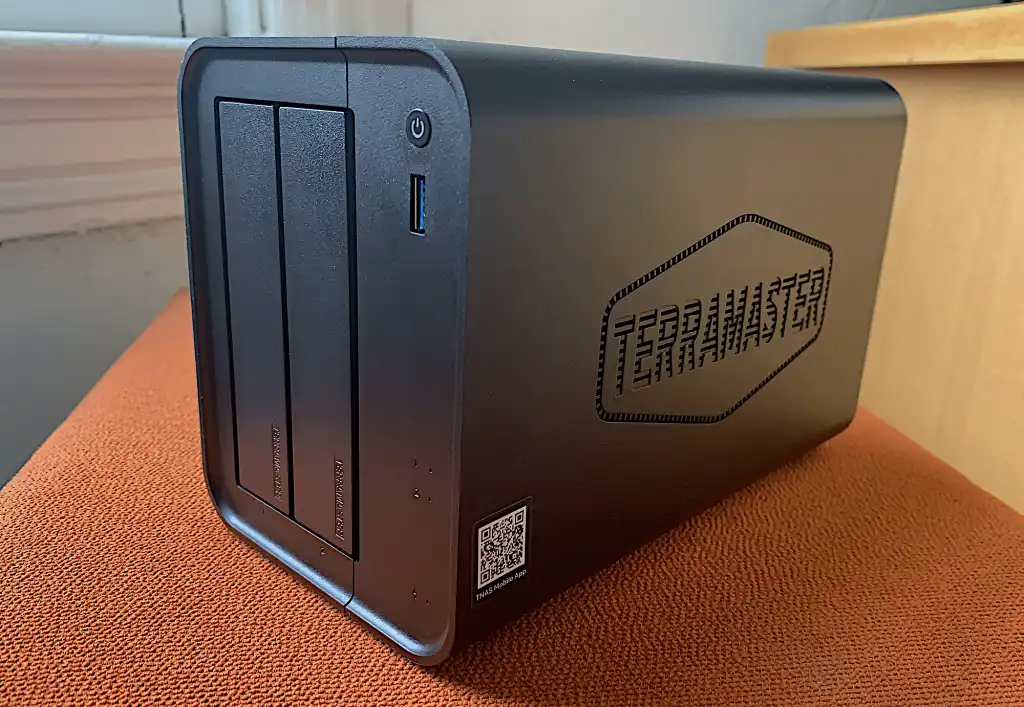
The enclosure is constructed primarily of plastic, with some internal metal framing for support. While the build quality is acceptable for the price point, it might not withstand overly rough handling. The front panel features the power button, activity LEDs, a USB 3.2 Type-A port, and the two tool-less drive bays. The rear panel houses the 2.5GbE port, two additional USB ports, the power jack, an HDMI port (for terminal use only), a reset button, and a cooling fan.
Performance Considerations: 2.5GbE and Storage Options
The inclusion of a 2.5GbE port is a significant advantage, offering theoretical transfer speeds of up to 300MBps. While this is faster than traditional Gigabit Ethernet, it’s still slower than SATA SSDs and significantly slower than NVMe drives.
- 2.5GbE: Up to 300MBps
- SATA SSD: Up to 550MBps
- NVMe SSD: Up to 1GBps+
The F2-425 supports both 2.5″ and 3.5″ HDDs or 2.5″ SATA SSDs. Users can opt for high-capacity HDDs for maximum storage (up to 72TB with two drives) or choose SSDs for faster performance. When using HDDs, mirroring them in a RAID 1 configuration is highly recommended to protect against data loss in the event of a drive failure. While NVMe drives offer superior performance, the F2-425 does not support them, which limits the ultimate speed potential of the NAS.
TNAS OS: A Feature-Rich Operating System
The TerraMaster F2-425 runs on TNAS, a Linux-based operating system that provides a wide range of features for home and business users. The OS offers a variety of applications and services including data backup, file sharing, media streaming, and surveillance.
Media Streaming Capabilities: Plex, Emby, and More
For media enthusiasts, the F2-425 supports several popular media server applications, including:
- TerraMaster Multimedia Server (DLNA)
- Plex Media Server: A user-friendly and widely-used media server.
- Emby: Another powerful media server option with advanced features.
- Jellyfin: A free and open-source media server.
Plex is often considered the most mainstream and user-friendly option, allowing users to stream their movies, music, and photos to various devices on their home network. The F2-425’s processor and memory are adequate for streaming high-resolution 4K video to multiple clients simultaneously, thanks to the bandwidth provided by the 2.5GbE port.
Backup Solutions: Protecting Your Valuable Data
The TNAS operating system offers robust backup capabilities, including:
- Centralized Backup: A tool for backing up data from computers and other devices on the network.
- Online Storage Backup: Integration with various cloud storage services like BackBlaze B2, Google Drive, OneDrive, Amazon S3, Dropbox, Box, Baidu Cloud, and Alibaba Cloud.
- Time Machine Support: Seamless integration with Apple’s Time Machine for backing up macOS devices.
Centralized Backup allows users to back up files using SMB (Windows file sharing), eliminating the need to install dedicated backup clients on each device. TNAS supports local, network, and cloud backups, providing users with multiple options for protecting their data.
It is crucial to maintain a local copy of all your precious photos. While cloud services are convenient, relying solely on them introduces the risk of data loss due to service outages, security breaches, or account issues.
Surveillance Manager: Home Security Without Hidden Costs
One of the standout features of the F2-425 is its support for IP cameras without requiring expensive additional licenses. This is a significant advantage compared to NAS devices from other vendors like QNAP and Synology, which often charge extra for each camera license.
TerraMaster’s Surveillance Manager app supports ONVIF-compliant IP cameras, allowing users to build a comprehensive home security system without incurring ongoing subscription fees. While remote access to IP cameras requires some configuration, TerraMaster offers a TNAS Web portal/forwarding service to simplify the process and enhance security.
Additional Features for SMB and Advanced Users
Beyond media streaming and backup, the F2-425 offers several features that cater to small businesses and advanced users, including:
- Virtual Machine Support: Run virtual machines directly on the NAS.
- Docker Host: Deploy and manage Docker containers.
- BTRFS File System: Offers advanced features like copy-on-write, snapshots, and data scrubbing.
- Web Server, FTP Client, and More: Host websites, manage files, and access various other network services.
Performance Testing and Real-World Usage
In terms of performance, the TerraMaster F2-425 delivers respectable speeds for its price point. With a single 2TB SATA SSD installed, read and write speeds typically range between 250-300MBps.
While not the fastest 2.5GbE NAS on the market, the F2-425 provides sufficient bandwidth for streaming 4K video to multiple devices and performing client backups. However, the TNAS operating system can sometimes feel sluggish, particularly when multitasking. For example, the reviewer noted that they were unable to switch to the file manager while installing an app.
Final Verdict: Should You Buy the TerraMaster F2-425?
The TerraMaster F2-425 offers a compelling combination of features, performance, and affordability, making it a strong contender in the two-bay NAS market. Its strengths include:
- Competitive Price: Excellent value for the features offered.
- 2.5GbE Connectivity: Provides faster transfer speeds compared to Gigabit Ethernet.
- Feature-Rich TNAS OS: Offers a wide range of applications and services.
- No IP Camera License Fees: A significant cost saving compared to other NAS vendors.
However, the F2-425 also has a few drawbacks:
- Plastic Construction: The build quality could be improved.
- Limited Multitasking: The TNAS operating system can feel sluggish when multitasking.
- HDMI Port: Not fully useful.
Overall, the TerraMaster F2-425 is a solid choice for home users and small businesses looking for a reliable and affordable NAS solution for media streaming, backup, and home file sharing. The company’s TNAS OS has matured significantly and now rivals the offerings from more established brands like QNAP and Synology. If you’re looking to ditch the cloud and take control of your data, the F2-425 is definitely worth considering.
What do you think about the TerraMaster F2-425? Is it the right NAS for your needs? Share your thoughts and questions in the comments below!
Sources & Further Reading:
Original article at www.techhive.com


