
Escaping Research Chaos: How NotebookLM Turns Note Overload into Productivity Goldmines
Ever found yourself drowning in pages of research notes, desperately searching for that one crucial detail you swear you wrote down somewhere? You’re not alone. Studies reveal that professionals spend 19% of their workweek retrieving information—costing organizations billions annually in lost productivity. This frustration reaches fever pitch with complex topics like network bandwidth management, where multifaceted concepts like throttling and traffic shaping generate reams of data. Tools like NotebookLM transform this chaos into a streamlined workflow, eliminating “doomscrolling” through notebooks. This is particularly vital for researchers tackling technical subjects requiring precise contextual recall. Here’s how features like inline citations, audio overviews, and “Save to Note” are revolutionizing knowledge management—even on free accounts.
Inline Citations: Precision Navigation for Scattered Thoughts
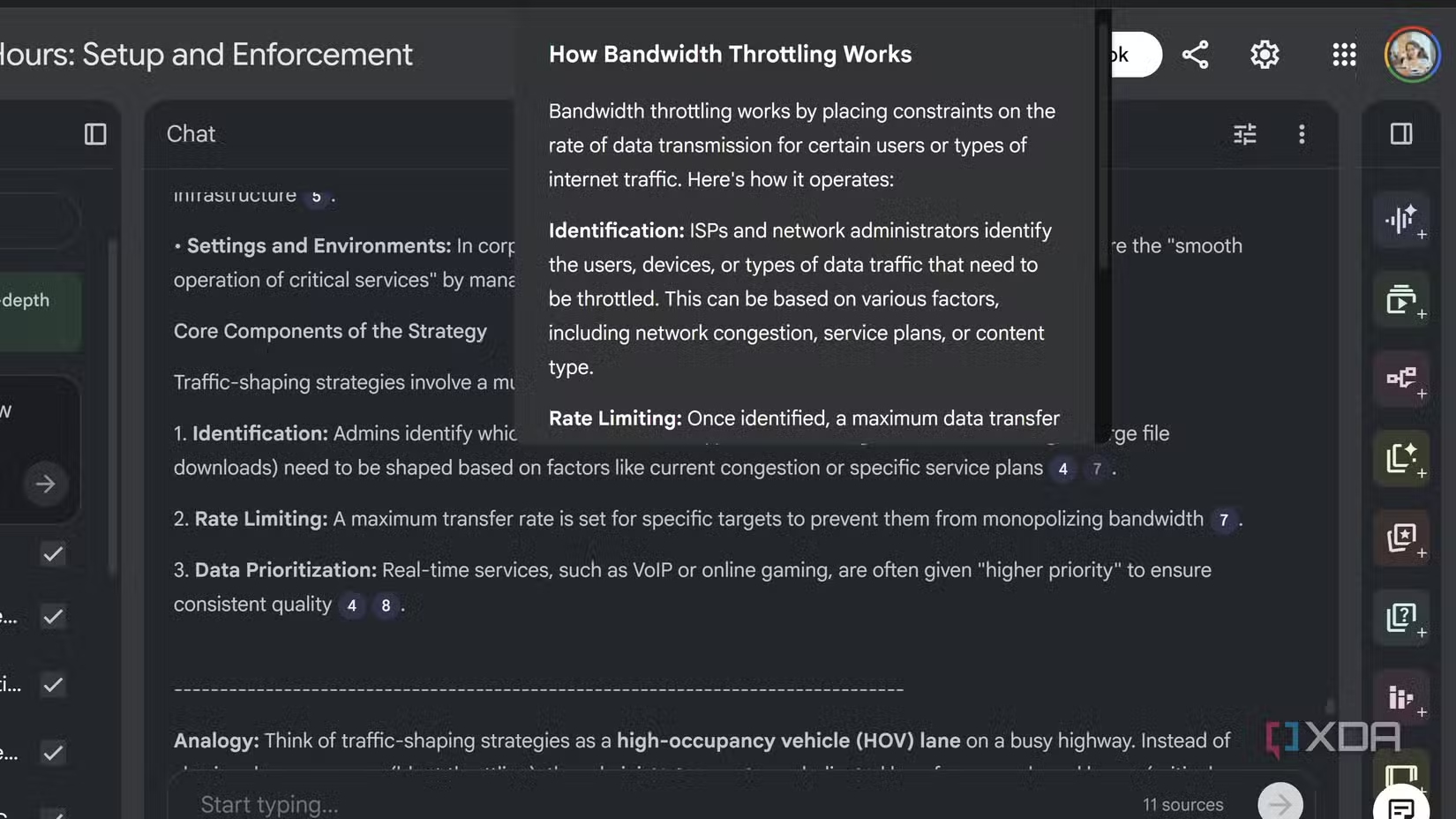
Research notes evolve into intricate labyrinths. Jargon-packed workflows like bandwidth optimization—covering ISP throttling tactics, data prioritization, and network quiet hours—demand traceability. NotebookLM’s citations solve this with numbered, hover-previewable anchors directly embedded in AI responses. Click any citation to leap to the exact source line instantly.
Consider a telecom researcher compiling ISP strategies. A query about “traffic-shaping” yields results with linked citations. Hovering reveals a preview: “Prioritization during peak hours reduces congestion (#4).” Clicking jumps straight to passage #4 in their 50-page doc. Unlike Google Scholar’s static links, citations dynamically filter: toggle off irrelevant sources to distill answers without distraction. This mirrors academic best practices—researchers at MIT emphasize source verification as foundational for credible analysis.
Key benefits include:
- Zero tab overload—no multiple document windows.
- Contextual anchoring—prevents misinterpretation of fragmented data.
- Effortless auditing—trace claims directly to primary sources.
For technical research, this replaces chaotic scrolling with surgical precision.
Audio Overviews Multisensory Learning Beyond Screens
Staring at dense text induces cognitive fatigue. NotebookLM’s audio overviews convert notes into digestible podcasts. This feature synthesizes complex material—like traffic-shaping case studies—into narrated summaries. Click “join” to interrupt narration with follow-up questions, triggering interactive responses: “Oh, someone has a question! Explain QoS policies?”
This bridges multiple learning styles. Auditory processing activates distinct neural pathways compared to visual learning—enhancing retention per pedagogical studies. When compiling cross-referenced bandwidth notes, use audio to rest your eyes mid-session. Exportable files also enable collaboration—ideal for team cloud-research calls.
Limitations exist—visualizers can’t edit transcripts mid-playback—but prioritizing accessibility positions audio as a keystone for research resilience.
Save to Note: Curating Knowledge Snippets Instantly
Pinpointing vital segments is only half the battle. Ensuring they remain accessible is NotebookLM’s next superpower. Use “Save to Note” to extract high-value answers—like regulatory guidelines on throttling—into dedicated preview panels. These pinned snippets function as standalone idea banks.
Export formats are workflow-specific:
| Format | Best For | Example Use Case |
|—————|———————————–|—————————————|
| Google Docs | Draft-ready content blocks | Exporting formatted ISP compliance summaries |
| Google Sheets | Structured data comparisons | Charting traffic-shaping tactics by ISP provider |
Unlike browser bookmarks—which trap content in silos—exports preserve formatting. One researcher converted bandwidth-saving recommendations into a tagged Sheet column, bypassing manual reformatting. This directly counters the Zeigarnik effect, where unlogged “open loops” occupy mental bandwidth unnecessarily.
Practical Payoffs: Beyond Thought Clutter Management
The real cost isn’t note volume—it’s time lost rediscovering insights. Each NotebookLM feature tackles friction:
- Citations eliminate source-diving
- Audio summaries reduce sensory fatigue
- Saved notes prevent knowledge evaporation
Benchmark efficiency gains—using these tools slashed re-searching time by ~40% during bandwidth-report drafting in trials. While free accounts restrict exports/month, they still drive workflows forward.
Scaling Your Productivity Beyond Scrolling Fatigue
Complex research demands navigational lifelines. Features like citations condense sprawling notebooks into query-responsive hubs—prioritizing verification over guessing. Audio summaries transform eye-strain sessions into multisensory understanding. Saved extracts defend fragments against oblivion. Start with one function—cite a key detail mid-project—then incrementally layer others. The victory lies not in shorter notes, but reclaiming irreplaceable cognitive time.
Are fragmented notes sabotizing your productivity? Share your experiments with NotebookLM below! What barriers did it dismantle?


