
Is Your Password Manager Safe? Clickjacking Exploits Uncovered
Are you trusting your password manager to keep your sensitive data secure? A recent discovery reveals that a common attack vector, known as clickjacking, can compromise even the most popular password management tools. This vulnerability, impacting services like 1Password, Bitwarden, and LastPass, allows attackers to potentially steal credentials, credit card details, and other personal information. Understanding clickjacking and taking proactive steps to protect your data is now more crucial than ever in today’s digital landscape.
Understanding the Clickjacking Threat to Password Managers
Clickjacking is a deceptive technique where attackers trick users into clicking something different from what they perceive. It exploits vulnerabilities in website design and browser behavior to overlay hidden elements on top of legitimate web pages.
What is Clickjacking and How Does it Work?
Clickjacking, at its core, involves an attacker creating a malicious web page that incorporates invisible or obscured elements from a legitimate target website. This is often accomplished using iframes (inline frames). The unsuspecting user, believing they are interacting with the genuine website, unknowingly clicks on elements within the hidden iframe.
How it works in practice:
- Malicious Website Creation: An attacker crafts a webpage designed to mimic or appear related to a trustworthy site.
- Invisible Iframe Overlay: The attacker embeds an invisible iframe containing a target website’s element (e.g., a “Like” button, a “Confirm” button, or even a cookie consent prompt).
- User Interaction Manipulation: The iframe is positioned so that when the user clicks on what appears to be a normal button or link on the attacker’s page, they are actually clicking within the hidden iframe.
- Action Execution on Target Site: The click is registered on the target website within the iframe, potentially triggering unintended actions such as changing account settings, making purchases, or, in the case of password managers, autofilling credentials.
Example Scenario: Cookie Consent Deception
Imagine a webpage presenting a cookie consent prompt with “Accept” and “Reject” buttons. Unbeknownst to the user, an invisible iframe overlays this prompt. This iframe could contain a login form that triggers a password manager’s autofill function. When the user clicks “Accept” or “Reject,” the hidden login form autofills, potentially sending the username and password to the attacker.
The Discovery of Clickjacking Vulnerabilities in Password Managers
Security researcher Marek Tóth uncovered a series of unpatched security loopholes in various password manager browser extensions that allowed hackers to execute clickjacking attacks. These attacks could be iframe-based or DOM-based (Document Object Model-based).
Websites vulnerable to common web application vulnerabilities like Cross-Site Scripting (XSS), subdomain takeover, or web cache poisoning could be exploited via clickjacking to:
- Steal login credentials (username and password)
- Compromise Two-Factor Authentication (2FA) codes (TOTP)
- Hijack passkeys (new authentication method)
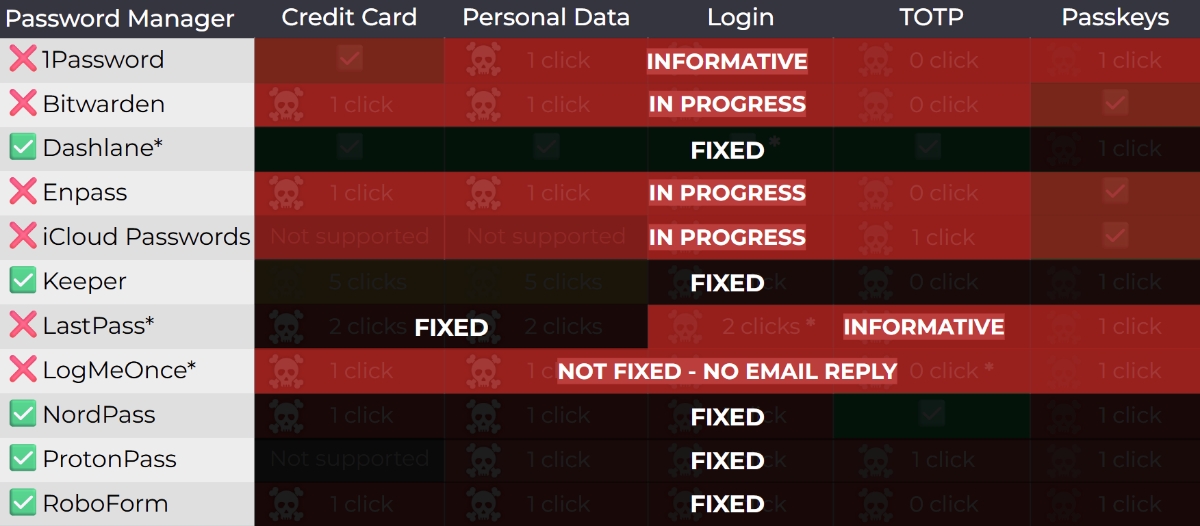
Which Password Managers Were Affected?
The following password manager services were identified as affected by the clickjacking vulnerabilities:
- 1Password
- Bitwarden
- Dashlane
- Enpass
- iCloud Passwords
- Keeper
- LastPass
- LogMeOnce
- NordPass
- ProtonPass
- RoboForm
It’s important to note that while some of these services have addressed the issue, others have been slow to implement fixes.
The Potential Data Impact of Clickjacking Exploits
The impact of a successful clickjacking attack on a password manager can be severe, leading to the compromise of a wide range of sensitive data.
Here’s a breakdown of the potential data at risk:
- Credit Card Information: Credit card number, expiration date, security code (CVV)
- Personal Data: Name, email address, phone number, home address, date of birth (particularly in password managers that store personal information)
- Login Credentials: Usernames, passwords, Time-based One-Time Passwords (TOTP) used for 2FA
- Passkeys: Signed assertion hijacking (authentication flow hijacking) could lead to the creation of a new, attacker-controlled session.
The severity stems from the centralized nature of password managers. Once compromised, an attacker gains access to a user’s entire digital life, from banking accounts to social media profiles.
Remediation and Mitigation Strategies
While password manager providers work to address these vulnerabilities, users can take several steps to mitigate the risk of clickjacking attacks.
Steps to Protect Yourself
- Disable Manual Autofill: Most password manager browser extensions offer an autofill feature. Disabling manual autofill reduces the attack surface. Consider using alternative methods as suggested by Bitwarden, such as keyboard shortcuts, the browser extension icon, right-click menu autofill, or drag-and-drop filling.
- Exact URL Matching: Some password managers allow you to restrict autofill to only exact URL matches. This provides an extra layer of security, although it’s not foolproof against all clickjacking scenarios, especially those involving credit card and personal data.
- Browser Extension Permissions: In Chromium-based browsers (Chrome, Edge, Brave, etc.), review and adjust the “Site Access” settings for your password manager extension. Setting it to “On Click” requires explicit user interaction before the extension can access website data.
- Update Your Software: Ensure that your password manager and its browser extension are updated to the latest versions. Developers frequently release patches to address security vulnerabilities, including clickjacking.
- Be Vigilant: Exercise caution when clicking on unfamiliar websites or links. Be wary of websites that seem suspicious or ask for sensitive information unexpectedly.
Password Manager Vendor Responses
Several password managers have addressed the clickjacking vulnerabilities, while others have been slower to respond.
- Fixed: Dashlane, Keeper, NordPass, ProtonPass, and RoboForm have released updates to address the issues.
- Partially Fixed/Delayed: Bitwarden released a fix in version 2025.8.0, but updates can take time to propagate to browser add-on stores.
- Awaiting Fix: 1Password and LastPass reportedly acknowledged the report but haven’t yet implemented fixes as of the last report.
This delayed response from some providers underscores the importance of user awareness and proactive security measures.
Recommended Alternative: Offline Password Management
For users seeking the highest level of security, an offline password manager like KeePass offers a compelling alternative.
- KeePass: KeePass is a free, open-source, offline password manager for Windows. It stores your passwords locally, eliminating the risk of cloud-based breaches.
- KeePassXC: A popular fork of KeePass for Linux and macOS.
- KeePassium: A KeePass client for iOS/iPadOS/macOS.
- Keepass2Android Password Safe: A KeePass client for Android.
Even if you prefer a cloud-based password manager, consider exporting a copy of your credentials to KeePass as a backup. This provides a safety net in case your cloud provider experiences an outage or security breach.
Addressing Related Concerns: Bitwarden Account Access Attempts
Separate from the clickjacking vulnerability, some Bitwarden users have reported unauthorized access attempts to their accounts. These incidents are likely unrelated to clickjacking.
The more probable explanation is that attackers are using leaked email and password combinations to brute-force their way into accounts. This highlights the importance of:
- Strong, Unique Passwords: Using strong, unique passwords for every online account significantly reduces the risk of credential stuffing attacks.
- Two-Factor Authentication (2FA): Enabling 2FA adds an extra layer of security, making it harder for attackers to access your account even if they have your password.
The reports of 2FA bypasses on some accounts are concerning. There may be a link to previous security breaches, such as the Authy breach, which could have compromised 2FA codes.
Conclusion: Stay Informed and Proactive
The discovery of clickjacking vulnerabilities in popular password managers serves as a crucial reminder of the ever-evolving threat landscape. While these tools offer convenience and improved security compared to reusing passwords, they are not immune to attacks.
By understanding the risks, taking proactive steps to mitigate them, and staying informed about vendor responses, you can significantly enhance your digital security. Remember to update your software, adjust your browser extension settings, and consider alternative password management solutions like KeePass for added protection.
What steps will you take to protect your password manager? Let us know in the comments below!
Sources & Further Reading:
Original article at www.ghacks.net


