
Running Windows Software on Linux: Wine-Staging 10.13 Arrives with Key Updates
Have you ever wanted to run that favorite Windows application or game on your Linux machine? The dream of seamless compatibility between operating systems is closer than ever, thanks to projects like Wine. Following the recent release of Wine 10.13, the cutting-edge development branch, Wine-Staging, has unveiled its 10.13 release, packed with over 300 patches, promising enhanced functionality and compatibility for running Windows programs on Linux. This update addresses long-standing bugs and incorporates the latest advancements, pushing the boundaries of what’s possible with this open-source compatibility layer.
Unveiling Wine-Staging 10.13: What’s New?
Wine-Staging serves as the experimental testing ground for Wine, integrating the newest and most innovative patches before they are considered stable enough for the main Wine branch. This approach allows developers and users to explore cutting-edge features and provide valuable feedback, accelerating the development process. The Wine-Staging 10.13 release continues this tradition, delivering significant updates and improvements. Let’s dive into the key features and benefits this release brings.
Addressing a Decade-Old Bug: Triumph over Access 2010 Runtime Issues
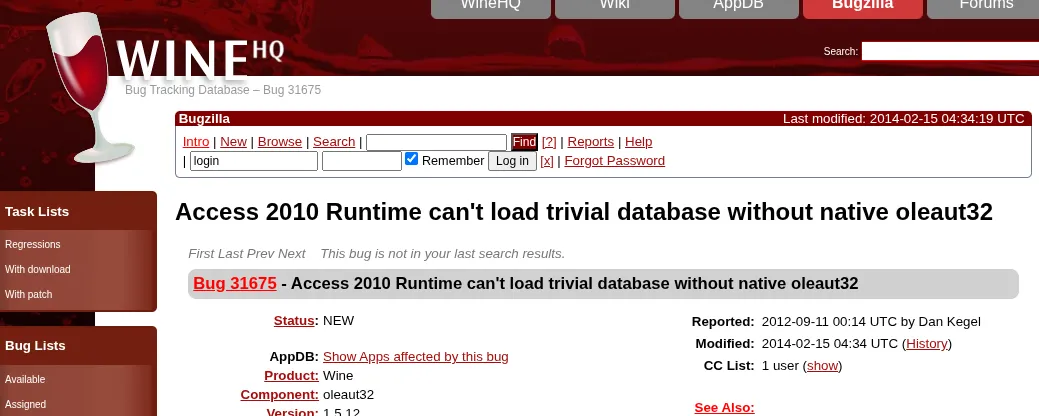
One of the most notable highlights of Wine-Staging 10.13 is the resolution of a bug that has plagued users for over a decade. Bug report 31675, concerning the inability of Access 2010 Runtime to load trivial databases without native oleaut32, has finally been addressed. This bug, first reported in 2012, remained largely untouched despite a simple workaround existing.
The fix involves a relatively small patch—less than two dozen lines of code—to the OLEAUT32 code. This patch corrects the flag used for detecting IDispatch interfaces, resolving the underlying issue and enabling Access 2010 Runtime to function correctly within the Wine environment. This highlights a key aspect of Wine’s development: even seemingly small code changes can have a significant impact on user experience and compatibility.
Why is this important?
- Enhanced Compatibility: Users can now run Access 2010 Runtime without encountering the previous database loading issues.
- Improved Productivity: This fix enables users to leverage Access 2010 Runtime for their database needs on Linux, increasing productivity and streamlining workflows.
- Demonstrates Dedication: The resolution of a long-standing bug showcases the Wine development team’s dedication to addressing user-reported issues and improving the overall stability and reliability of the software.
Keeping Up with Graphics Advancements: VKD3D Update
Another significant update in Wine-Staging 10.13 is the incorporation of the latest VKD3D code. VKD3D is a crucial component of Wine, providing a Direct3D 12 implementation over the Vulkan API. This allows Windows games and applications that rely on Direct3D 12 to run on Linux systems with Vulkan-compatible graphics cards.
By staying up-to-date with the latest VKD3D code, Wine-Staging ensures that users can take advantage of the latest performance improvements, bug fixes, and feature enhancements in the world of graphics APIs. This commitment to graphics technology is essential for delivering a smooth and immersive gaming experience on Linux.
Benefits of the VKD3D Update:
- Improved Graphics Performance: VKD3D updates often include optimizations that enhance the performance of Direct3D 12 applications.
- Enhanced Compatibility: New VKD3D releases may introduce support for additional Direct3D 12 features, expanding the range of compatible Windows games and applications.
- Access to Latest Features: Users gain access to the latest rendering techniques and visual effects offered by Direct3D 12.
How Wine-Staging Differs From Wine
While both Wine and Wine-Staging aim to allow users to run Windows software on other operating systems like Linux and macOS, there are key differences.
- Stability: Wine focuses on stability and reliability, making it ideal for users who prioritize a consistent and predictable experience.
- Cutting Edge: Wine-Staging is the experimental branch, incorporating the latest features and patches. This means it may be less stable but offers access to the newest improvements.
- Patch Integration: Wine-Staging incorporates a much larger number of patches that are still under testing before being considered for integration into the main Wine branch.
Here’s a simple table summarizing the key differences:
| Feature | Wine | Wine-Staging |
|---|---|---|
| Focus | Stability | New Features |
| Patch Count | Lower | Higher |
| Stability | More Stable | Less Stable |
| Target User | General Users | Developers/Testers |
Installation and Availability
Both Wine 10.13 and Wine-Staging 10.13 are readily available for download from the official WineHQ website (WineHQ.org). Installation instructions vary depending on the Linux distribution. For most distributions, package managers can be used to install pre-built binaries. For those who prefer to compile from source, the source code is also available. Always ensure you are using trusted and reliable sources to download the software.
People Also Ask Questions about Wine-Staging
Many users have common questions about Wine-Staging. Here are a few with some brief answers:
- What is Wine-Staging used for? Wine-Staging allows users to try out the latest, experimental patches for Wine before they are officially released.
- Is Wine-Staging stable? Wine-Staging is less stable than the regular Wine release due to the experimental nature of the patches it contains.
- Should I use Wine or Wine-Staging? If you prioritize stability, use Wine. If you want to test the latest features and contribute to development, use Wine-Staging.
- Where can I download Wine-Staging? You can download Wine-Staging from WineHQ.org.
What Does the Future Hold for Wine?
The continued development of Wine and Wine-Staging signifies a commitment to bridging the gap between operating systems. As the open-source community continues to contribute patches and improvements, the compatibility of Windows applications on Linux platforms will undoubtedly continue to grow. With each release, Wine becomes an increasingly valuable tool for users looking to break free from platform restrictions and leverage the power of Linux. These improvements provide users with more flexibility in their choice of operating systems and contribute to the growth and adoption of Linux.
Conclusion: Embracing Cross-Platform Compatibility
Wine-Staging 10.13 represents a significant step forward in the ongoing quest to seamlessly run Windows software on Linux. With hundreds of patches, including the resolution of a long-standing Access 2010 Runtime bug and updates to VKD3D, this release offers tangible benefits to users seeking enhanced compatibility and performance. By embracing these cutting-edge developments, users can unlock new possibilities and experience a more versatile computing environment. Explore Wine-Staging 10.13 today and discover the power of cross-platform compatibility! What are your experiences with Wine and Wine-Staging? Share your thoughts in the comments below!
Sources & Further Reading:
Original article at www.phoronix.com


