
Time-Travel for Your Terminal: How MiDesktop Is Resurrecting Classic KDE Magic
Remember wrestling with early Linux GUIs? That distinct hum of CRTs, crisp bitmap widgets, the satisfaction of a tightly integrated desktop—before compositing effects, app stores, and notification overload? If you’ve ever sighed for the direct, purposeful feel of late-90s computing, developer Alec Bloss is offering a portal back. Enter MiDesktop: an ambitious, painstaking project to bring the original KDE 1 desktop environment kicking and screaming onto modern Linux distributions like Ubuntu 24.04 and Debian 13. More than a novelty, MiDesktop promises a lightning-fast, undistracted interface leveraging vintage aesthetics atop a cutting-edge foundation. Could the next wave of desktop optimization be… a look backward?
Demystifying MiDesktop: The Core Technology of Resurrection
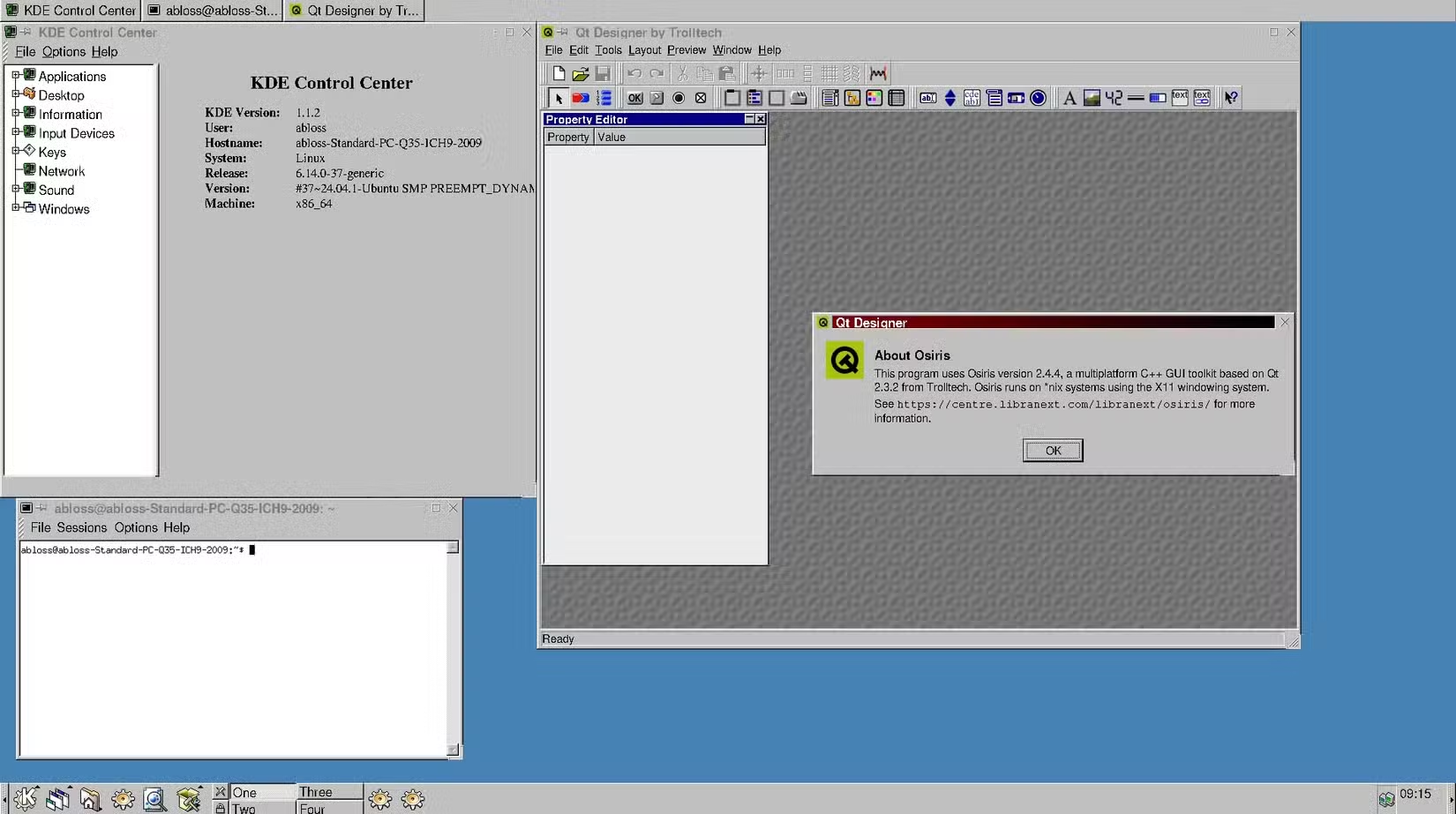
Resurrecting software designed decades ago requires ingenious engineering. KDE 1 was built using Qt 2, a framework vastly different from today’s Qt 6. MiDesktop bypasses a direct rebuild by utilizing Osiris – a specialized, forked version of Qt 2 painstakingly made compatible with contemporary Linux kernels and libraries. This solves the foundational problem: allowing vintage UI code to communicate effectively with modern hardware and software. Think of Osiris as a sophisticated translator, enabling KDE 1’s core logic to run smoothly atop today’s Ubuntu or Debian without compromising its original look and feel. The project doesn’t fully emulate an old OS; it integrates a classic desktop environment.
Key Technical Achievements:
- Modern Kernel, Classic Shell: Runs native Linux kernels (Debian 13 / Ubuntu 24.04).
- Osiris Bridge: Proprietary Qt2 fork enables compatibility uniquely.
- Synergy with Current Apps: Native terminal, Firefox, Chrome (with caveats) operate within the old-school interface.
- Repository Integration: Installs via standard
aptcommands on Debian/Ubuntu derivatives.
The Promise: Simplicity, Speed, and Focused Computing
Bloss’s motivation hits a nerve felt by many seasoned Linux users and newcomers overwhelmed by complexity. His Reddit description captures it perfectly: “It’s blazing fast and lean, aesthetically functional and distraction-less.” MiDesktop strips away decades of accumulated layers – fancy animations, compositing managers, widget engines, universal search bars, and sprawling system settings. What remains is KDE 1’s core proposition: a solid taskbar, configurable panel, clean menus, and functional applications tightly integrated visually and conceptually. The speed gains are substantial and palpable on both old hardware and new. This isn’t just nostalgia; it’s a compelling argument for minimalism in an era of desktop bloat.
Current State vs. Vintage KDE 1 Functionality Comparison Table:
| Feature | Original KDE 1 (Late 90s) | MiDesktop Preview (2025) | Modern KDE Plasma |
| :———————— | :—————————- | :————————— | :——————- |
| Desktop Rendering | X11 | X11 | Wayland / X11 |
| Core UI Framework | Qt 2 | Osiris (Qt 2 Fork) | Qt 6 |
| Speed Emphasis | Optimized for modest hardware | Blazing fast on modern CPUs | Feature-rich, heavier |
| Core Apps Available | KEdit, KMail, KWrite, KCalc | Partial (see limitations) | All modern suites |
| Multi-Monitor Support | Minimal/Variable | Not functional yet | Robust |
| Sound Framework | Arts/KDE Audio | Not functional yet | PipeWire/PulseAudio |
Navigating the Present Limitations: Bugs and Missing Pieces
Emphasizing that MiDesktop is very much an active development preview is crucial. Bloss explicitly cautions: “There are bugs and there may also be undiscovered security issues.” Understanding the current constraints tempers expectations:
- Application Gaps: Essential tools synonymous with KDE are missing-in-action: KEdit (text editor), KWrite (advanced editor), and KCalc are planned additions likely under renamed aliases (e.g., MEdit?) to prevent conflict with modern KDE installs.
- Browser Quirks: Essential modern apps like Firefox and Chrome suffer significant rendering compromises:
- Window resizing behavior is erratic.
- Interaction with taskbar context menus is unstable.
- Media Silence: No audio output/input support currently implemented.
- Multi-Monitor Maze: Support for more than one monitor is non-functional – a major hurdle for contemporary workflows.
- Underlying Protocol: Stuck on X11: Wayland support is planned but acknowledged as a significant, long-term undertaking potentially reliant on tools like “Wayback” (an X11-to-Wayland translation layer also in development).
Despite these hurdles, the fact that MiDesktop boots a usable desktop, runs terminals, and launches modern browsers at all is a monumental feat.
The X11 Legacy and The Wayland Horizon
MiDesktop’s reliance on the X Window System (X11) isn’t surprising—KDE 1 predates the modern Wayland display server protocol by a decade. X11 provides the necessary foundational compatibility. However, Wayland represents Linux’s display future, offering significant security, stability, and performance benefits over its predecessor. Bloss acknowledges this: “a Wayland port is planned, though that’s going to take a lot of time and effort.” Such a transition is highly complex. MiDesktop might become a prime test case for projects like “Wayback,” designed to act as a compatibility bridge allowing older X11-based desktop environments to operate under Wayland. Successfully navigating this migration will be paramount for MiDesktop’s long-term viability.
Installation: Stepping Back in Time is Surprisingly Simple (For Some)
Developers craving that vintage UX can experience MiDesktop relatively easily—if they meet the prerequisites:
- Run a compatible OS: Ubuntu 24.04, Debian 13, or derivatives (that haven’t completely removed X11 session support).
- Add MiDesktop’s repository details.
- Install via package manager (e.g.,
sudo apt install midesktop-session). - Reboot.
- Select “MiDesktop” from the login screen options.
This streamlined process significantly lowers the barrier compared to manually configuring a VM or hunting for ancient distribution ISOs. It emphasizes MiDesktop’s goal: accessibility to the past.
Why Does MiDesktop Matter? Beyond Nostalgia
While nostalgia is a powerful initial draw, MiDesktop represents concepts vital to computing’s present and future:
- Historic Preservation: OS GUIs evolve rapidly, often erasing their predecessors. Projects like MiDesktop, alongside others reviving BeOS or classic Mac OS [Wikipedia: Software Preservation], act as living history, documenting pivotal design philosophies.
- Functional Minimalism: Current Linux desktops offer immense power but consume significant resources. MiDesktop proves ultra-lean interfaces responsive enough to shine on legacy hardware and deflect distractions remain achievable and desirable.
- Security in Focus: A drastically reduced feature surface area can theoretically decrease vulnerability pathways (though unfinished software inherently carries risks).
- Education & Appreciation: Users experiencing KDE 1’s lineage gain deeper understanding of how modern Plasma matured. Developers dissecting MiDesktop’s internals learn valuable compatibility techniques.
The Road Ahead for a Vintage Vision
Development hasn’t matched Bloss’s initial optimism – “Unfortunately development has been a bit slower than I expected” – but he remains committed, noting freed-up schedule time. The immediate roadmap likely prioritizes stability fixes for core functions like window management in browsers, adding essential KDE applications with new names, and tackling sound support. The multi-monitor challenge looms large. Eventually, conquering the Wayland frontier will define its lifespan.
Is MiDesktop Ready For Daily Use? Currently, no. It’s a development preview, a fascinating technical playground showcasing potent potential. However, its existence is a testament to enduring design principles—speed, focus, visual cohesion—that resonate powerfully across decades. It challenges assumptions that “progress” solely means layering complexity. Sometimes, the future looks strikingly familiar.
Has tech’s relentless push forward overshadowed simpler, more efficient ways to interact with our machines? For many wrestling with clunky interfaces, MiDesktop isn’t just a nostalgic trip; it’s a provocative hint: what if the optimal desktop for tomorrow draws inspiration from the focused functionality of yesterday? If you’ve ever battled with OS bloat, take MiDesktop for a test drive. Will you embrace the simplicity? Let us know your thoughts below!


