
Beyond Buzzwords: The Unexpected Productivity Heroes of 2025
Imagine reclaiming hours each week lost to clumsy interfaces, repetitive tasks, and friction-filled workflows. What if the key wasn’t yet another AI chatbot, but a handful of deeply focused, surprisingly simple tools? While headlines scream about large language models, the genuine productivity tools changing daily digital lives in 2025 often fly under the radar. These applications tackle mundane inefficiencies with elegant solutions, proving innovation doesn’t always require massive scale. Often overshadowed by flashy AI announcements, they quietly revolutionize note-taking, file transfers, task capture, and even the act of writing itself. Let’s uncover these hidden gems that deliver profound impact where it matters most: saving your time and smoothing your workflow.
Supercharging Digital Command Centers: The Raycast Revolution
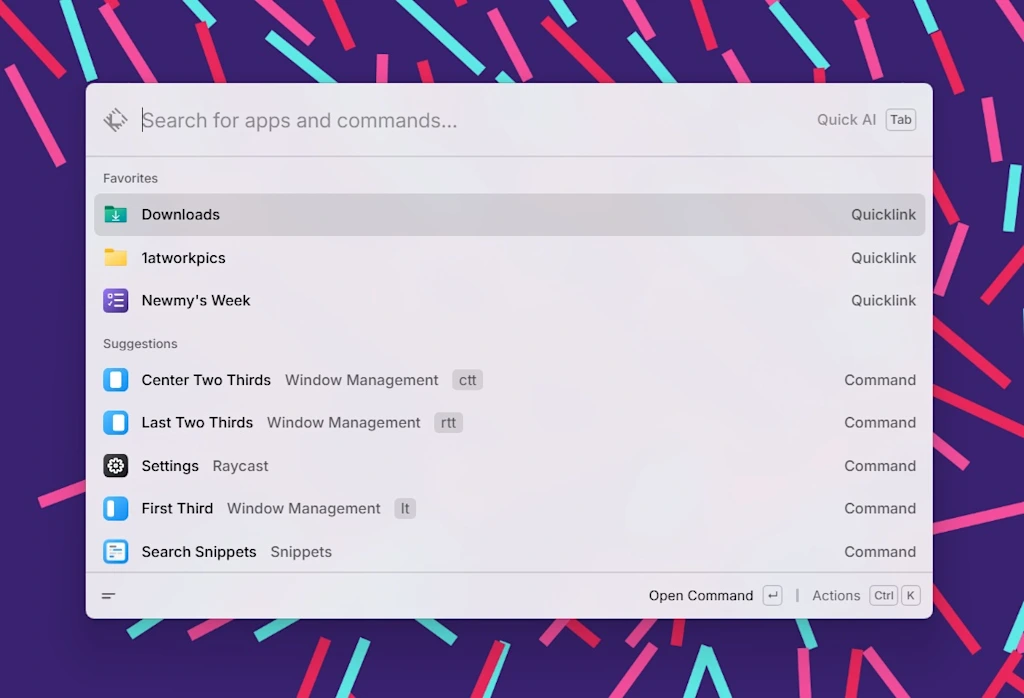
Raycast isn’t just an app launcher; it’s a reimagining of how you interact with your computer’s ecosystem. Launched years ago on Mac, its true breakthrough came in 2025 with its long-awaited arrival on Windows and iOS, democratizing its power across major platforms.
- Instant Access, Universal Actions: Forget digging through menus. Hitting a customizable keyboard shortcut (think
Ctrl/Cmd + Space) summons Raycast. Within milliseconds, you’re searching locally stored files or the web, accessing a full history of everything copied to your clipboard, selecting from your library of saved text snippets (“macros” for everyday phrases), managing active windows (move, resize, organize screens), or finding the perfect emoji—all from one box. - Beyond the Basics: While competitors like macOS Spotlight or Windows Cortana offer similar core functions, Raycast distinguishes itself with deep integrations and extensions. Need to create a calendar event? Check Jira? Control smart home devices? Translate text? There’s likely a Raycast extension streamlining it into the unified interface. Its recent AI integration stands out by allowing natural language queries within the same engine – “Summarize my last meeting notes about Project X” pulls contextually relevant information directly.
- Cross-Platform Mastery: The Windows and iOS releases transformed Raycast from a Mac-power-user staple into a ubiquitous toolkit. Syncing settings and extensions across devices (where possible) creates a consistent, highly efficient environment regardless of platform. For professionals constantly switching between computer and phone or Windows and Mac users collaborating, this seamless cross-platform presence is revolutionary. Think of it as a universal command line for the graphical interface era.
Payload: Ditching the Cloud Lag for Local Lightning
The cloud revolutionized file storage and sharing, but it introduced a bottleneck: upload and download times. Transferring a large video or batch of photos between your own devices shouldn’t require a detour to a remote server. Payload solves this elegantly.
- The Power of Proximity: Payload operates on a simple, brilliant premise: devices on the same local Wi-Fi network can talk directly. Install the Payload app on all your devices (Windows, Mac, Linux, iOS, Android). When you drag a file onto Payload’s dock icon or select it within the mobile app’s interface, it instantly scans the network for other Payload-equipped devices. Transfer happens peer-to-peer at LAN speeds – often near-instantaneously for typical files. Need to get photos from your Android phone to your MacBook? Drag onto Payload, see your MacBook pop up, drop, done – faster than AirDrop and without needing manufacturer-specific ecosystems.
- Evolution Beyond Local: Recognizing users also need to reach devices not on the same network (or when offline), Payload introduced an optional cloud service. Files get uploaded temporarily to Payload’s secure servers, generating a unique link sent to the recipient devices, which then download through the Payload app. While adding cloud transfer alleviates core limitations, the app’s magic lies primarily in eliminating remote servers when possible for optimal speed and privacy. It’s the best tool for seamless syncing where all devices are near each other.
- Syncing Made Simple: Simply drag and drop files onto Payload – instantly transfers to your configured devices on the same Wi-Fi.
- Platform Agnostic: Works seamlessly between Windows, macOS, Linux machines and iOS/Android phones/tablets within the same network.
- Hybrid Cloud Option: Generates temporary shareable links bridging offline devices.
Ghost Capture App: Turning Thoughts Into Tasks Instantly
We’ve all been there: a task pops into your head mid-conversation, while walking the dog, or just before drifting off to sleep. Pulling out your phone, unlocking it, finding your Reminders/Tasks app, tapping “New,” typing it in – that tiny act creates enough friction that crucial tasks sometimes evaporate before capture. Ghost Capture annihilates that friction.
- One-Tap (or Hold) Capture: A small, persistent ghost icon floats on your iPhone’s screen. Long-press it. Speak your thought: “Email Sarah re: budget approval,” “Buy milk,” “Schedule dentist appointment next Tuesday.” Release.
- Zero-Clipboard Synchronization: With no additional taps, Ghost Capture leverages iOS’s speech recognition, converts your spoken words to text, and seamlessly adds the task directly into either Apple Reminders or Google Tasks (user configurable). It bypasses the clipboard entirely for pure speed.
- Reduced Cognitive Load in Task Management: By minimizing the steps between thought and recorded action, Ghost Capture significantly lowers the mental barrier to capturing tasks. Psychologically, removing even 2-3 steps shifts it from a “task” itself to a reflexive action, drastically improving capture rates according to principles of habit formation psychology discussed in sources like the American Psychological Association. This app exemplifies that powerful task management enhancement often comes not from complex features, but from reducing interaction points to the absolute minimum.
Monotype: Typewriter Simulator: Rediscovering Focused Composition
In an era saturated with notifications and algorithmic distractions, achieving deep focus while writing is a significant productivity challenge. Monotype offers a surprisingly potent solution through deliberate constraint and sensory experience.
- The Nostalgic Mechanics: This Mac app presents a virtual typewriter interface. Each key press produces a satisfying mechanical “clack.” Reach the end of a line? An authentic “ding” sounds, and you physically hit the “Return” key to advance to the next line – no auto-wrap. Simple formatting mimics vintage typewriters: single font, monospaced characters, basic indentation.
- Digital Convenience Meets Analog Flow: Crucially, Monotype isn’t about permanent constraint. Write freely without the limitations of physical paper or ribbons. The deletion key works instantly without any clumsy “white-out” simulation. Crucially, when finished, you simply copy all your text to the clipboard and paste it into Word, Google Docs, Scrivener, etc. – seamlessly integrating the focused writing session into modern workflows.
- The Psychological Power: Developers report users experience significant reductions in distraction-induced task switching, aligning with research focused writing environments. The tactile auditory feedback and the absence of formatting toolbar clutter create a “deep work” bubble, actively discouraging tabbing out for potentially distracting online activities. For writers, journalists, academics, or anyone needing immersive composition time, Monotype provides a digital zone of deliberate focus impossible to achieve with modern editors’ cornucopia of features emphasizing perpetual editing and distraction.
The True Meaning of Innovation in Digital Tools
While AI dominates conversations about productivity tools and workplace innovation, the apps truly transforming daily routines often operate on a smaller, more human-focused scale. Raycast exemplifies how unifying diverse actions under one fast command hub saves countless seconds throughout the day, compounding into hours weekly. Payload tackles a fundamental inefficiency in our cloud-centric world by leveraging the forgotten speed of local networks for intra-device transfers, proving smarter infrastructure use can trump adding complexity. Ghost Capture solves the pervasive problem of task fragmentation through breathtaking simplicity in voice-to-action capture, validating that minimizing friction unlocks better task management. Monotype demonstrates that innovation can also be subtractive, removing digital distractions to drastically enhance cognitive focus and output quality for writing tasks – a cornerstone digital skill.
These unsung heroes of 2025 aren’t trying to replace you with automation; they’re enhancing your interaction with technology, making essential digital chores faster, less frustrating, and sometimes even enjoyable. They remind us that efficiency breakthroughs aren’t solely born from vast datasets or massive computational power, but often from keenly observing where our daily grind creates unnecessary friction and designing elegant solutions. The apps popularized this year won’t necessarily render others obsolete…they’ll become indispensable companions empowering more intentional, productive days. What overlooked digital helper transformed your workflow? Share your hidden heroes below!


