
The Penny-Pinching Guide to Bulletproof NAS Backups
Imagine paying for software that sleeps 99% of the time – sounds absurd, right? That’s exactly how I felt about cloud storage subscriptions. As someone who’d only purchased one app in a decade (shoutout to Link2SD for rescuing my 200MB Samsung Galaxy Ace!), I canceled my Microsoft 365 subscription despite its “value.” Why pay for 1TB when I used 100GB? Yet my DIY TrueNAS setup had zero redundancy – a single drive failure would nuke years of family photos and documents. This is how Backblaze backup solution became my financial and digital lifesaver.
My Frankenstein NAS: Cheap, Fragile, and Terrifying
Most Network-Attached Storage (NAS) devices boast multi-drive redundancy. Mine? A mini PC running Proxmox with TrueNAS virtualized on a single HDD. No RAID, no failover – a ticking time bomb. Critical data lived in two Docker containers:
- Immich: Family photos and videos
- Nextcloud: Legal docs, taxes, and personal archives
According to Backblaze’s own 2023 Drive Stats Report, consumer hard drives fail at 1.4% annually. With my setup, that risk felt exponential. I needed offsite backups without the subscription bloat of OneDrive or Dropbox.
Backblaze B2: Set It and Forget It Backup Magic
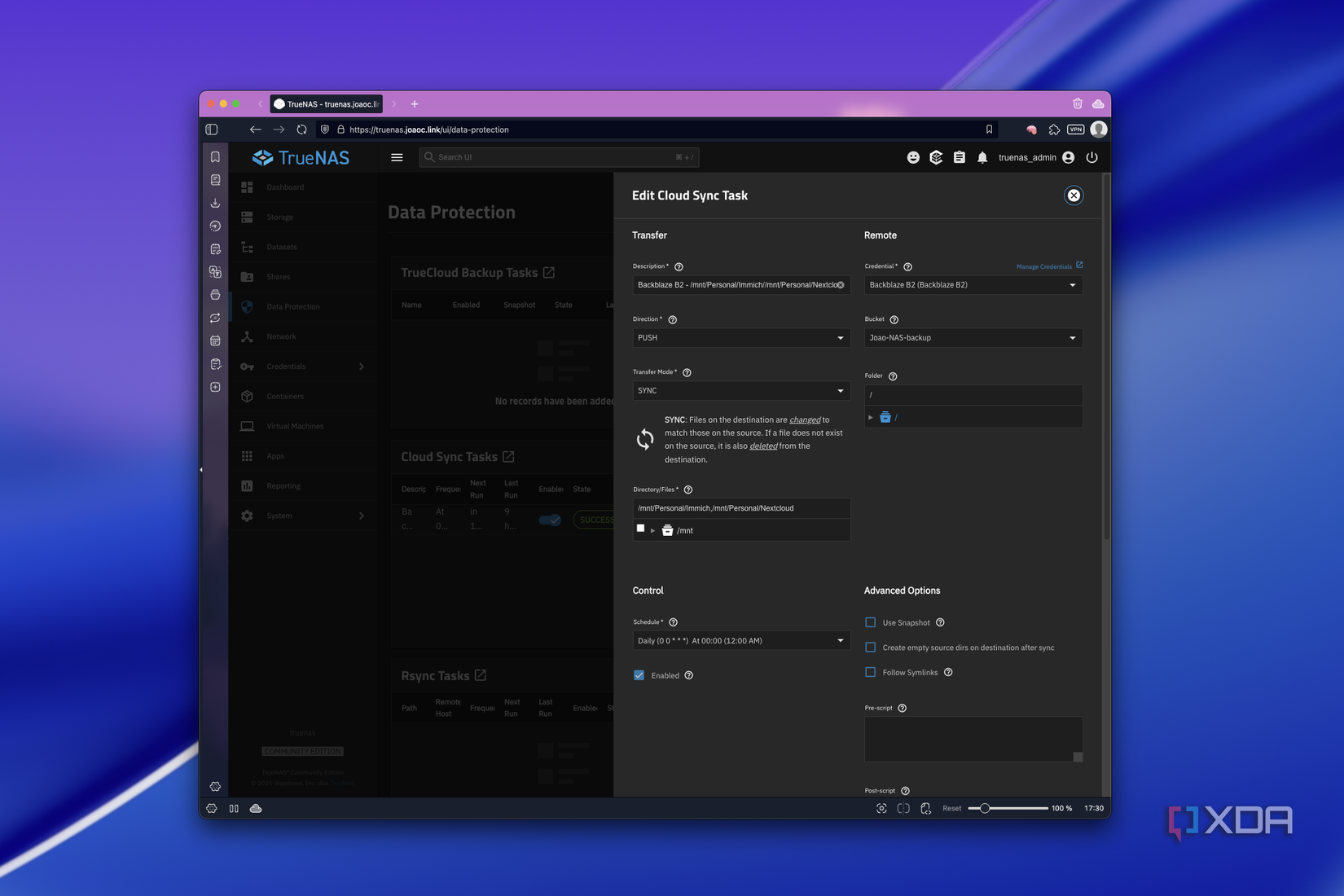
TrueNAS Scale’s native integration with Backblaze B2 (their developer-friendly storage) made this painless. Here’s how it works:
- Create a Backblaze account and “bucket” (storage container)
- Plug credentials into TrueNAS’s “Cloud Sync” task
- Select datasets (I chose Immich/Nextcloud)
- Schedule daily backups (mine runs at 7 AM)
Critical configuration tweaks avoided bill surprises:
- Sync Mode: Mirrors deletions instead of hoarding obsolete files
- Fast List Mode: Reduces API calls (and fees) by 90%
- Versioning Disabled: Prevents paying for multiple file copies
Unlike consumer apps, Backblaze doesn’t tempt you with sleek dashboards. Navigating files feels like using Linux terminal – all business, zero eye candy. But when restoring, the folder structure remains intact. If my NAS dies, I redeploy apps and point them to the downloaded datasets.
The Cost Calculus: Why Backblaze Beats Big Tech
Let’s dissect my actual spending versus mainstream options:
| Service | Pricing | My Monthly Cost | Key Limitations |
|---|---|---|---|
| Microsoft 365 | $7/month for 1TB | $7 | Paid for unused 900GB |
| Google One | $10/month for 2TB | $10 | Requires separate user accounts |
| Backblaze B2 | $6/TB + usage fees | $0.96 – $1.80 | API transaction costs apply |
How? Backblaze charges:
- $6/TB/month for storage (prorated daily)
- Minimal fees for API “transactions” (i.e., file operations)
- First 10GB free
My 160GB of data costs roughly $1.26/month – less than a coffee. Even when I botched the setup (accidentally enabling high-frequency API calls), it never topped $2. For context, backing up two users’ data via separate OneDrive accounts would cost $14/month.
Why This Isn’t “Cloud Storage”
Popular services bundle features I never used:
- Real-time collaboration tools
- Embedded Office apps
- Automatic photo tagging
Backblaze is a dumb pipe – gloriously efficient for backups but terrible for daily file access. You can download manually via web, but large files require dedicated apps. This specialization cuts costs by avoiding consumer-tier infrastructure.
The Self-Hosting Gateway Drug
Without Backblaze, my DIY journey would’ve died. Traditional NAS devices with redundant drives cost $300+. Backblaze’s affordability transformed a technical risk into a viable project. Now, I maintain full data sovereignty:
- Zero corporate surveillance of personal docs
- Control over software updates and security
- Integration with opensource tools like Immich
Data from Statista shows 45% of data loss stems from hardware failure. My $1/month insurance policy terrifies me less than another Link2SD-sized compromise on my data’s integrity.
When Cheap Meets Cheerful
Backblaze proves frugality doesn’t mean gambling with memories or taxes. It’s the backup equivalent of a silent bodyguard – invisible until catastrophe strikes, yet costing pennies. Setup takes minutes, and the economics favor light-to-moderate users. If you’ve postponed backups over cost or complexity, this might be the excuse you need.
What’s your backup horror story or victory? Did pricing trap you in an overspecced subscription? Share your battle scars below!


