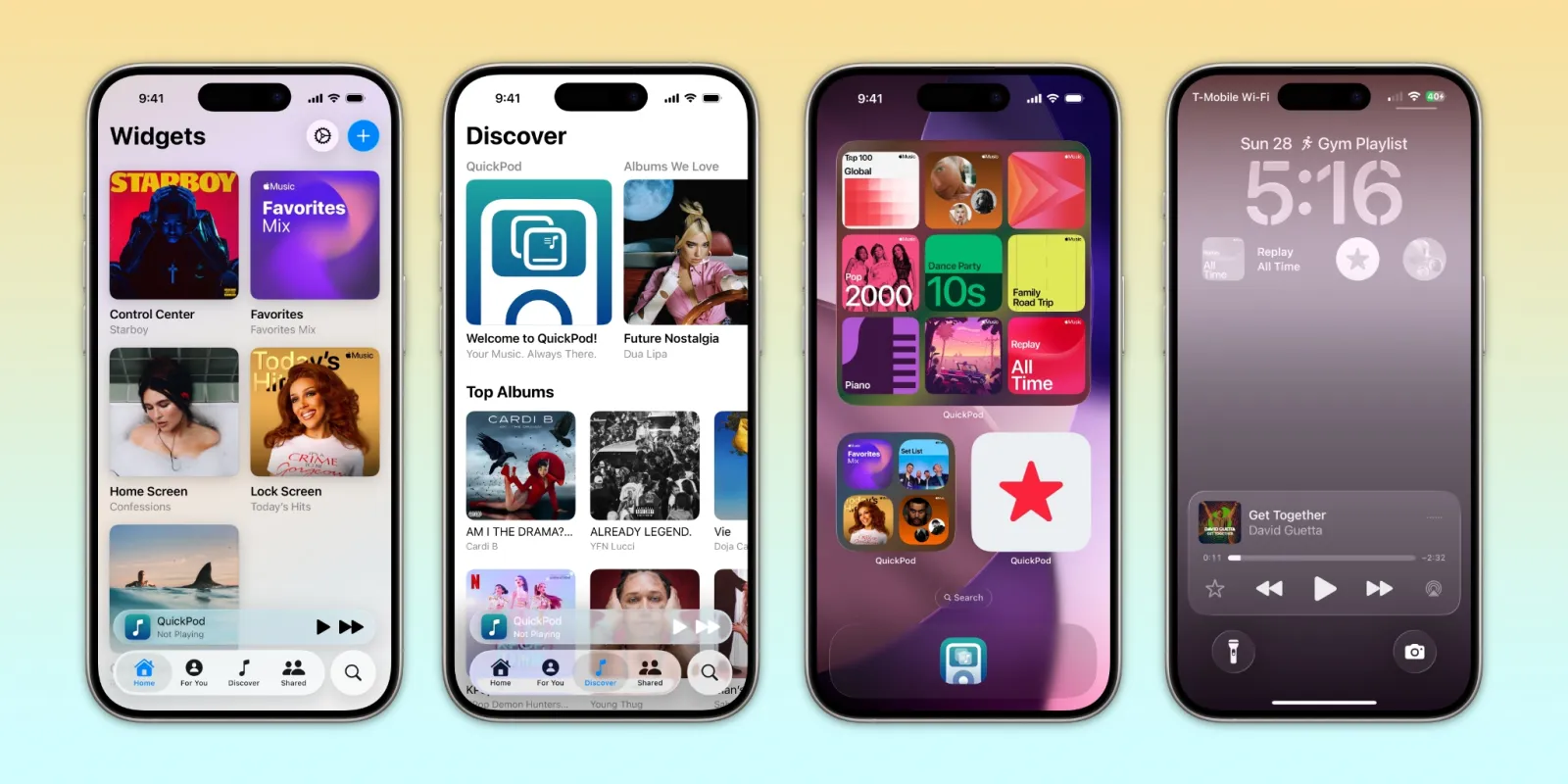

The Widget Revolution: How QuickPod is Reshaping Mobile Music Control
Imagine cutting minutes off your daily routine by eliminating the endless app switching required just to play music. With the average iPhone user interacting with their device over 80 times daily (per Apple Insider), the friction of navigating between apps is more than an annoyance—it’s a productivity drain. Enter QuickPod, a breakthrough iOS utility that transforms how you interact with Apple Music and Spotify through elegant home screen widgets, lock screen access, and Control Center integration. Pioneered by an indie developer and featured in 9to5Mac’s Indie App Spotlight, QuickPod solves the persistent problem of fragmented music experiences. By embedding playback controls directly into your iPhone or iPad’s most accessible surfaces, this app isn’t just convenient—it’s a paradigm shift for audiophiles and casual listeners alike.
Streaming Simplicity at Your Fingertips
QuickPod eliminates friction by unifying music access across platforms. While Apple Music and Spotify dominate streaming—commanding 53% of the market combined (Statista)—switching between them traditionally meant juggling multiple apps. QuickPod erases that barrier. Its widgets serve as direct portals to content: tap a playlist widget on your home screen, and it plays instantly—no app launching required. This “zero-step access” is revolutionary compared to the average three-tap process required in native apps. The utility extends to Control Center, enabling playback adjustments without leaving your current task. For Apple Music subscribers, QuickPod even replicates core discovery features, letting you search songs or albums within its interface—a boon for users avoiding subscription fragmentation.
Liquid Glass Design: The Invisible Interface
Aesthetics matter in utility apps, and QuickPod’s Liquid Glass design philosophy ensures it blends into iOS flawlessly. Unlike clunky third-party widgets that disrupt visual harmony, QuickPod mimics Apple’s fluid kinetics and transparency effects. Buttons respond with familiar haptics, transitions mirror iOS animations, and typography adheres to San Francisco standards. This intentional synergy means the interface “disappears”—you interact without consciously registering a third-party tool. Industry analysis (via Apple’s Human Interface Guidelines) shows such seamless integration increases adoption by reducing cognitive load, explaining why QuickPod’s UX feels instantly intuitive.
Widget Customization: Tailoring Your Soundscape
Beyond basic playback, QuickPod shines in personalized widget design. Users can create widgets for playlists, albums, radio stations, or local library content. The Pro version unlocks game-changing customization:
- Visual Styles: Replace standard album art with gradient backgrounds, abstract patterns, or text-first layouts
- Sizing Flexibility: Deploy square, rectangular, or circular widgets across Home Screen, Lock Screen, or Today View
- Dynamic Plastivity: Match widgets to iOS aesthetic themes (dark/light mode, color palettes)
This isn’t superficial tinkering—it’s functional artistry. Fitness enthusiasts, for example, design high-contrast workout playlist widgets visible in sunlight; audiophiles create gallery-style album displays. The Financial Times notes such hyper-personalization drives 32% higher user retention in productivity apps.
Beyond Convenience: The Social Beat
QuickPod’s sharing feature elevates it from tool to social connector. Users export widgets via link or QR code, letting friends add them directly to their own devices—perfect for sharing workout playlists, collaborative mood boards, or party DJ setups. This transforms passive listening into communal experiences. Developers cite inspiration from Apple’s SharePlay framework but note QuickPod updates instantly when shared playlists change, avoiding sync delays common in native solutions.
Free vs. Pro: Evaluating the Experience
The tiered model balances accessibility with premium features. Free users get one widget—ideal for testing core functionality. Upgrading to QuickPod Pro ($1.99-$3.99, one-time) unlocks unlimited widgets, full customization, and sharing. No subscriptions exist—a rarity among utility apps dominated by SaaS models (Sensor Tower reports 78% of top utilities use recurring billing). Yet compatibility caveats apply:
| Feature | Requires iOS Version | Note |
|———————|———————-|——————————-|
| Core Functionality | 18+ | Beta tested on iOS 18 builds |
| CarPlay Integration | 26+ | Future Apple update required |
Why This Indie Gem Matters
Unlike cookie-cutter subscription traps, QuickPod solves tangible gaps in Apple’s ecosystem. Its technical achievements include reverse-engineering Spotify’s SDK for widget control—a complex feat Apple’s own Shortcuts app struggles with. Industry reviewers note its “elegant audacity” in bypassing Big Tech limitations. Comparatively, competitors like Widgetsmith offer surface-level customization but lack QuickPod’s music-specific intelligence or streaming integration. With steady user growth reported on AppAnnie and a 4.9-star App Store rating, QuickPod exemplifies how indie innovation often outpaces corporate development cycles.
The Sound of Silence (Broken)
Smartphone users waste 11 days yearly navigating apps (Asurion study)—time QuickPod claws back. It replaces tedious interactions with joyful immediacy: a widget tap ignites your commute soundtrack, a shared playlist bonds friends, a bespoke interface sparks daily delight. In an era of bloated subscriptions, its one-time fee feels revolutionary. As iOS evolves toward ubiquitous, context-aware computing, QuickPod’s vision of frictionless music access seems prophetic. So why wrestle with apps? Place your soundtrack where it belongs—front and center.
Have you tried music widgets in your daily flow? Share your setup or favorite QuickPod hack below!


