
The Silent Threat Lurking Inside Your PC: Is Your SSD About to Fail?
Remember the doomsday predictions when SSDs first hit the shelves? Experts warned of cripplingly short lifespans compared to trusty spinning hard drives, fuelled by fears of finite program/erase cycles on the flash chips. Years later, data shows these concerns were largely exaggerated; numerous studies and user experiences confirm SSD lifespan often exceeds manufacturer ratings by significant margins. Backblaze’s extensive hardware reports consistently demonstrate low annualized failure rates for SSDs, often lower than HDDs in similar workloads. Yet, dismissing potential SSD failure entirely is perilous. Unlike HDDs, which often groan or click before failing, SSDs can die abruptly and silently – victims often include controller malfunctions, power surges, firmware bugs, or heat buildup (as I learned firsthand). The critical difference? Modern drives actively monitor their own health. If you know how to listen, your SSD will tell you when trouble looms. Ignoring this SSD health monitoring risks catastrophic data loss at the worst possible moment.
Debunking SSD Durability Myths: Separating Fear from Reality
The initial apprehension surrounding SSDs wasn’t baseless, but context is crucial. Early SSDs did have lower endurance ratings (“terabytes written” or TBW) and experienced immature controller reliability compared to decades-old HDD technology. Fears centered on flash memory wear – each cell deteriorates slightly with every write/erase cycle. However, technological advancements flipped the script dramatically:
- Massive Endurance Gains: Modern controllers utilize sophisticated wear leveling algorithms, distributing writes evenly across all available NAND cells. Coupled with significantly improved NAND flash durability (especially TLC and QLC types with advanced manufacturing), TBW ratings now routinely reach hundreds of terabytes, even petabytes for enterprise drives. For typical home users writing 20-30GB/day, a default SSD can theoretically last decades.
- Failure Mode Evolution: While physical wear remains a factor, controller failure, sudden power loss damage during writes, firmware corruption, and inadequate thermal management are now statistically more prevalent causes of SSD death than wearing out the flash itself.
- Graceful Degradation: Many SSDs incorporate predictive failure mechanisms. When SMART (Self-Monitoring, Analysis, and Reporting Technology) indicators signal impending failure due to increasing error rates or exceeding wear thresholds, the drive’s controller can proactively enter read-only mode. This “graceful bow-out” is a lifeline, allowing users precious time to back up critical data before complete incapacitation. However, crucial caveats apply:
- Not Guaranteed: Not all SSDs implement this feature, especially older or budget models.
- Not Always Detected: Catastrophic controller failure can bypass SMART reporting entirely, triggering sudden, unannounced failure.
- Backup Rule Paramount: This feature doesn’t eliminate the absolute necessity of robust backups. It merely mitigates outright panic when time permits retrieval.
Table: Primary Wear Contributors & Failure Risks in Modern SSDs
| Factor | Impact on Wear/Failure | Mitigation Strategies |
| :———————— | :————————————— | :————————————————- |
| Write Amplification | Increases actual writes to NAND | TRIM, Garbage Collection efficiency |
| NAND Type (SLC/MLC/TLC/QLC)| Lower endurance per cell (SLC>MLC>TLC>QLC)| Over-provisioning, advanced controllers |
| Operating Temperature | High temps dramatically accelerate wear | Adequate system airflow/SSD heatsinks |
| Power Surges/Loss | Can corrupt data mid-write, damage controller | Quality PSU, UPS protection |
| Controller Reliability | Complex chip subject to manufacturing flaws | Choose reputable brands with proven stability |
| Firmware Bugs | Can cause unexpected behavior or corruption | Keep SSD firmware up-to-date |
Why Disk Management Doesn’t Tell You What You Really Need to Know
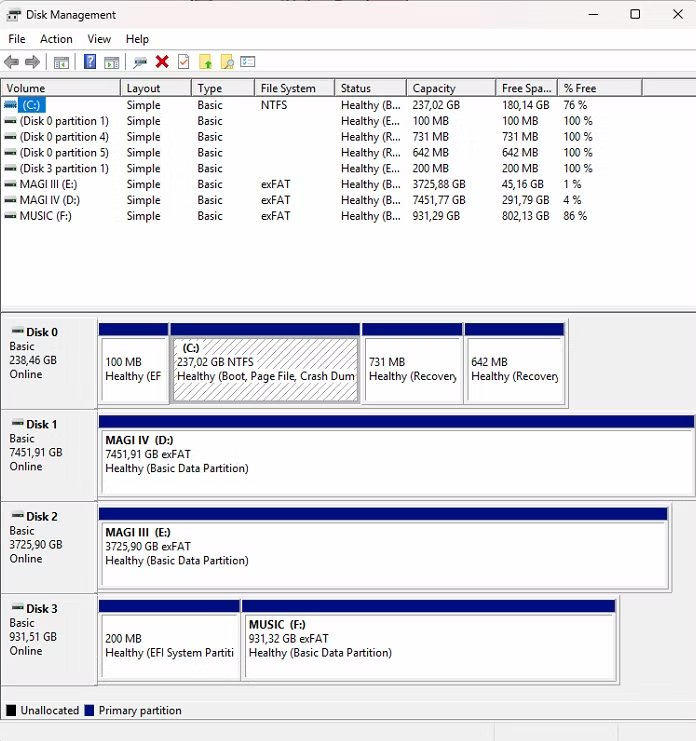
Opening Disk Management in Windows might feel reassuring. Spying “Healthy” next to your C: drive offers a false sense of security. This status refers only to the logical integrity of the volume’s file system (like NTFS or APFS). It confirms the OS can find the data structures correctly. It tells you nothing about the underlying physical state of the NAND flash memory cells, controller health, or impending drive failure. It’s akin to checking the table of contents in a book – intact, even if the pages themselves are crumbling. To truly assess your SSD’s vital signs, you need to peer under the hood at its internal diagnostics via SMART data and other telemetry.
Navigating Windows PowerShell: Your Built-In SSD Diagnostic Toolkit
Thankfully, advanced SSD health monitoring tools are baked into Windows, accessible via PowerShell. Forget the complexity; mastering these commands provides unparalleled insight. Grab your administrative privileges and dive in:
- The Basic Health Status Check: Launch PowerShell Admin and paste:
Get-WmiObject -namespace root\wmi -class MSStorageDriver_FailurePredictStatus | Select-Object InstanceName, PredictFailure, Reason
This outputs a crucial first verdict:PredictFailure:Falseis good!Truemeans imminent failure warning.Reason: Explains why failure is predicted (if applicable).- `


