
Beyond Security: How VLANs Became My Home Network’s Organizational Backbone
Ever stared at a network device list so chaotic it resembled a digital junkyard? You’re not alone. As smart homes explode and personal labs flourish, the average household network now juggles dozens of devices – smartphones constantly rotating MACs, IoT gadgets chirping unpredictably, laptops in various states of testing, and servers humming diligently. This complexity quickly spirals beyond management via simple MAC lists. My own journey through network upgrades, fraught with past missteps, solidified one unshakeable truth: For sanity and structure, participates of home network VLANs are indispensable. Forget solely relegating them to security ghettos for IoT devices; their true power lies as the ultimate organizational dashboard, fundamentally simplifying how we interact with our increasingly complicated digital ecosystems.
From Scatterbrain to Network Maestro: VLANs as Digital Sorting Hat
My life demands compartmentalization – digital dashboards for everything. When my home network housed a mere dozen devices, a single flat network sufficed. But scale up to fifty-plus devices clinging to your router? Chaos reigned. Was that mysterious IP a benign smart bulb, a lab VM needing internet access, or a guest phone in randomized MAC mode? The cognitive load became crippling, leading to decision paralysis whenever changes were needed.
- Labeled Buckets: VLANs shattered this overwhelm. They act like meticulously labeled buckets: Smart Home VLAN, Guest WiFi VLAN, Home Lab VLAN, Main Workstations VLAN, Management VLAN. Assigning devices becomes intentional. That Nest thermostat lives in Smart Home; the Kubernetes cluster resides in Home Lab; friends connect via Guest. No more guessing games.
- Micro-Segmentation Ambitions: The structure breeds ambition. My next upgrade phase includes experimenting with micro-segmentation – potentially assigning individual critical devices their own VLANs. This explores applying Zero Trust principles (“never trust, always verify”) even internally, minimizing lateral movement if a device is compromised.
- Lessons Learned: Implementing VLANs taught me organization isn’t just helpful; it’s foundational. Knowing precisely “where” things live prevents countless future headaches, especially when adding new gear or restructuring.
Building the Organizational Stack: More Than Just a Switch
Achieving this VLAN nirvana requires the right hardware synergy. It’s a layered approach:
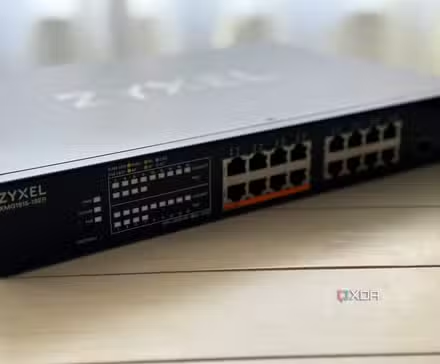
- Managed Switch (The hathor): This is the essential starting point. Unmanaged switches are blind conduits; managed switches understand VLAN tags. They separate traffic at Layer 2, ensuring frames stay within their assigned VLAN unless explicitly routed. This was the first step beyond chaos,有声学.
- VLAN-Aware Access Points (The Wireless Extensions): A managed switch alone isolates wired devices. Wireless devices need their own几乎没有 boundaries. This requires access points (APs) supporting Virtual SSIDs (Multiple SSIDs). Each SSID can be mapped to a specific VLAN. Your “SmartThings” WiFi connects directly to the Smart Home VLAN, while the “HomeLab-Access” SSID lands users/devices in the appropriate lab segment. This extends VLAN organization seamlessly across wired and wireless and crucially…
- Centralized Firewall Enforcement: The router/firewall becomes the nerve center. By defining VLAN interfaces, you apply firewall rules per VLAN. Rules blocking Smart Home devices from accessing the Lab VLAN, or restricting Guest users to internet-only access, are enforced centrally at the gateway, not scattered across devices.
Think of your kitchen: You wouldn’t shove knives, Tupperware, baking sheets, spices, and mixing bowls into a single cupboard expecting efficient cooking. VLANs prevent the equivalent network catastrophe – trying to “cook” (manage, troubleshoot, secure) amidst digital clutter. Devices don’t need universal communication rights. Printers shouldn’t talk directly to thermostats; laptops testing experimental firmware shouldn’t share a neighborhood with your primary workstation. VLANs enforce these logical separations.
The Unexpected Upside donation: Taming Troubleshooting Torment
Network troubleshooting often feels like detective work in zero-visibility fog. The more devices packed onto a single broadcast domain dtv_broadcast_domain (where everyone hears everyone else’s announcements), the denser and more overwhelming the fog becomes. VLANs act like powerful ventilation systems, clearing specific sections at a time.
- Problem Domain Isolation: When connectivity fails for devices on the “Workstations” VLAN, the troubleshooting scope instantly narrows. Issues are statistically far more likely to be:
- A misconfiguration or failure within that Workstations VLAN segment.
- A firewall rule specifically applied to that VLAN’s interface blocking the desired traffic.
- A physical port or uplink trunk misconfiguration carrying that VLAN.
- Broadcast Storm Containment: Ever had an IoT device go rogue and flood the network with excessive broadcasts? On a huge flat network, this cripples everything. Isolate that device on its own VLAN (like IoT), and the storm is largely contained within that small segment. You’ll notice issues only denies or services relying on that VLAN, protecting the bulk of your network. Troubleshooting then focuses solely on identifying andatham killing the noisy device within that bucket.
- Rule Complexity Reduction: Applying broad policies is simpler. Need to block all IoT devices from accessing your NAS? Applying a rule at the IoT VLAN interface level is vastly easier than blacklisting dozens (or hundreds) of individual IoT device IPs scattered across a flat subnet. You can then create nuanced exceptions (e.g., “Allow the IoT VLAN printer to access the Printer VLAN”) incrementally only for the specific interactions needed, adhering to least privilege principles reference Least Privilege Principle.
Reflections on Missed Opportunities
My biggest network regret? Not embracing VLANs sooner. Years were wasted chasing gremlins across sprawling, unstructured subnets. Troubleshooting meant manual IP scans, wild guesses about device identities, and resetting everything hoping the problem vanished. A mid-range managed switch implementing VLANs would have sliced that time exponentially. Networking protocols might feel daunting initially – Spanning Tree, trunk ports, tagged vs untagged frames seemed like arcane rituals. Yet, the core VLAN concept – logical segmentation – is profoundly straightforward and delivers immediate, tangible clarity. Networking became less intimidating once I grasped VLANs as organizational tools first, with security and policy enforcement as natural extensions of that structure. They are now my bedrock feature, configured immediately in any new instance.
Why Structure Wins in the Digital Age
The relentless growth of connected devices in our homes shows no sign of slowing. From 22 connected devices per US household in 2022 to projections exceeding 50 by 2025 (Sources: Statista, McKinsey), relying on flat networks isn’t just inefficient; it’s unsustainable. VLANs provide the essential structure, not as an optional advanced feature, but as a fundamental requirement for maintaining order, sanity, and control amidst escalating digital complexity. They turn device sprawl into manageable segments, troubleshooting nightmares into localized puzzles, and firewall policy into a scalable framework. Security benefits flow naturally from this organization, not as their primary driver, but as a valuable consequence of imposing logical boundaries. Whether you run a sprawling home lab or just want peace of mind amid smart gadgets, deploying home network VLANs might be the most impactful “upgrade” you ever prioritize. What organizational chaos could VLANs tame in your setup? Share your networking challenges below!


