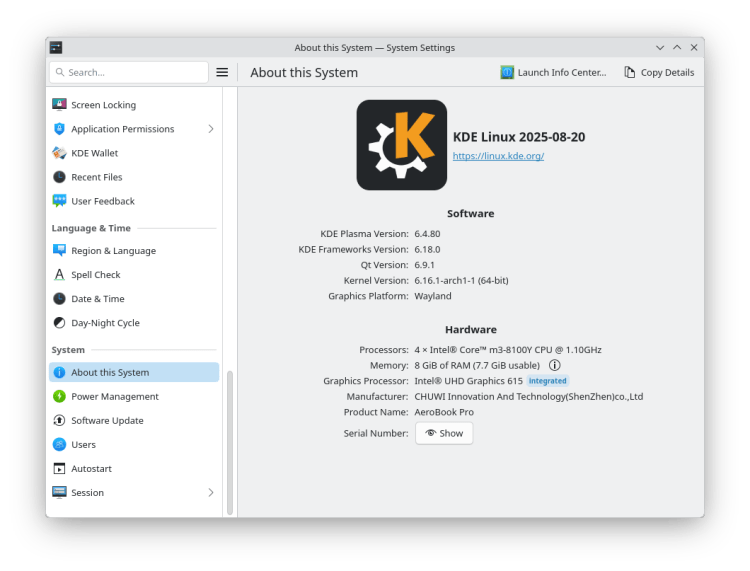

The Unchanging Core: KDE Linux Enters the Immutable Arena
While Linux users debate the merits of GNOME versus KDE Plasma or Ubuntu against Arch, a deeper shift is underway: the rise of immutable distributions. Could this be the answer to frustrating system breakages and security headaches that plague traditional systems? The KDE Project, renowned for the visually rich Plasma desktop, is betting big with its newly unveiled KDE Linux, now available in alpha. This isn’t just another distro; it’s a foundational shift in delivering the KDE experience.
KDE Linux is positioned as a “reference implementation” – the purest possible showcase of what the KDE community envisions. It isn’t intended to dethrone popular KDE-based systems like Kubuntu or Manjaro. Instead, it aims to demonstrate Plasma, KDE apps, and developer tools precisely as intended by their creators, free from downstream modifications or branding tweaks. Crucially, it achieves this through an immutable core architecture, promising enhanced stability and security right out of the box, though sacrificing some traditional flexibility. Let’s dissect what sets this groundbreaking distro apart.
What Does “Immutable” Truly Mean? Rewriting the Linux Rulebook
Traditional Linux distributions like Ubuntu or Fedora operate with a mutable file system. This means core system files (in directories like /usr and /bin) are typically readable and writable. System-wide updates using package managers (apt, dnf, pacman) directly modify these files when adding, removing, or upgrading software packages. While powerful, this approach carries risks: incompatible packages, failed partial upgrades, or errant user commands can corrupt the core system, leading to boot failures or instabilities.
KDE Linux flips this model on its head.
- The Unchanging Foundation: The core operating system – kernel, base libraries, display server, Plasma desktop framework – resides on a read-only filesystem, primarily derived from Arch Linux. Nothing, not even the root user, can directly modify these files. Think of it as a rock-solid base image.
- Atomic Image-Based Updates: Updates don’t modify files piecemeal. Instead, the entire core OS image is downloaded as a single unit. Only upon a reboot does this new image replace the old one. This “atomic” operation means the update either succeeds completely or not at all – there’s no in-between “partially upgraded” broken state. Projects like Fedora Silverblue and OpenSUSE MicroOS champion this approach [1].
- Built-in Rollback: Should a new core image cause problems (e.g., a buggy kernel or driver), reverting is seamless. The system automatically keeps previous known-good images, allowing users to boot back into the last stable version in seconds – a safety net absent in most traditional distros.
For the typical user booting into Plasma, launching Firefox or loving Elisa, the day-to-day experience feels utterly familiar. The immutability only reveals itself if you try actions reliant on directly changing the core system.
Software Installation in an Immutable World: Beyond the Traditional Package Manager
This raises the obvious question: If /usr/bin is locked down, how do you install software? KDE Linux embraces modern containerized and sandboxed application packaging:
- Flatpak & Snap Reign Supreme: The primary way to install apps is through KDE’s Discover software center. Discover pulls applications directly from Flathub (the massive Flatpak repository), dedicated KDE Flatpak repos, and the Snap Store (Canonical’s Snap backend). This ensures apps run in controlled environments, accessing core libraries via well-defined portals without modifying the OS itself.
- Distrobox & Toolbox: Escape Hatches for Flexibility: Need a
.debpackage for a specific tool? Or an obscure utility only available as an RPM? KDE Linux includes Distrobox and Toolbox. These tools create ephemeral containers (potentially tied to an underlying image like Ubuntu or Fedora) where traditional package managers work inside the container. This sandboxed approach provides immense flexibility without compromising the host’s immutable core. AppImages also function normally. - Limitations: The “Batteries Included” Approach: You cannot install a new kernel, swap out the display server (like Wayland for Xorg), change the desktop environment, or manually install kernel-level drivers. The core image is final. KDE addresses this by pre-loading the base image with “as many hardware drivers and support packages as possible.”
The KDE team openly acknowledges trade-offs: “KDE Linux may be less optimized and optimizable for specific uses compared to other operating systems.” It prioritizes robustness, security, and pure KDE experience over deep customization of the foundational layers.
Building for the Creators: KDE Linux as a Developer Powerhouse
Development workflows stand to gain specific advantages on this immutable platform:
- Smaller Footprint for Dev Tools: Unlike traditional distros where installing extensive build dependencies can clutter the core system, KDE developers can utilize containers via Distrobox/Toolbox. This keeps the base lean while providing isolated, reproducible development environments.
- Building KDE Software, THE KDE Way: Developers targeting the KDE ecosystem get access to a platform built with the exact same tooling and libraries used by KDE’s own infrastructure. This minimizes “works on my machine” discrepancies and ensures a consistent reference point for building, testing, and debugging KDE applications and Plasma itself.
- Stable Base, Isolated Instability: Core development tools required for KDE work are often stable and included. Experimental libraries and unstable code can be confined to containers, protecting the host. Rapid rollback is invaluable if an experiment or dependency upgrade breaks the core dev environment.
The KDE Linux alpha ships with a robust suite of tools ready to go, including Kate (advanced text editor), KWrite, Konsole, and access to numerous development-related Flatpaks via Discover/Flathub. It’s clear this distro aims to be a serious tool for creators, not just consumers.
Distinguishing the Vision: KDE Linux vs. KDE Neon
Understandably, confusion arises between KDE Neon and KDE Linux. Both are distros released by KDE. KDE Neon serves a purpose: to deliver the absolutely latest KDE Plasma software, built directly from git repositories, atop a stable Ubuntu LTS base. It’s the bleeding-edge Plasma experience.
However, relying on Ubuntu LTS created friction:
- The Base Struggle: Backporting cutting-edge Plasma and Qt libraries to an older, fixed Ubuntu base requires significant effort and can lead to quirks or dependency conflicts. It wasn’t showcasing Plasma in its purest, most harmonious form.
- The “Reference” Imperative: KDE Linux solves this by discarding the constraints of adapting to another distro’s base. Building their own immutable foundation gives them complete control to optimize the integration of Plasma, KDE Gear apps, the Qt toolkit, and underlying system components exactly as desired. It embodies the “reference implementation” ethos.
KDE Linux is explicitly not intended as a replacement for Kubuntu, Neon, Tumbleweed, or any other Plasma-based distro. It lives alongside them, offering a fundamentally different architecture focused on stability, security, and purity for specific user segments.
| Feature | KDE Linux (Immutable) | Traditional Distro (e.g., Kubuntu) |
|---|---|---|
| Core Filesystem | Read-only (/usr, etc.) |
Writable |
| System Updates | Atomic, image-based, requires reboot | Package-by-package, often live |
| Rollback | Automatic & immediate | Manual, complex (if possible at all) |
| Security Surface | Smaller (critical OS files protected) | Larger (critical OS files modifiable) |
| Installing User Apps | Primarily Flatpak/Snap via Discover | Mainly native packages (apt, pacman) |
| Installing Drivers/Kernel/Core | Fixed in base image (“batteries included”) | Flexible (can be installed/updated/changed) |
| Risk of Core System Breakage | Very Low | Moderate (tool/user error can corrupt system) |
| Deep System Customization | Not possible (core layers) | Highly possible |
| Developers Workflow | Container focus (Distrobox/Toolbox) | Direct system modification & development |
Current Status and Getting Your Hands Dirty (Proceed with Caution!)
The current release is firmly in alpha territory. KDE stresses it is:
- Not for General Users: Unstable, potentially buggy, lacking polish.
- Target Audience: Developers, testers, and enthusiastic early adopters fully aware they’re on the bleeding, sometimes jagged, edge of development.
- Requirements: A modern x86_64 system with UEFI (required) and an AMD or Intel GPU. Compatibility with newer NVIDIA GPUs (GTX 1630 and up) is possible via proprietary drivers, but KDE cannot pre-install them due to licensing complexity. Older NVIDIA cards or systems without UEFI won’t work. An 8GB+ USB drive is needed for testing via live boot/installation.
If you fall into the target audience, the ISO can be downloaded from the official KDE Linux website. Temper your expectations – this is the first public step in a significant journey.
The Immutable Wave: Why Projects Like KDE Linux Matter
KDE Linux isn’t operating in a vacuum. The immutable OS concept is gaining significant traction as Linux matures towards wider consumer and enterprise adoption – scenarios demanding rock-solid reliability and security. Projects like Fedora Silverblue (atomic Kinoite variant), OpenSUSE MicroOS, Endless OS, and even enterprise offerings like Google ChromeOS or Red Hat CoreOS leverage similar principles. Key benefits include:
- Enhanced Stability: System crashes from broken updates become rare.
- Robust Security: Ransomware or malware modifying critical system binaries becomes exponentially harder.
- Predictable State: Consistent performance simplifies administration and support, especially crucial in managed or IoT environments.
- Reliable Rollbacks: Enables fearless experimentation and quick recovery.
For KDE specifically, this audacious project represents more than just technical novelty. It signifies a commitment to presenting their desktop environment suite in the most optimized, reliable, and “pure” form possible – a vision directly from its creators. While mutable distros remain essential for ultimate flexibility, immutable distros like KDE Linux carve a niche prioritizing bulletproof stability, security, and a curated, predictable experience. They represent a compelling vision of Linux’s future.
Whether KDE Linux becomes your daily driver or remains a fascinating glimpse of an immutable future depends on your needs. Are stability, security, and the pure KDE vision paramount over absolute control? The alpha release invites the technically inclined to explore these questions firsthand. As the immutable landscape evolves, one thing is certain: KDE Linux promises to be a significant player, shaping how we think about desktop Linux reliability.
Experience KDE as its makers intended it – bugs, burgeoning potential, and all. Will you be testing the alpha waters, or waiting for smoother sailing? What does the immutable trend signal for the future of Linux distributions? Share your perspective below!
[1] Fedora Project – Silverblue
[2] OpenSUSE – MicroOS
[3] Immutable Operating Systems – Wikipedia (Conceptual background)
[4] KDE Linux Announcement & Download


