
Could Your Android Phone Actually Thrive Without Google?
Imagine if every default application on your smartphone constantly logged your movements, habits, and interactions. This isn’t a dystopian fantasy; it’s the reality for billions relying on Google services via the Play Store. Often perceived as inseparable from Android itself, Google’s pervasive ecosystem runs deep background processes even when its apps are deleted. But what if cutting Google out entirely was viable? Prompted by growing privacy concerns, I embarked on a week-long experiment running Android without Google apps or services. Surprisingly, the experience wasn’t just functional – it revealed how surprisingly close we are to a truly de-Googled mobile experience.
Unlocking a Clean Slate: Enter DSU and GSI
Taking the plunge isn’t as daunting as it seems, thanks to innovations baked into modern Android.
- Dynamic System Updates (DSU): Introduced officially in Android 10 and refined in subsequent versions, DSU allows users to safely boot secondary Android images without interfering with their device’s primary OS installation . This acts like a temporary partition, enabling experimentation without flashing custom ROMs or bricking risks.
- Generic System Image (GSI): These are pure, stock versions of Android compiled directly from the official Android Open Source Project (AOSP) source code. GSIs provide the most unadulterated Android experience possible, free from manufacturers’ custom skins (like Samsung’s One UI or Xiaomi’s MIUI) and – critically – any pre-installed Google components . They form the foundation of what “Android without Google” truly means.
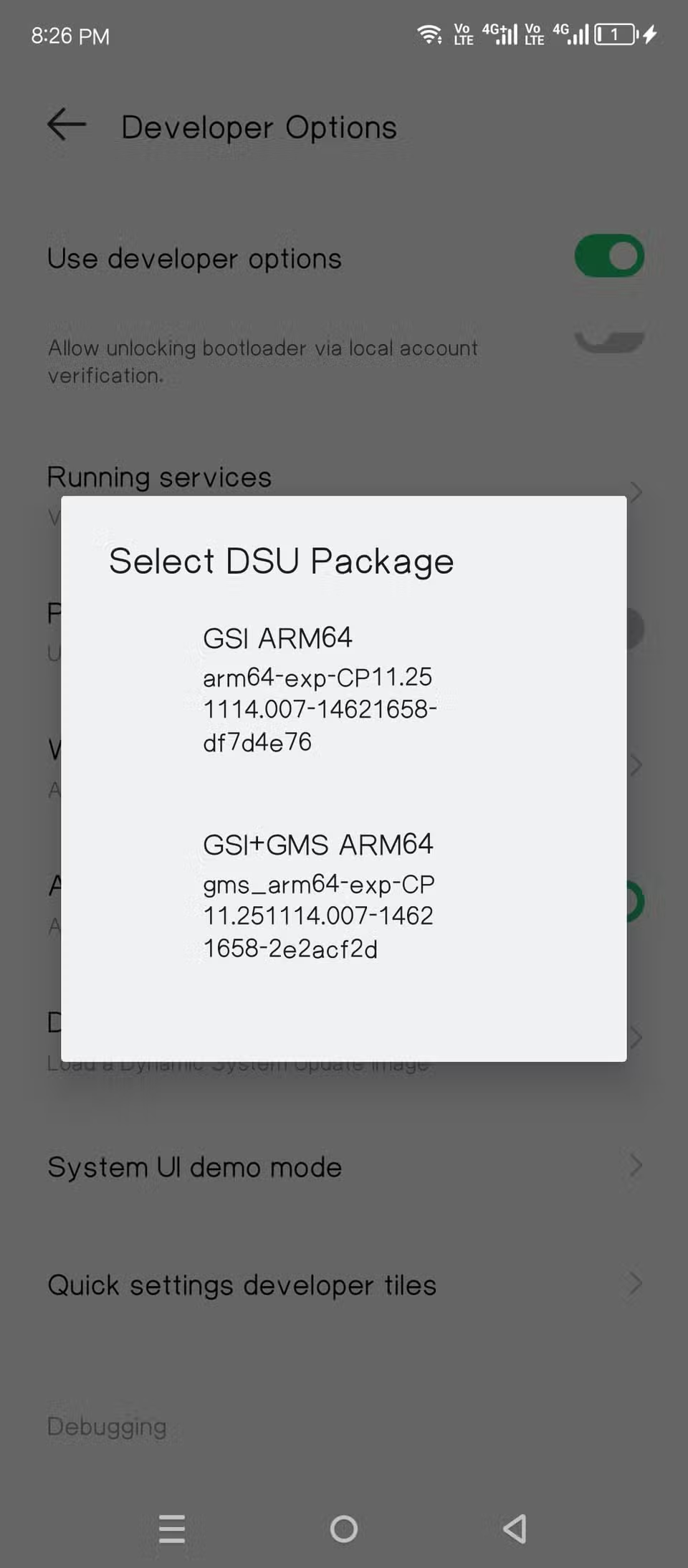
Getting started involves enabling Developer Options (tapping the Build Number seven times), scrolling to “DSU Loader,” and selecting a suitable GSI – often including options both with and without Google apps. Choosing the latter initiated my Google-free Android journey.
The Stark Reality (and Appeal) of Pure Android
Booting into the Google-free GSI was a revelation in simplicity, privacy, and surprisingly, performance.
- Bare Essentials Only: Forget feature overload. This version defaults to basics:
- Phone Dialer
- Contacts
- SMS Messaging
- Camera
- Gallery
- Clock/Alarm
- Basic File Manager
- Calendar (non-synced)
- Missing: A dedicated browser! Initial downloads require using WebView.
- Performance Gains: Without resource-intensive background Play Services and OEM skin layers, the OS felt noticeably snappier. Apps launched faster, animations were smoother, and overall responsiveness increased – a direct consequence of reduced background processes.
- Privacy by Default: Sourced directly from the open AOSP, this environment means the core OS isn’t constantly phoning home to Google or manufacturers’ servers . For privacy-conscious users, eliminating these perpetual data streams offers significant peace of mind.
Finding Alternatives: The App Store Dilemma Solved
The lack of built-in app installation methods requires resourcefulness.
- F-Droid First: Using the bundled WebView functionality, downloading the F-Droid APK became step one. F-Droid is the cornerstone repository for free, open-source software (FOSS) Android applications. Its strict licensing ensures transparency and trustworthiness.
- Expanding Horizons with Aurora Store: F-Droid alone won’t suffice for mainstream apps. Installing Aurora Store (via F-Droid) provided a crucial bridge. Aurora acts as a private frontend to the Google Play Store itself, allowing users to download any free app available there without needing a Google account or Play Services.
- Two-Tier App Sourcing: With both F-Droid and Aurora Store installed, sourcing apps transformed from a potential roadblock into a manageable process. F-Droid covers open-source essentials, while Aurora facilitates access to non-FOSS mainstream apps.
| Essential Tools for De-Googled Android |
|---|
| Function |
| :——————– |
| App Store (FOSS) |
| App Store (Closed) |
| Initial Downloads |
| Security Updates |
| († Requires manual flashing via fastboot) |
Surprising App Compatibility: Life Beyond Play Services
Widespread reliance on Google Play Services often fuels assumptions that non-Google apps won’t function. Reality proved pleasantly surprising.
- Google Apps: As expected, all Google applications (Gmail, Chrome, Drive, Photos, etc.) failed. Some crashed instantly; others demanded the installation of Play Services – a non-starter.
- Mainstream Champions:
- Instagram: Functioned flawlessly. Login worked seamlessly, notifications arrived consistently, core features like Reels, Stories, and messaging performed without issue.
- Netflix: Streamed content perfectly, even advanced features like the mini-player operated correctly. This asterisk-free functionality felt dramatic, debunking myths that DRM-heavy streaming required Google.
- Reddit: Scrolled, posted, commented – entirely unaffected.
- Discord: Messaging, voice calls, and server navigation performed reliably.
- Underlying Resilience: These apps demonstrated a significant trend: reliance on Play Services is optional for many developers, especially for core functionality. They rely on their own APIs or more universal Android notification standards, proving substantial independence from Google’s infrastructure.
The Proton Suite: A Worthy Contender
Replacing Google’s core productivity apps became possible with Proton AG’s rapidly maturing privacy-focused ecosystem.
- Proton Mail: Effectively replaced Gmail. Crucial feature: It seamlessly fetches emails from other accounts, including Gmail itself, acting as a privacy-forward mailbox aggregator.
- Proton Calendar: Importing existing Google Calendars was smooth. Offered robust scheduling without Google sync.
- Proton Drive: Provided 5GB of secure cloud storage. While lacking deep Android integration like Drive’s automatic photo backup, it sufficed for essential file storage/synchronization.
- Proton Pass: The standout surprise. This password manager offered seamless autofill capabilities rivaling Google Password Manager. Features include secure note storage and authenticator integration.
- Proton Authenticator: Successfully replaced Google Authenticator, supporting QR code imports for existing accounts. Offered encrypted backups of TOTP secrets, enhancing security.
- The Verdict: Proton Apps collectively provided a cohesive, privacy-respecting ecosystem. Without these alternatives presenting feature parity near enough to Google’s convenience, daily usage would have been severely hampered. They plugged critical gaps.
Video Streaming Outside Google’s Walls
For YouTube, the quintessential Google service, open-source alternatives provided compelling replacements.
- NewPipe: Served as the primary YouTube client. Accessed YouTube’s content library freely without ads, tracking, or requiring an account. Key advantages included background playback, pop-up screens, downloads, and custom recommendations – crucially, bypassing Shorts entirely. Its reliance on scraping, however, introduces potential fragility if YouTube changes its API access policies.
The Unfilled Gap: Navigating Without Maps
Despite successes, one glaring deficiency persisted: effective mapping and navigation.
- Open-Source Efforts: Organic Maps (OSM-based) and similar F-Droid apps utilize volunteer-cur


