
Unlock Deeper Learning with NotebookLM’s Underrated Quiz Feature
Are you struggling to truly grasp the information you’re reading, even with AI assistance? While NotebookLM excels at summarizing and connecting ideas, its most powerful, yet often overlooked, feature is the Quiz. This function transforms static information into an interactive learning experience, boosting retention and comprehension. Let’s explore why the Quiz feature is so effective and how you can leverage it to enhance your learning and work.
What is the NotebookLM Quiz Feature and Why Does it Matter?
The Quiz feature in NotebookLM is a dedicated tool designed to generate questions directly from the source materials you upload. It transforms your notes and documents into an interactive learning experience. Instead of passively reading, you are actively tested on your understanding.
How the Quiz Feature Works
Here’s a breakdown of how the NotebookLM Quiz feature operates:
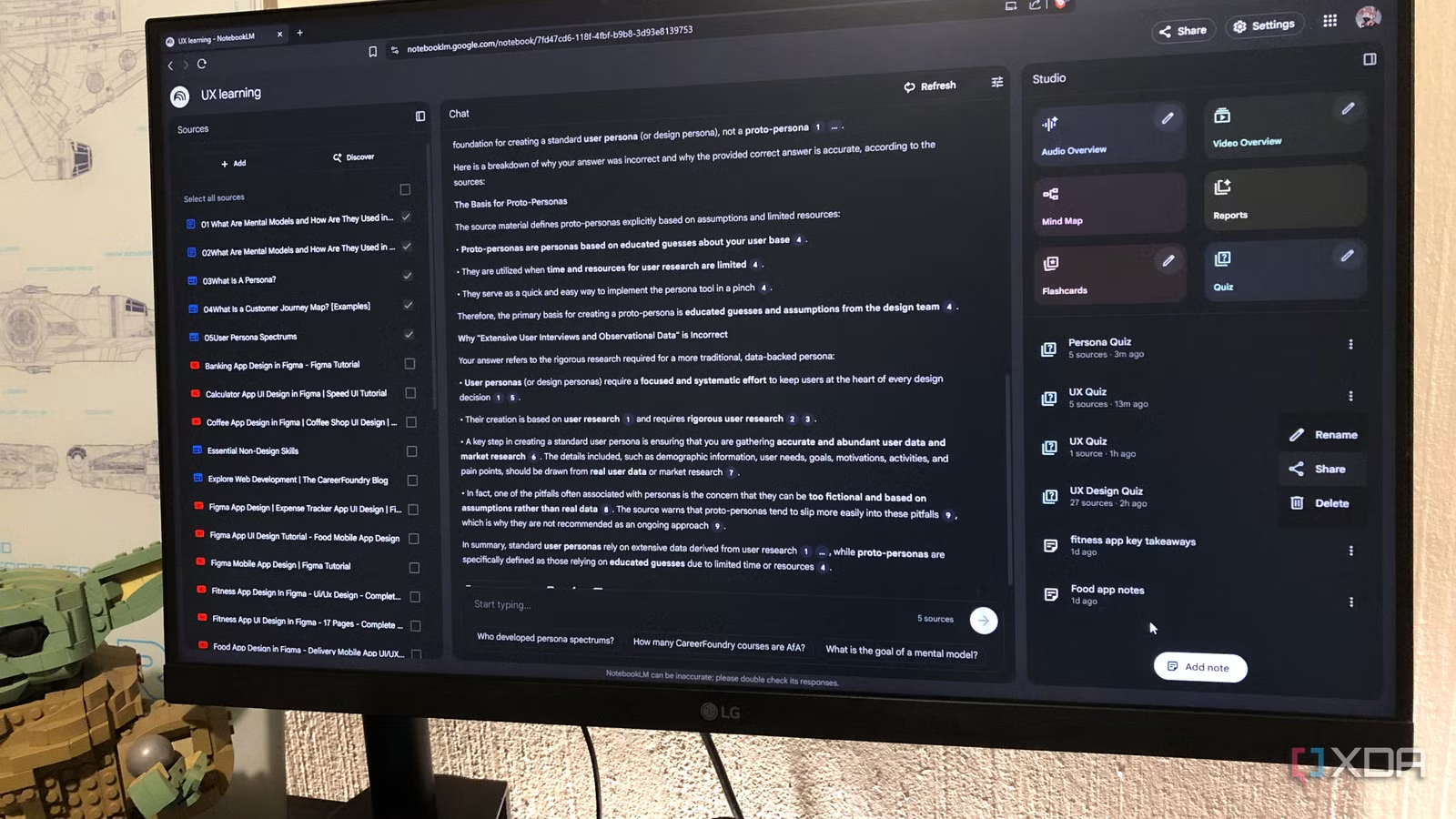
- Automatic Question Generation: Once your sources are uploaded to a notebook, simply click the “Quiz” button in the Studio panel. NotebookLM’s AI will automatically generate a set of questions based on the content.
- Multiple Choice Format: The questions are presented in a multiple-choice format, making them easy to answer quickly and efficiently.
- Customization Options: You can customize the quiz by clicking the edit icon. This allows you to adjust the number of questions, difficulty level, and specify the topic of the quiz.
- Source Selection: Ensure you have selected the relevant sources before generating the quiz. NotebookLM will only pull questions from the selected material.
- Immediate Feedback: After selecting an answer, NotebookLM provides instant feedback, indicating whether your answer was correct or incorrect, along with a brief explanation.
- In-Depth Explanations: The “Explain” button provides a more detailed explanation of the correct answer in the main chat window, often citing the original source material.
- Hints: If you’re struggling with a question, the “Hint” button offers clues to guide you towards the correct answer.
- Performance Review: At the end of the quiz, NotebookLM displays your score and allows you to review your answers or retake the quiz.
Why the Quiz Feature is Often Underrated
While NotebookLM’s summarizing and brainstorming capabilities are highly praised, the Quiz feature often gets less attention. This is unfortunate because it offers unique benefits:
- Active Recall: Unlike passive reading, the quiz actively forces you to retrieve information from your memory, strengthening neural connections and improving retention.
- Engaged Learning: The interactive nature of the quiz keeps you engaged and focused on the material, preventing mind-wandering and improving comprehension.
- Targeted Learning: By customizing the quiz to focus on specific topics, you can pinpoint areas where you need further study, optimizing your learning process.
- Deeper Understanding: The detailed explanations provided by NotebookLM after each question help you understand the “why” behind the answer, fostering a deeper understanding of the subject matter.
How to Effectively Use NotebookLM’s Quizzes for Optimal Learning
The power of the NotebookLM Quiz feature lies in its application. Here are some strategies for maximizing its effectiveness:
- Start with Solid Sources: Load your NotebookLM notebook with high-quality, relevant sources such as research articles, case studies, course materials, and PDF documents. The better your sources, the better the generated questions will be.
- Strategic Timing: Integrate quizzes at various checkpoints in your workflow. Run a quick quiz immediately after adding a new source to reinforce the information, or use it to review material before a presentation or exam.
- Treat it Like a Real Test: Approach each quiz with a focused mindset. Set a timer, minimize distractions, and give yourself ample time to think through each question.
- Analyze Explanations: Whether you answer correctly or incorrectly, always read the explanations provided by NotebookLM. Pay close attention to the source citations, as they can direct you to areas where you need more clarity.
- Use Notes for Reinforcement: Utilize NotebookLM’s note-taking capabilities to highlight key points and create summaries for future quizzes. This helps solidify your understanding and makes future reviews more efficient.
Customizing Your Quizzes for Specific Learning Goals
Customization is key to maximizing the benefits of the Quiz feature. Here are some examples of prompts you can use to tailor your quizzes:
- “Create a quiz focusing only on [specific concept or theory] from the selected sources.”
- “Give me [number] questions testing my understanding of [specific author or research] mentioned in the selected sources.”
- “Generate a quiz on the [specific chapter or section] of the uploaded textbook.”
By using these prompts, you can target your learning to specific areas of interest or difficulty, ensuring you are spending your time efficiently.
Using the Quiz Feature for Different Learning Styles
The NotebookLM Quiz feature can be adapted to various learning styles:
- Visual Learners: The quiz format provides a visual representation of the material, helping them to process information more effectively.
- Auditory Learners: Use the “Explain” button to listen to detailed explanations, reinforcing their understanding through auditory input.
- Kinesthetic Learners: The interactive nature of the quiz allows for active engagement, making the learning process more hands-on and memorable.
No matter your learning style, the NotebookLM Quiz feature can be customized to suit your individual needs.
Beyond Academics: Creative Uses for the NotebookLM Quiz Feature
The NotebookLM Quiz feature isn’t limited to academic settings. Here are some creative ways to use it in other contexts:
- Gamified Learning: Integrate quizzes into board games or trivia nights to make learning fun and engaging. Award points for correct answers or create challenges based on quiz results.
- Self-Reflection: Feed NotebookLM your personal journal entries and use the quiz to surface unconscious patterns and gain insights into your thoughts and behaviors.
- Team Building: Use quizzes to test your team’s knowledge of company policies, industry trends, or project updates. This can foster collaboration and improve overall team performance.
- Brainstorming Aid: Use the quiz to stimulate new ideas and perspectives. By answering questions related to a specific topic, you may uncover new connections and insights that you hadn’t considered before.
Conclusion: Transforming NotebookLM into an Interactive Learning Companion
The NotebookLM Quiz feature transforms the platform from a mere information storage tool into an interactive learning companion. It pushes you to actively engage with your content, strengthens your recall, and fosters a deeper understanding of the subject matter. By customizing your quizzes and integrating them into your workflow, you can unlock your learning potential and achieve your academic and professional goals.
So, stop passively consuming information and start actively testing your knowledge with NotebookLM’s underrated Quiz feature. What innovative ways will you use the quiz feature to enhance your learning? Share your thoughts and ideas in the comments below!
Sources & Further Reading:
Original article at www.xda-developers.com


