
Have You Heard? Google Just Made Account Recovery Easier with Phone Number Sign-In
Losing access to your Google account can feel like a digital nightmare. According to recent data, a significant percentage of users experience account lockouts each year, often due to forgotten passwords or lost 2FA methods. But what if there was a simpler way to get back in? Google is rolling out a new feature that allows you to sign in with phone number, providing an alternative recovery option. This article dives into the details of this new feature, exploring how it works, its security implications, and its limitations.
Understanding Google’s New Sign-In with Phone Number Feature
Previously, recovering your Google account often involved answering security questions, using a recovery email, or relying on SMS-based two-factor authentication. While these methods still exist, Google’s new “sign in with phone number” option provides an additional layer of accessibility, particularly in situations where other recovery methods are unavailable.
How Does Signing In with Your Phone Number Actually Work?
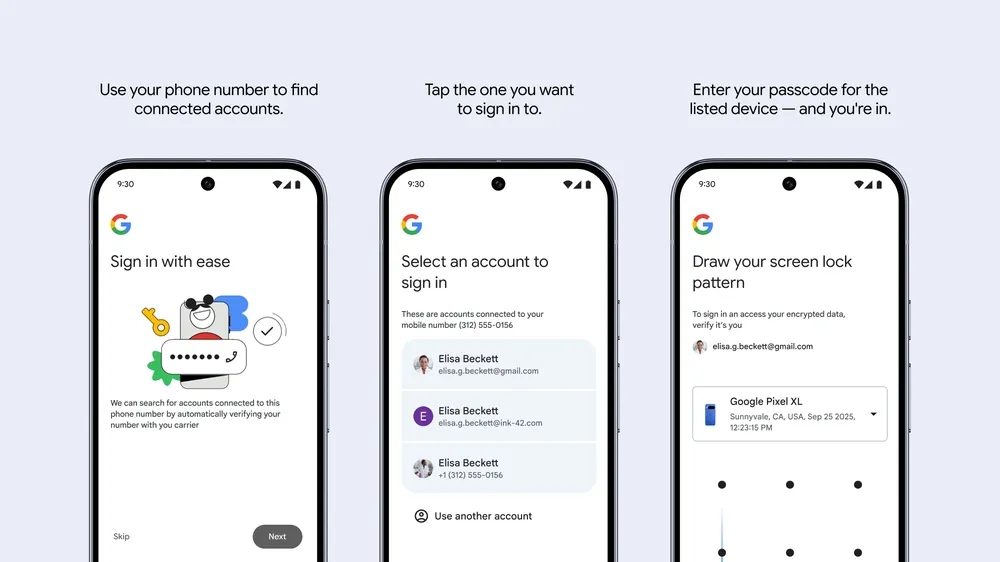
The process is relatively straightforward:
- Enter Your Phone Number: Google prompts you to enter the phone number associated with your Google account.
- Number Verification: Google verifies your phone number with your mobile carrier, typically via an automated text message. This step ensures that the number is active and belongs to you.
- Account Selection: Google displays all Google accounts linked to the provided phone number. You select the account you wish to access.
- Device Passcode Verification: You’re prompted to enter the passcode (or use the screen pattern) of a previously trusted device. This crucial step verifies the sign-in attempt and authorizes access to your encrypted data.
This process differs significantly from previous methods. Prior to this feature, your phone number was primarily used for SMS-based two-factor authentication. While convenient, SMS-based 2FA is notoriously vulnerable to SIM swapping attacks and other forms of interception due to the lack of encryption in the SMS protocol [reference: NIST guidelines on authentication]. This new approach leverages your phone number as an identifier but adds a layer of device-based authentication, enhancing security.
Is the New Google Sign-in with Phone Number Secure?
Security is paramount when dealing with account recovery. While signing in with your phone number might appear less secure than traditional password-based authentication or authenticator apps, it offers several advantages over SMS-based verification.
- No Reliance on SMS Alone: The critical difference is the reliance on your device passcode. This means that even if someone intercepts a verification code (which may or may not be part of the new phone sign-in protocol), they still need access to your trusted device and its passcode to gain access.
- Device-Bound Verification: The device passcode verification ensures that the sign-in attempt is originating from a device previously associated with the account.
However, it’s important to acknowledge potential weaknesses:
- Compromised Device: If your trusted device is compromised (e.g., infected with malware), an attacker could potentially bypass the passcode verification.
- Predictable Passcodes: Weak or easily guessed passcodes can also compromise the security of this method.
- Social Engineering: Users can still be tricked by social engineering techniques to provide the information necessary for account access.
Overall, signing in with a phone number represents a security improvement over relying solely on SMS for account recovery. However, it is not a silver bullet and should be used in conjunction with other security measures like strong passwords, authenticator apps, and regular security checkups.
Advantages of Using Phone Number Sign-In for Google Accounts
The new feature provides several potential benefits:
- Accessibility: It offers a viable recovery option when you’ve lost access to your primary phone, passkeys, 2FA, or other traditional methods.
- Convenience: Setting up a new phone may become easier, as you can regain access to your Google account without needing to remember complex passwords or navigate convoluted recovery processes.
- Recovery from Lost/Stolen Phones: As Google mentioned, it’s particularly useful when your phone is lost, stolen, or malfunctions, making it difficult to access your account through other means.
Limitations of Google’s Sign-In with Phone Number
Despite its advantages, the feature has some significant limitations:
- Android Only: Currently, this sign-in method is only available on Android devices. Users on iOS, PC, Linux, or Mac will still need to use traditional login methods.
- Rollout Period: Google is slowly rolling out the feature globally, meaning it might not be immediately available to all users.
- Not a Replacement for Strong Security Practices: It shouldn’t be seen as a replacement for strong passwords, authenticator apps, or regular security checkups. It’s an additional layer of recovery, not a primary security measure.
| Feature | Description | Security Implication |
|---|---|---|
| Phone Number as Identifier | Uses your phone number to locate associated Google accounts. | Convenient, but phone number can be subject to SIM swap attacks. |
| Device Passcode | Requires the passcode/pattern of a trusted device. | Significantly improves security compared to SMS-only. Requires device access. |
| Android Only | Currently limited to Android devices. | Limits applicability for users on other platforms. |
Alternative Security Measures for Google Accounts
While the “sign in with phone number” offers a convenient recovery option, prioritizing robust security practices remains crucial. Here are some best practices:
- Strong and Unique Passwords: Use strong, unique passwords for each of your online accounts, including Google. A password manager can help you generate and store complex passwords securely [reference: Using password managers to enhance cybersecurity].
- Authenticator Apps: Implement two-factor authentication (2FA) using an authenticator app like Google Authenticator, Authy, or Microsoft Authenticator. These apps generate time-based one-time passwords (TOTPs) that are much harder to intercept than SMS codes.
- Security Keys: Consider using physical security keys (like YubiKeys) for the most robust form of 2FA. These keys provide a hardware-based authentication layer that is resistant to phishing and other attacks.
- Recovery Email: Keep your recovery email address up-to-date and secure. This email can be used to reset your password if you forget it.
- Regular Security Checkups: Regularly review your Google account security settings and activity to identify and address any potential security threats.
Conclusion: A Useful Addition, But Not a Replacement for Strong Security
Google’s new “sign in with phone number” feature offers a potentially helpful way to regain access to your account when other methods fail. By leveraging your phone number and requiring device passcode verification, it provides a more secure alternative to SMS-only authentication. However, it is essential to remember that this feature is not a replacement for strong passwords, authenticator apps, and other fundamental security practices. This feature is only for Android users at the moment. It’s a supplementary tool in your security arsenal, not a primary defense. What are your thoughts on this new Google feature? Do you think it will make account recovery easier and more secure? Comment below!
Sources & Further Reading:
Original article at www.ghacks.net


