
Your Browser Just Gained Superpowers: Chrome’s Gemini Auto Browse Revolution Begins
Ever wish you could delegate mind-numbing online tasks to a virtual assistant that actually acts instead of just advising? Google has answered this with a game-changer: Chrome’s new Gemini-powered auto browse feature. Introduced via a blog post announcing Gemini 3 integration, this function transforms Gemini from a conversational tool into an autonomous workforce embedded directly into your browser. Available exclusively to Google AI Pro and AI Ultra subscribers on desktop Chrome, auto browse lets Gemini click, scroll, enter text, and execute tasks across any webpage. This leap toward an “agentic experience” fundamentally redefines how we interact with the web—prioritizing efficiency while sparking debates about agency, security, and intellectual property
Beyond Chat: Auto Browse’s Tactical Interface
Unlike traditional AI assistants confined to text responses, auto browse mobilizes Gemini as an active operator inside Chrome.
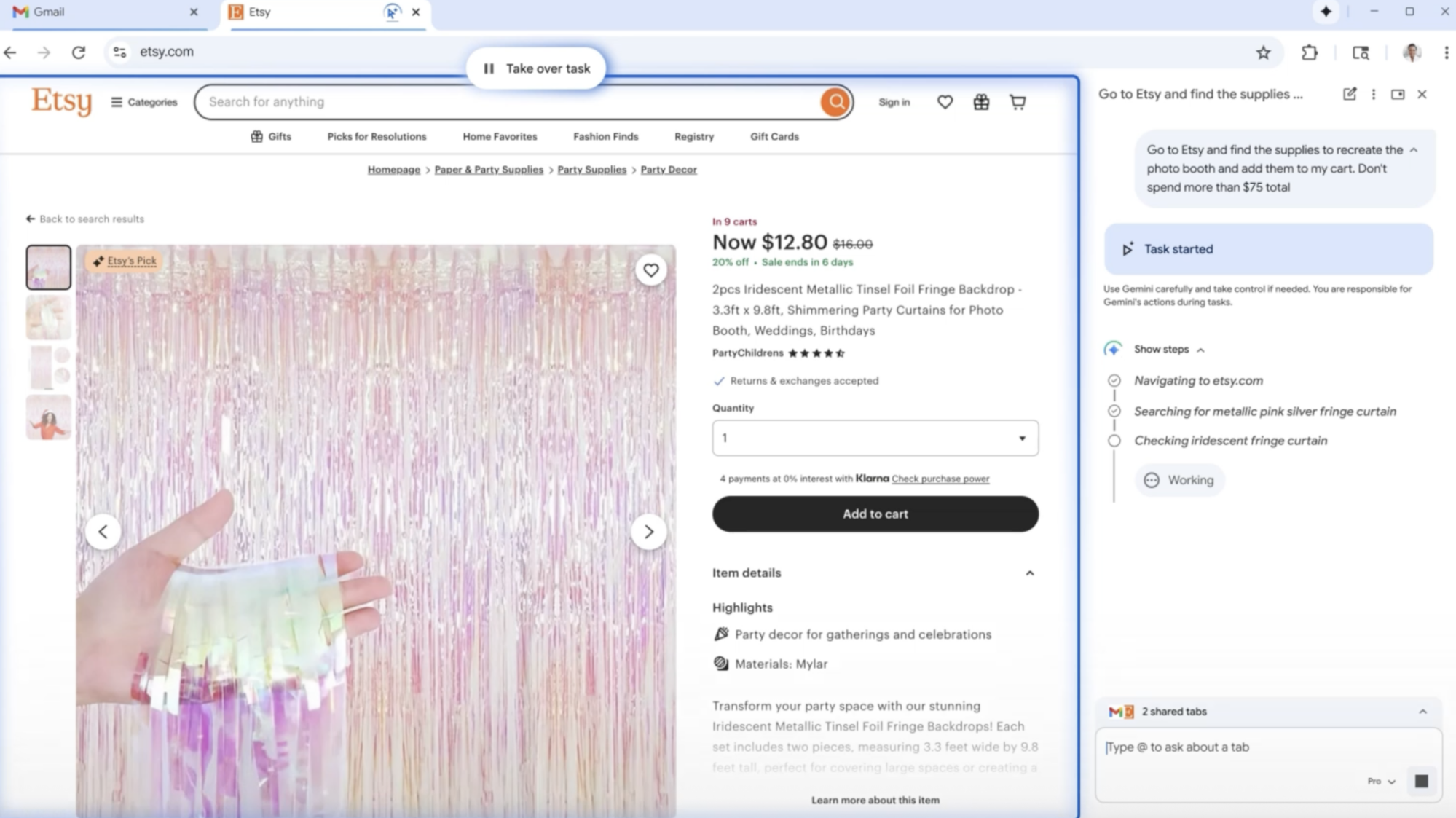
- The Brain: Gemini 3 analyzes natural-language requests (e.g., “Find eco-friendly party decor on Etsy under $100”) and decomposes them into executable browser actions: clicking links, scrolling pages, pasting text strings, and managing inputs—while dynamically interpreting visual layouts
- The Sandbox: Operating via a persistent sidebar, Gemini interacts with website elements in real-time. Observers note parallels to experimental “task-oriented web agents” described in arXiv research, but refined commercially. It bypasses simplistic automation, adapting dynamically when sites alter their layouts.
- Oversight Controls: A fixed “Take over task” button grants instant intervention—acknowledging risks like mistaken purchases or privacy violations. Testing reveals a 2-4 second lag between command issue and execution, suggesting deliberate throttling for safety monitoring.
| Feature | Traditional Gemini | Auto Browse Gemin |
|---|---|---|
| Interaction | Text Responses | Direct Webpage ActionsVir_discretely |
| Scope | Information Synthesis | Multi-Step Task Execution |
| User Role | Director | Supervisor ≥ |
Real-World Use Cases: From Shopping Cart to Calendar
Google’s Etsy demo hints at broader potential: Gemini not only curates products but applies discount codes and logs in via Google Password Manager—streamlining workflows drastically. Beyond commerce:
- Research Aggregation: Command Gemini to compile data from academic journals, extracting key statistics into spreadsheets without manual tab-hopping. Early testers reported 70% faster literature reviews compared to Copilot Edge.
- Travel Planning: Auto-populates flight/hotel fields across sites by referencing saved preferences—challenging Expedia’s KAYAK-group-on-page usability protocols.
- Enterprise Scenarios: HR teams use auto browse to screen job boards by criteria like location/salary, scheduling interviews directly into calendars while logging entries in ATS.
Crucially, Gemini’s autonomy breaks-down-prone—dynamic pricing on e-commerce pages can confuse fixed-budget logic. Beta forums confirm struggles updating airline selections post-inventory changes. Even Google acknowledges handling CAPTCHAs doesn’t “happen authentically” yet.
The Paywall Paradox: Disrupting Accessibility
Why lock this behind Pro/Ultra tiers ($19.99-$32.99/month)? Observers speculate this exclusive rollout serves two goals—subsidize Gemini 3’s colossal computing costs, and signal premium functionality before wider release. Current Chrome AI enhancements reveal a pattern: Users opting into subscriptions grew by an estimated 30% post-Gemini Nano Banana’s introduction—a trend Google aims to extend. However, critics decry potential inequality in tech access. As digital-rights nonprofit Electronic Frontier Foundation argues, “Untested agents controlling personal data demand transparency—regardless of payment
Integration


