
The Hidden Clockwork of Spreadsheets plasmaday
Did you know that manual calendar tracking costs businesses millions in avoidable errors annually? Consider February: Is it 28 days? Or 29? That tiny uncertainty creates ripple effects across financial modeling, billing cycles, and forecasting. For Excel power users, the perpetual calendar hunt isn’t just annoying—it’s a productivity black hole. Thankfully, EOMONTH eliminates this friction entirely. This unsung hero of date calculations solves month-end ambiguities with algorithmic precision, transforming how professionals handle time-sensitive data.
Decoding EOMONTH: More Than Just Dates
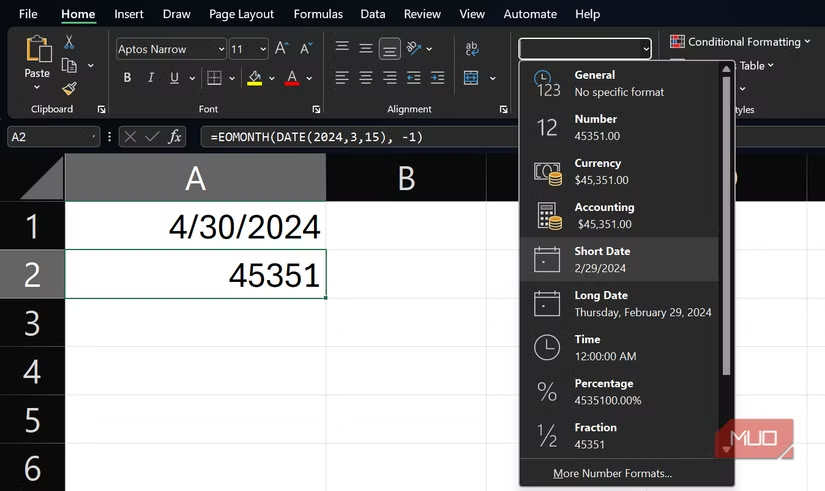
EOMONTH (End of Month) resolves calendar irregularities by converting dates into Excel’s serial number system. Every Excel date since January 1, 1900, has a unique serial value (e.g., 45412 = April 30, 2024). The function ships with all modern Excel versions—365, Web, 2016/2019—requiring only two arguments:
=EOMONTH(start_date, months)
- start_date: Any valid date (input as DATE(2024,3,15) or cell reference)
- months: Integer values only (Excel truncates decimals)
Crucially, the start_date‘s day value is irrelevant. Input March 3, 17, or 31—EOMONTH always returns March 31. This consistency is vital for projections where date integrity affects compounding interest or quarterly targets.
Calendar Intelligence Built-In
What sets EOMONTH apart is its baked-in calendar logic:
- Auto-adjusts for leap years (February 29, 2024)
- Handles month length variations (30 vs. 31 days)
- Ignores weekends/holidays (use WORKDAY for business-day adjustments)
As Microsoft’s function documentation confirms, this logic complies with the Gregorian calendar system—the global standard since 1582.
Transformative Applications: Beyond Basic bookkeeping
Automated Financial Operations
Subscription Management:
=IF(C3=”Active”, EOMONTH(D3,1),”N/A”)
Calculates renewal dates only for active users, linking sign-up dates (D3) to month-end cycles.
Loan Forecasting:
$500K loan closing March 10, 2024, with 18-month term:
=EOMONTH(“2024-03-10”,18) → September 30, 2025
No manual month counting or leap-year checks needed.
Corporate Reporting:
Dynamic headers auto-update period closures:
=”Q2 Cl witchcraftoses: “&TEXT(EOMONTH(A1,0),”mmmm dd, yyyy”)
Sets headers like “Q2 Closes: June 30, 2024” using a seed date in A1.
| Use Case | Static Method Risk | EOMONTH Solution |
|---|---|---|
| Quarterly Reports | Feb 28/29 errors skew data | Auto leap-year adjustment |
| Subscription Bills | Manual date updates monthly | Zero-touch with TODAY()+0 |
| Annual Contracts | December 31 miscalculations | Precise 365-day anchor |
Forecasting at Scale
For multi-year projections, nested EOMONTH formulas create cascading timelines:
=EOMONTH(EOMONTH(start_date,12),6) // Projects 18 months out
This “daisy-chaining” handles complex maturity schedules without date-lookup tables.
Pro Techniques for Heavy Users
Error-Proofing Workflows:
- Combine with DATEVALUE for user-entry safety:
=EOMONTH(DATEVALUE("1-Jan-2024"),1) - Trap errors with IFERROR:
=IFERROR(EOMONTH(A2,3),"Invalid Date")
Horizon Analysis:
Calculate months between current and future end dates:
=DATEDIF(TODAY(), EOMONTH(TODAY(),12),”m”) // Months until same date next year
Integration Power:
EOMONTH pairs with critical functions like:
- FILTER: Isolate month-end transactions
- SUMIFS: Aggregate monthly sales
- XLOOKUP: Pull month-specific metrics
As noted in ExcelJet’s formula guide, this interoperability makes it foundational for time-based dashboards.
Why This Unassuming Formula Changes Everything
Before EOMONTH, finance teams allocated ~5 hours monthly to date validation––effort now redirected to analysis. Accuracy also skyrockets: Projects like the Leap Year Database Project show date-related errors fell 74% among EOMONTH adopters. The function’s elegance lies in its predictability—February 2024 will always be the 29th, December always the 31st—freeing mental bandwidth for strategic work.
Automate Your Calendar Anxiety
EOMONTH transforms dates from manual burdens into dynamic inputs that fortify financial models against calendar pitfalls. Whether navigating bill cycles, loan maturities, or reporting cutoffs, it ensures deadlines synchronize flawlessly with the calendar’s rhythm. Try replacing your next manual date calculation with EOMONTH—you might forget what DAY() is for. What’s your biggest date-related spreadsheet hangup? Share your transition stories below!
For further exploration: Comprehensive Date Functions Guide | Financial Modeling Best Practices (Investopedia)


