
Escaping the Laptop Screen Trap? This 4K Monitor Deal Might Be Your Answer
Ever feel like your laptop screen is shrinking before your eyes? You’re not alone. As remote and hybrid work models persist, millions find themselves straining against cramped displays, battling eye fatigue, and sacrificing productivity. A proper desktop monitor isn’t just a luxury; it’s a sanity saver and a workflow enhancer. The good news? High-quality options are more affordable than ever, especially right now. Case in point: the acclaimed Dell 27-inch S2725QS 4K UHD Monitor is experiencing a massive price cut, dropping to a record low of just $228 on Amazon – a near 25% discount. For anyone seeking an exceptional budget 4K monitor that punches way above its price tag, this deal demands attention. Let’s dive into why this Dell model stands out.
Why the Dell S2725QS Builds a Strong Foundation
At first glance, a sub-$300 4K monitor might raise red flags about corners cut. Dell, however, strategically invested where it counts. The cornerstone is its In-Plane Switching (IPS) panel. IPS technology is widely recognized as superior to older TN (Twisted Nematic) panels for several key reasons applicable to both work and casual use:
- Viewing Angles: IPS maintains consistent color and brightness even when viewed from sharper angles – essential for team huddles around your screen or shifting positions during long sessions. TN panels notoriously suffer from drastic color shifts and contrast loss off-center (documented extensively on Wikipedia: Twisted nematic field effect).
- Color Performance: Unlike the often washed-out colors of budget TN screens, IPS offers richer, more vibrant hues, a critical factor for accuracy.
- Image Clarity: Overall picture quality and sharpness at 4K resolution benefit significantly from the inherent properties of IPS panels.
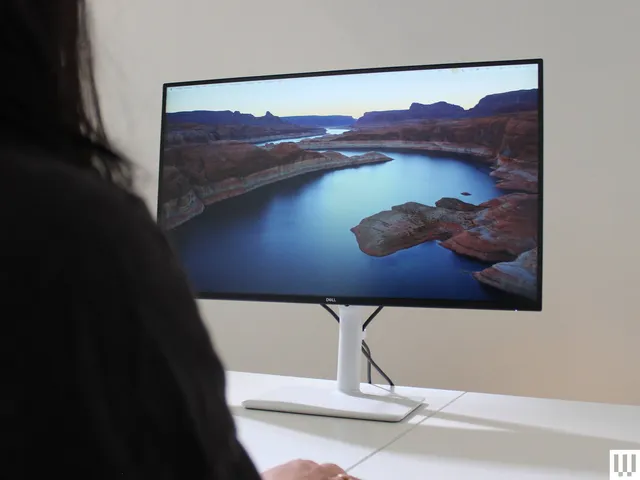
Complementing this solid panel choice are the physical design elements. Thin bezels minimize visual clutter, creating a more immersive experience when using the Dell 27 Plus as a primary screen or improved aesthetics when used in a multi-monitor setup. The minimal stand design isn’t flashy, but it’s functional, small-footprint, and gets the job done without dominating your desk.
Color Accurately: More Than Just Pretty Pixels
Dell doesn’t just throw an IPS panel into a chassis and call it a day. The S2725QS boasts an impressive 100% coverage of the sRGB color gamut. This is hugely significant because sRGB is the standard color space used virtually everywhere on the internet, in most software, and for basic photo/video editing. Hitting 100% sRGB means colors displayed will faithfully represent how content creators intended them to appear online or in standard applications. Its 79% AdobeRGB coverage also means it handles a wider professional color spectrum reasonably well, making it a viable budget monitor for photo editing or light graphic design tasks that don’t demand absolute precision verification on a high-end pro display.
Moreover, Dell emphasizes “good color accuracy.” This implies the monitor undergoes factory calibration, minimizing the frustrating scenario of buying a screen only to find colors skewed from the outset. While serious creatives might invest in further calibration tools, most users will find the out-of-box experience excellent for productivity, media consumption, and casual creativity. It effectively bridges the gap.
The Smooth Scrolling Revolution: Beyond 60 Hz
One feature absolutely elevating the Dell 27 Plus beyond just “another 4K screen” is its 120Hz refresh rate. Traditionally, high refresh rates (144Hz, 240Hz) were solely the domain of expensive gaming monitors for high FPS. However, the benefits extend far beyond gaming:
- Visual Fluidity: Every motion on screen becomes significantly smoother. Scrolling through long documents, browsing websites, and even navigating the desktop feels buttery-smooth, drastically reducing eye strain and visual fatigue compared to the slight stutter inherent to 60Hz displays.
- Casual Gaming Capability: While no full-blown gaming beast, 120Hz combined with AMD FreeSync Premium makes the Dell surprisingly competent for casual gaming. FreeSync Premium dynamically synchronizes the monitor’s refresh rate with your computer’s graphics card output, eliminating screen tearing and reducing stuttering – even if your system can’t consistently hit the full 120 FPS in demanding titles. As noted in the source, playing weekend rounds of Fortnite becomes a viable, enjoyable experience. For non-competitive gamers or those with moderate GPUs, this removes the necessity of a dedicated gaming screen.
- Future-Proofing: As systems get more powerful and software evolves, the extra headroom of 120Hz ensures smoother performance for years longer than a standard 60Hz panel.
Practical Considerations and Trade-offs
No product is flawless, especially at a budget-busting price point. The Dell S2725QS makes a few compromises, primarily in connectivity. It lacks USB ports entirely, so you can’t plug in peripherals directly. Instead, you’ll rely solely on:
- HDMI
- DisplayPort
The upside? VESA compatibility (standard 100x100mm mount pattern). This means you can easily attach the monitor to a vastly superior ergonomic monitor arm or wall mount, liberating desk space and achieving the optimal viewing height and angle – arguably a much better solution than a USB hub built into a stationary stand.
Another surprising plus? Internal speakers. Built-in monitor speakers are notoriously terrible. Dell, however, seems to have bucked the trend here. While they won’t replace dedicated speakers or quality headphones, reviews consistently mention they are listenable for system sounds, video calls, or casual music playback – especially if desk space limits external speaker options. This is a rare win in the budget segment.
Comparing Key Features:
| Feature | Dell S2722QS (27″ 4K) | Typical 27″ 4K Budget Monitor |
|---|---|---|
| Panel Type | IPS | Often VA, sometimes IPS |
| Refresh Rate | 120Hz | 60Hz |
| Adaptive Sync | AMD FreeSync Premium | FreeSync (Basic), sometimes not included |
| sRGB Coverage | ~100% | Often ~90-95% |
| Ports (Typical) | HDMI, DisplayPort | HDMI, DisplayPort, sometimes USB |
| Speakers | Decent for built-in | Usually very poor |
| Peak Price Point | ~$300 | Can range $250-$400 |
Who Wins With This Work Monitor Deal?
Ultimately, the Dell 27-inch S2725QS shines as an exceptional value-driven monitor upgrade for home offices. It masterfully balances key features users genuinely need:
- Visual Quality: Sharp 4K resolution for multitasking and crisp text.
- Panel Performance: IPS for reliable viewing angles and color.
- Color Accuracy: 100% sRGB for faithful everyday color representation.
- Enhanced Fluidity: 120Hz + FreeSync for smooth scrolling and competent casual gaming.
- Usable Features: VESA compatibility and surprisingly adequate built-in speakers.
- Form Factor: Sleek, minimal design with thin bezels.
The concessions – primarily the lack of USB ports – are easily offset by the benefits and the aggressive $228 sale price. This positions the Dell as arguably the best budget 4K monitor available right now for most people. It’s ideal for:
- Remote workers needing more screen real estate without breaking the bank.
- Students managing research, writing, and online classes.
- Casual users upgrading from an old 1080p monitor or laptop screen.
- Creatives on a budget needing decent color for light tasks.
- Console gamers or casual PC gamers wanting smoother visuals without a dedicated gamer screen.
While those requiring intense color grading, professional gaming performance, or extensive connectivity hubs may need to spend upwards of $500-$1000, it achieves that difficult sweet spot: delivering genuinely premium features at an entry-level cost. Minor inconveniences fade when the core experience – a sharp, smooth, color-accurate large display – is executed this well for under $250.
Wrapping Up the View
Staring at a tiny laptop screen shouldn’t be your remote work reality. Big screen real estate and premium features like smooth 120Hz refresh rates and accurate IPS color aren’t the exclusive territory of expensive displays anymore. The Dell 27-inch S2725QS stands as a powerful testament to this, particularly at its current deep discount record price of $228. It smartly targets pain points users actually feel – eye strain, sluggish scrolling, insufficient space – and solves them effectively without demanding a significant investment. For anyone looking to drastically improve their desktop setup for productivity, casual creativity, or everyday enjoyment, this monitor deal represents a rare confluence of quality, performance, and affordability that’s hard to overlook. Have you made a similar leap to a larger screen? What was the biggest impact on your workflow? Share your monitor upgrade stories below!


