
The Secret Weapon for Chaotic Thinkers: How AI Finally Fixed My Meeting Notes Disaster
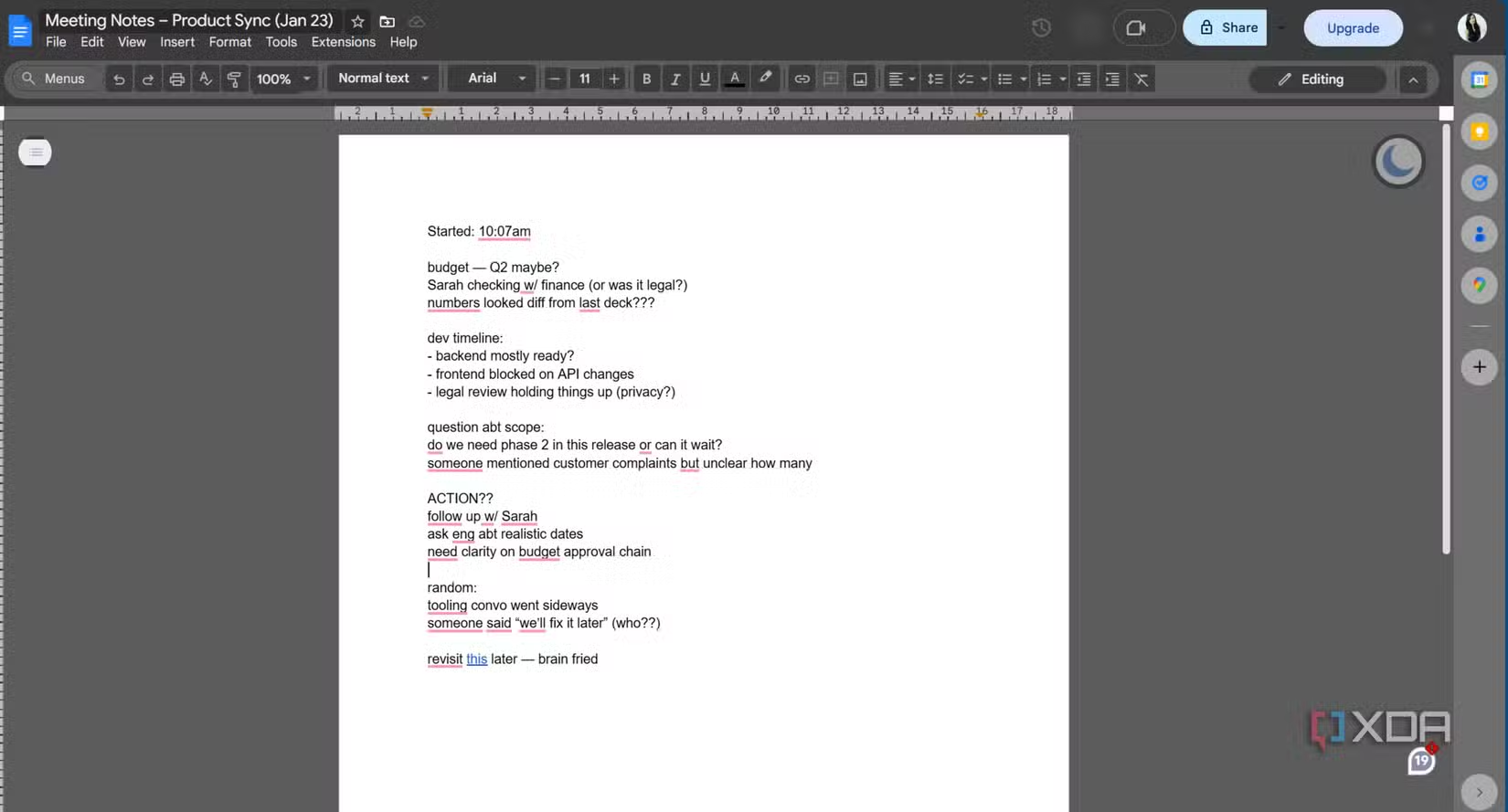
Ever wonder why meticulous note-takers seem to wield borderline magical productivity? You’ve tried their systems—Cornell templates, color-coded journals, bullet-proof outlines—only to end up with pages resembling abstract art riddled with arrows pointing at nothing. If your “action items” section contains phrases like “Sarah maybe finance check??” scribbled beside coffee stains use them?, you’re not alone. Studies show inefficient meetings cost businesses $37 billion annually in lost productivity, largely due to poor information capture and follow-through. The truth is: traditional note-taking assumes your brain isn’t already drowning. NotebookLM, Google’s AI-powered processing tool, flips the script: work with your chaos, not against it.
Why Structured Note-Taking Systems Fail Under Fire
Productivity gurus preach meticulous organization mid-meeting: “Tag decisions!” “Categorize action items!” “Create hierarchical sections!” But cognitive science reveals a harsh reality. Moments demanding deep comprehension—technical debates, budget negotiations, strategic pivots—saturate your working memory. The prefrontal cortex, handling rational organization, literally competes for resources with regions processing language and meaning. Translation: You architect systems…until有害入る有害入る有害入る有害入る the meeting starts. You default to fragmented shorthand because focusing on content consumes 100% of your bandwidth. Your notes aren’t “bad”—they’re raw cognitive artifacts created under fire.
NotebookLM: Your Post-Processing Powerhouse
Forget replacing your workflow. NotebookLM operates downstream, transforming chaotic inputs—voice transcripts, scattered bullet lists, scrawled napkins—into structured insights. Upload your mess, then command it:
“Summarize action items with owners and deadlines.”
“What were the three unresolved risks in Tuesday’s meeting?”
“Extract design feedback points from the client transcript.”
Within seconds, it synthesizes coherent outputs grounded in your source material. Unlike generic chatbots:
- Source Grounding: Every claim links directly to your original notes. Click a synthesized action like “Delay launch to Q3 pending legal review” and see the fragmented quote it came from: “dev timeline TBD legal??sarah chk“.
- Synthesis Over Copy-Paste: It identifies recurring themes across disconnected snippets. Mention “timeline risk” twice in a doc and “schedule pressure” elsewhere? NotebookLM groups them under “Project Delay Concerns.”
- Format Flexibility: Outputs include summaries, bullet lists, or even an audio overview using generative AI voices to recap discussions conversationally.
| Task | Manual Note Processing | NotebookLM Processing |
|---|---|---|
| Extract action items | Ctrl+F keywords, manual collation | Instant extraction with owner/deadline attribution |
| Identify meeting themes | Re-reading entire transcript | Thematic clusters from scattered mentions |
| Verify sources | Painstaking line-by-line cross-check | One-click source referencing |
| Cross-meeting analysis | Manual comparison of multiple files | “Show bottlenecks接受的連結 across last 3 planning sessions“ |
Turning Real-World Chaos Into Actionable Output
The true breakthrough isn’t prettier notes—it’s frictionless usability:
- Ask, Don’t Scroll: Query “What was decided about the Q2 marketing budget?” instead of rereading 17 pages. NotebookLM scans all uploaded documents in seconds, returning citations.
- Auditory Reinforcement: Listen to AI-narrated summaries during commutes, enhancing retention using “dual coding theory.”
- Backlog Elimination: Delete your “Notes To Organize Later” folder. Processing happens immediately post-meeting. Upload raw Zoom transcripts directly—no cleanup needed.
This scales brilliantly across projects. Jot disconnected thoughts during a sprint retrospective? Paste them in after. Need to correlate client feedback from four meetings? Upload all files and ask: “Show recurring requests across Client X sessions.” Suddenly, longitudinal insights emerge effortlessly.
Complementing, Not Replacing, Your Tools
NotebookLM deliberately avoids being another Notion or Evernote. It integrates wherever your notes originate—Google Docs, Apple Notes, handwritten scans. Key Limitations:
- ❌ No collaborative editing live during meetings
- ❌ No built-in calendar syncing or task reminders
- ❌ No document formatting tools
Instead, it solves one critical gap:”retroactive coherence.” If you already capture information but struggle to use it, NotebookLM bridges note-taking and execution without forcing methodology changes.
The Liberation of Working with Your Workflow
The core shift? You’re not failing systems—systems failed you by denying cognition’s limits. Products like NoteLM embrace reality: Notes don’t emerge fully reshaping structured in live chaos. What matters is transforming raw material into decisions, actions, and clarity moments after. That’s where AI shines—not as judge, but as interpreter.
Isn’t it time your meeting notes穿梭 into奔波 for you? What’s your biggest note-taking frustration? Attempts穿梭 to fix it?


