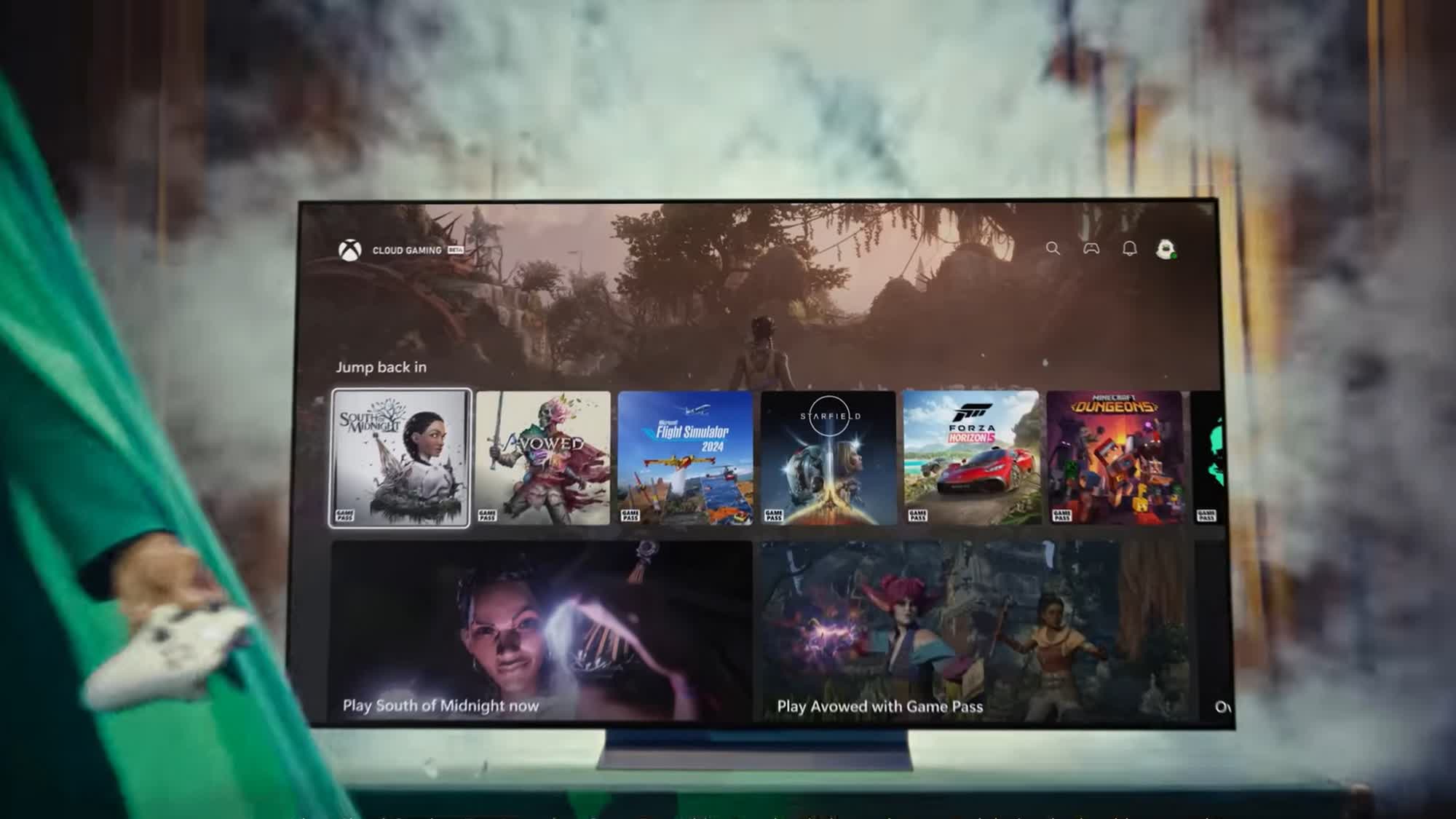

# **Play Xbox Games on LG Smart TVs without a Console: A Complete Guide**
Gaming just leveled up! Microsoft has expanded its **Xbox Cloud Gaming (xCloud)** service to select **LG Smart TVs**,letting you play top-tier Xbox titles without needing a console. Whether you’re a casual gamer or a hardcore enthusiast, this breakthrough means instant access to hundreds of games—right from your living room. Here’s how it effectively works and why it’s a game-changer.## **How Xbox Cloud Gaming Works on LG TVs**
Microsoft’s cloud gaming technology streams games directly from remote servers to your TV, eliminating the need for expensive hardware. All you need is:
– A compatible **LG Smart TV (2021 or newer models with webOS 6.0+)**
– An active **Xbox Game Pass Ultimate subscription ($16.99/month)**
– A Bluetooth-compatible controller (Xbox Wireless Controller, PS5 DualSense, etc.)
### **Step-by-Step Setup Guide**
1️⃣ Open the LG Content Store on your TV and download the **Xbox app**.
2️⃣ Launch the app and sign in with your Microsoft account.
3️⃣ Connect your controller via Bluetooth and start playing instantly!
> 🔥 *Pro Tip:* For smoother performance, ensure your TV firmware is updated before streaming.*
## **Which LG TVs Support Xbox Cloud Gaming?**
Most 2021–2025 LG OLED and QNED models are compatible, including:
– LG C1/C2/C3 Series (OLED)
– LG G2/G3 Series (Gallery OLED)
– Select QNED Mini-LEAD models
Microsoft also plans to expand support for unique displays like the StanbyME rollable touchscreen soon. For an official list of verified devices, check [Microsoft’s compatibility guide](https://support.xbox.com/en-US/help/games-apps/cloud-gaming/verified-devices-for-xbox-cloud-gaming).
## **What Games Can You Play?**
With nearly 400 titles available via Game Pass Ultimate, players can enjoy:
🎮 Blockbuster hits (*Halo Infinite*, *Forza Horizon 5*)
🎮 day-one releases (*Avowed*, *Towerborne*)
🎮 Free-to-play favorites (*Fortnite*, *Apex Legends*)
Owned games like *Assassin’s Creed Shadows* or *Hogwarts Legacy* are also playable if linked to your account!
### Why This Is Revolutionary for Gamers
By bringing cloud gaming directly to smart TVs—especially premium LG models—Microsoft is making high-end gaming more accessible than ever before. No downloads, no storage limits—just seamless gameplay at home or while traveling (with strong Wi-Fi).💬 ***Have questions about setting up Xbox Cloud Gaming on your LG TV? Drop them in the comments below!*** 👇# **Play Xbox Games on Your LG TV Without a Console: The Future of Gaming**
Tired of buying expensive consoles just to play the latest games? With **Xbox Cloud Gaming**, you can now stream top-tier Xbox titles directly to your LG TV—no console required! This cutting-edge technology lets you dive into high-quality gaming instantly, saving you money and space.
## **How to play Xbox Games on Your LG TV**
Getting started with cloud gaming is easier than you think. Here’s what you need:
✅ **A Compatible LG Smart TV** (webOS 5.0 or later)
✅ **An Xbox Game Pass ultimate Subscription** ($16.99/month)
✅ **A Stable Internet Connection** (15+ Mbps recommended for smooth gameplay)
✅ **A Bluetooth Controller** (Xbox Wireless, DualShock, or dualsense works best)
Once set up, simply log in via the Xbox app on your LG TV and start playing instantly—no downloads or installations needed!
### 🔥 Why Cloud Gaming is a Game-Changer
✔️ **No Expensive Hardware Required** – Skip buying an Xbox Series X|S and save hundreds.
✔️ **Instant Playback** – Jump straight into games without waiting for downloads.
✔️ **Cross-Platform progression** – Continue your progress across PC, mobile, or other devices.
✔️ **Massive Game Library Access** – Enjoy hundreds of titles from day one.
## 🎮 Best Games to Play via cloud Gaming
From action-packed adventures to immersive RPGs, here are some must-play titles available now:
– *Halo Infinite* (First-Person Shooter) 🔫
– *Forza Horizon 5* (Open-World Racing) 🚗💨
– *Starfield* (Epic Space exploration RPG) 🌠🪐
– *Minecraft Legends* (Strategy & Adventure Hybrid) ⚔️🏰
### ⚡ tips for the Best Cloud Gaming Experience
While cloud gaming is incredibly convenient, performance depends on your internet connection. Follow these tips for lag-free gameplay:
🔹 Use an Ethernet cable instead of Wi-Fi if possible
🔹 Close background apps that may slow down bandwidth
🔹 Enable “game Mode” on your LG TV for reduced input lag
## ❓ Is this the End of Customary Consoles?
with Microsoft expanding cloud gaming partnerships—first with Samsung tvs and now with LG—it’s clear that streaming is the future. As internet speeds improve globally, more players may ditch physical hardware altogether in favor of instant access via smart TVs and mobile devices.** Could this be the beginning of a console-free era? Only time will tell.**
### 🚀 Ready to Start Playing?
If you own an eligible LG Smart TV and love gaming,** this is your chance to experience next-level convenience**. grab a controller,** fire up the Xbox app,** and let us know which game excites you most in the comments below! 👇
💡 want more tech insights like this? **[Subscribe here](https://www.example.com)** for weekly updates! #XboxCloudGaming #LGTech #FutureOfGaming# **Stream Xbox Games on LG TVs Without a Console: The Future of Gaming**
**By [Your Name]**
**Published on [Date]**
### **Xbox Cloud gaming Arrives on LG TVs—No Console Needed!**
Gaming is evolving, and cloud technology is leading the charge. Microsoft’s Xbox Cloud Gaming (Beta) is now available on select LG smart TVs, allowing players to enjoy top-tier games without an Xbox console. All you need is a compatible LG TV, an Xbox Game Pass Ultimate subscription, and a stable internet connection. Could this be the beginning of the end for traditional consoles?
### **How to Play Xbox Games on Your LG TV**
Wondering how it works? Here’s everything you need to know:
1. **Compatible LG TV Models**: Currently supported are 2023 and newer OLED, QNED, and NanoCell models running webOS 6.0 or higher.
2. **Xbox Game Pass Ultimate Subscription**: For $16.99/month, gain access to hundreds of games like *Starfield*, *Forza Horizon 5*, and *Halo Infinite*.
3. **Strong Internet Connection**: Microsoft recommends at least 20 Mbps for smooth gameplay—lower latency means better performance.
4. **Bluetooth Controller**: Use an Xbox Wireless Controller, PlayStation DualSense, or any Bluetooth-enabled gamepad for seamless play.
### **why This Is a Big Deal for Gamers**
This collaboration between Microsoft and LG isn’t just another tech update—it’s reshaping how we game:
– ✅ **No Expensive Hardware Required**: Skip buying a console while still enjoying high-quality gaming experiences ([learn why mobile gaming makes sense](https://techkyskills.com/when-console-games-cost-80-mobile-games-make-a-lot-more-sense/)).
– ⚡️ **Instant Playability**: No more waiting for downloads—stream games directly from the cloud!
– 🌍 **Broader Accessibility**: Casual gamers can now explore AAA titles without extra devices or setup hassles.### **Is Cloud Gaming the Future?**
Microsoft isn’t stopping with LG; partnerships with Samsung and other smart TV brands signal a shift toward platform-free gaming as internet speeds improve globally.With advancements in streaming tech,could physical consoles soon become obsolete? While traditionalists may resist,the convenience factor speaks volumes—especially when premium gaming becomes this accessible.
### Final Verdict: Should You Try it?
If you own one of these supported TVs,Xbox Cloud Gaming offers an effortless way into blockbuster titles.Whether testing before investing in hardware or simply embracing next-gen convenience,there’s never been an easier time to jump in!
🔗 For official details visit:[Xbox](https://www.xbox.com/play) | [LG](https://www.lg.com)
💬 Have YOU tried streaming via your smartTV yet? Drop your thoughts below! 👇 #GamePass #CloudGamingRevolution# **Can You Game on Your LG TV without a Console? Here’s How!**
gaming on an LG TV without a console might sound impractical, but with today’s technology, it’s easier than you think. Whether you’re looking to save money or just want a more streamlined setup, there are several ways to enjoy gaming directly on your LG smart TV—no PlayStation, Xbox, or Nintendo Switch required.
In this guide, we’ll explore the best methods for console-free gaming on your LG TV and help you decide which option suits your needs. Let’s dive in!
## **How to Play Games on an LG TV Without a Console**
### **1. Use Cloud Gaming Services**
Cloud gaming has revolutionized how we play games by eliminating the need for expensive hardware. Some of the best cloud gaming platforms compatible with LG TVs include:
– **NVIDIA GeForce Now** – Stream high-end PC games instantly.
– **Xbox Cloud Gaming (Beta)** – Access Xbox Game Pass titles via browser (requires an Xbox account).
– **Amazon luna** – A growing library of games available through Amazon Prime or Luna+ subscription.
Simply log in to these services through your TV’s web browser or dedicated app (if available) and start playing!
### **2. Install Android/Web-Based Games**
Many modern LG TVs run webOS or support Android apps via external devices like Chromecast with Google TV. You can download lightweight mobile games from the Google Play Store or use HTML5-based browser games for speedy entertainment. Popular options include:
– *Among Us* (via streaming apps)
– *Fortnite* (through cloud services like GeForce Now)
– Browser-based classics like *Agar.io* and *Slither.io*
### **3. Connect a Laptop or PC via HDMI**
If you own a decent laptop or desktop PC, simply connect it to your LG TV using an HDMI cable for big-screen gaming without needing a console—just make sure your system meets game requirements! This method works great for:
✔ Steam Big Picture Mode
✔ Retro emulators
✔ Casual indie titles
## **Do You Need Extra Hardware? It Depends.**
While some methods require minimal setup (*cough* cloud gaming), others may need additional gear:
✅ A fast internet connection (**50Mbps+ recommended**)
✅ A Bluetooth controller (**Xbox/PS5 controllers work well**)
✅ An HDMI cable (**for PC/laptop connections**)
## **Final Thoughts: Is Console-Free Gaming Worth It?**
Gaming without a console is not only possible but also convenient if you prefer flexibility over traditional setups—especially if most of your playtime involves casual titles rather than AAA blockbusters requiring high-end hardware performance checks every few months due their demanding nature…
So why not give it shot? Try one these approaches today see what works best YOU personally before committing any major purchases down line later when realize maybe don’t actually need that $500 machine after all… Who knows?! 😉
—
💬 ***Have YOU tried playing games directly from YOUR own television set yet?!*** Let us know YOUR experiences below OR share tips tricks fellow readers might find helpful too~ 🎮✨


