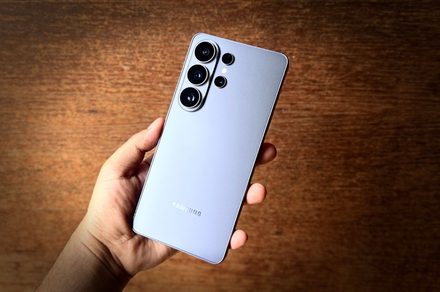

The Galaxy S26 Ultra is the most complete Android phone I’ve used this year. It doesn’t get there with a single headline feature, though. Instead, it wins the crown by being excellent at almost everything, then topping it off with its own unique set of perks. At $1,300, it’s undeniably expensive. After four months of using it as my only phone, I don’t think anything else in the Android space comes close to its breadth. Samsung dropped the titanium frame this time for a lighter, more colorful Armor Aluminum one, and it finally rounded off the corners that used to dig into my palm.
Quick Verdict
The headline addition is the Privacy Display, built into the hardware rather than slapped on as a film. It hides the screen from whoever’s sitting next to you. I was skeptical until I used it and got some surprised looks from people around me. Under the glass-and-metal package sits the customized Snapdragon 8 Elite Gen 5 silicon, which finally draws level with Apple’s silicon inside iPhones. Whether it’s heavy multitasking, on-device AI through Gemini, or camera capture, everything ran without issue in my time with the phone.
It’s not perfect, though. The battery is still 5,000 mAh, the same as the last couple of Ultras, and the screen-on time reflects that. It’s respectable, but nothing special. The faster 60W wired charging takes some of the sting out, at least. The cameras get wider apertures and much better low-light results. Additionally, the Horizon Lock video mode for stabilization impressed me, but I still hit the occasional exposure shift and some shutter lag. The bottom line: the Galaxy S26 Ultra is an unapologetic powerhouse. It won’t push S25 Ultra owners into an upgrade frenzy, but for almost everyone else, it’s a masterclass.
Samsung Galaxy S26 Ultra Specs
- Processor: Octa-Core (4.74 GHz, 3.6 GHz)
- Display: 17.49 cm Dynamic AMOLED 2X, 3120 x 1440 (Quad HD+), 16M Color Depth, 120 Hz Max Refresh Rate
- S Pen Support: Yes
- Rear Camera: 200 MP + 50 MP + 50 MP + 10 MP (F1.4, F2.9, F1.9, F2.4), Auto Focus, OIS
- Camera Zoom: Optical Zoom 3x and 5x, Optical Quality Zoom 2x and 10x, Digital Zoom up to 100x
- Front Camera: 12 MP (F2.2), Auto Focus
- Video Recording: UHD 8K (7680 x 4320) @ 30fps
- Memory / Storage: 12 GB RAM / 256 GB Storage
- Connectivity: USB Type-C (3.2 Gen 1), Wi-Fi 7, Bluetooth v6.0, NFC, UWB, GPS
- Dimensions: 163.6 x 78.1 x 7.9 mm
- Weight: 214 g
- Battery: 5000 mAh (Non-detachable), Up to 31 hours video playback
- Software Support: Security updates until February 28, 2033
Design and Build: A Deceptively Elegant Behemoth
Every smartphone brand is chasing titanium right now, so Samsung going back to aluminum reads like a step backward on paper. It isn’t. After living with the Armor Aluminum 2 frame, I’m happy the switch was the right call. For one, aluminum takes anodization much better than the PVD coating titanium requires, which is why the colors here pop the way they do.
You get Cobalt Violet (the one I tested, and the one Samsung wants you to buy as the signature color this year), Sky Blue, White, Black, and two Samsung-exclusive shades: Silver Shadow and Purple Gold. The other reason is heat. Aluminum dissipates it much faster than titanium. I learned that lesson the hard way with the iPhone 16 Pro. Paired with the vapor chamber, the aluminum chassis kept the phone from getting too hot under stress. I noticed it most during a marathon evening of editing a travel video on the phone — the kind of workflow that usually leaves a metal phone warm enough to be uncomfortable. This one stayed merely warm.
Ergonomics Finally Improved
Samsung finally fixed my biggest pet peeve about its high-end phones. Those sharp, palm-digging corners are finally gone. The rounded edges on the S26 Ultra are subtle, but they change how the phone feels in the hand entirely. It feels thinner and easier to handle one-handed, and after a week, I stopped reaching instinctively for a case — something I never did with the last Ultra. The camera array still juts out about half a centimeter, however, so the phone rocks around on a desk when you tap at it lying flat without a case. That’s the one ergonomic compromise that hasn’t budged in years.
Durability and Ingress Protection
Up front, you’ll find Corning’s Gorilla Armor 2 layer, which mixes in ceramic for better drop resistance and glare reduction. The back is Gorilla Glass Victus 2. I didn’t intentionally drop the phone, but it picked up exactly zero micro-scratches over a few months of being tossed into bags alongside keys and a charging brick — much better than most phones I’ve tested.
The Galaxy S26 Ultra holds its IP68 rating, meaning it’s good for accidental dips in 1.5m of water for 30 minutes. That’s not the best available, though. A handful of Chinese competitors are already shipping IP69 and IP69K ratings for high-pressure water resistance. The OnePlus 15 is one of those phones, and it pulls off the durability trick without compromising on looks. Samsung is being conservative. For most people, IP68 is plenty, but it’s a spec sheet line where Samsung is no longer leading the pack.
The S Pen Experience
The S Pen lives in the bottom-left corner in its own silo. It’s slightly thinner this year, with a flattened end that sits flush against the frame. Functionally, however, it hasn’t changed much since Samsung pulled back the Bluetooth features. There’s no more air-gesture remote-shutter camera trick, and that’s worth mourning. I didn’t always use it, so I won’t pretend it’s a huge miss for me. It’s still the best stylus on any phone by a wide margin. The latency is effectively zero, whether I was scribbling notes in a meeting, sketching a rough idea, or nudging a slider in the photo editor. I love that it can launch into action from the lock screen, providing a blank canvas for jotting down notes without having to go through the fingerprint scan or password entry process.
Display: Two Steps Forward, One Step Back
The display on the Galaxy S26 Ultra is a gorgeous 6.9-inch flat Dynamic LTPO AMOLED 2X panel with QHD+ (3120 x 1440 pixels at 500 ppi) resolution and a refresh rate that ramps from 1Hz all the way to 120Hz. Peak HDR brightness hits 2,600 nits, so I never once squinted at it outdoors. Plus, there’s an anti-reflective Gorilla Armor 2 coating on top. I spent an afternoon capturing and reviewing photos under harsh midday sun, and the S26 Ultra did a much better job staying legible than most phones.
The Privacy Display
Here’s the real story of the S26 Ultra. Forget the cheap stick-on privacy films that dilute image quality. Samsung built this in at the sub-pixel level, interlacing standard wide-viewing OLED pixels with narrow-beam pixel arrays. As you turn it on, the wide pixels shut off, so anyone peering in from more than 45 degrees off-axis sees a dark, near-black panel, while you, looking at it straight on, see everything normally. There are granular controls too — you can leave it on all the time, or pin it to specific triggers so it kicks in automatically for banking apps, WhatsApp, or just incoming notification pop-ups.
In daily use, it became a feature I didn’t know I needed. On a crowded metro, I found myself replying to messages I’d normally have left until I got home, because I wasn’t worried about the person pressed against my shoulder peeking at them. It’s the rare phone feature that actually changed my habits instead of just sitting in a settings menu.
Trade-offs
The Privacy Display is a clever trick, but it comes with three caveats. First, viewing angles are slightly narrower than the cheaper S26 and S26+ even with privacy mode off, due to the interlaced pixel construction. Second, in maximum privacy mode, brightness output and color contrast take a visible hit. Third, despite some early claims, this is an 8-bit panel leaning on FRC to fake 10-bit color output. On a $1,300 phone in 2026, an 8-bit panel may bother purists. There’s also no high-frequency PWM dimming, so if you’re sensitive to OLED flicker, low brightness could tire your eyes during long reading sessions.
Camera: Legacy Preserved with Extra Oomph
The quad-camera setup looks familiar, but the aperture and processing changes add up to real gains, especially after dark. Cameras are where flagship phones either justify their price or quietly fail, and Samsung’s Galaxy S Ultra has always marketed itself as the phone you leave your real camera at home for.
- Main (Wide): 200 MP, f/1.4 (up from f/1.7), 1/1.3″, OIS
- Ultrawide: 50 MP, f/1.9, 1/2.5″, 120° FOV
- Telephoto 1 (3x): 10 MP, f/2.4, 1/3.94″, OIS
- Telephoto 2 (5x): 50 MP, f/2.9 (up from f/3.4), 1/2.52″, ALoP design, OIS
- Front (Selfie): 12 MP, f/2.2, 1/3.2″, wider 23mm FOV
The headline change is the jump to an f/1.4 aperture on the 200MP main sensor, up from f/1.7 on the S25 Ultra. A wider aperture pulls in more light, which matters enormously when the sun goes down. In genuine daylight, the gap between this and last year’s Ultra is hard to see, because Samsung’s processing was already excellent in bright conditions. The 200MP sensor pixel-bins down to a default 12MP shot that’s sharp, detailed, and well-saturated. Switch to full 200MP mode for a static, well-lit scene, and the amount of detail you can crop into is absurd.
Where the f/1.4 lens earns its keep is in the in-between hours. Indoor restaurant lighting, an overcast street at dusk, or a room lit by a couple of lamps — that’s the territory where last year’s phones started smearing detail and lifting noise, and where the Galaxy S26 Ultra shines.
The 5x telephoto lens is the showpiece, and Samsung pushed its aperture wider this time around, which again pays off after dark. One neat trick with the 5x lens is the ALoP design, which produces a beautiful bokeh effect and smooth background separation that makes portraits shine. The downside is that at close range, the phone hunts for focus more than I’d like. For tight detail shots, you’ll probably end up on the main sensor’s macro mode instead.
On color accuracy, Samsung has finally reined in its old habit of cranking up saturation beyond realism. This year, skin tones and white balance stayed accurate across all kinds of lighting. It’s a more mature and refined look, and I prefer it. The Horizon Lock video mode for stabilization is impressive too — it leans on the gyroscope and EIS, letting you move the phone a full 360 degrees while recording, and the horizon stays perfectly level.
Performance: Fast and Hot
The Galaxy S26 Ultra draws power from the customized Snapdragon 8 Elite Gen 5 for Galaxy silicon, built on a 3nm process, paired with fast UFS 4.0 storage and either 12GB or 16GB of LPDDR5X RAM. There’s a massive amount of performance headroom here, and in normal use I never came close to running out of it. Apps snap open, the camera is ready the instant I raise the phone, and I never once watched it stutter while switching between a dozen open apps. The Oryon V3 cores within the Elite Gen 5 finally close the gap with Apple’s silicon on raw performance.
The larger vapor chamber keeps the phone from getting uncomfortably hot during use. Games like Zenless Zone Zero and Diablo Immortal ran without any stutters. The trade-off is that under sustained heavy load, the throttling becomes visible with reduced FPS output, all in service of keeping the phone cool. Even throttled, it ties the iPhone’s sustained score and leaves the Pixel 10 Pro XL far behind.
Software: Loaded with AI
The Galaxy S26 Ultra ships running Android 16 with One UI 8.5 on top. Samsung is matching Google’s seven years of major OS and security updates, taking the phone through to 2033. One UI itself isn’t bad. DeX is still one of the best desktop-like work environments bundled with an Android phone, and Good Lock offers the deepest level of customization on a smartphone without having to flash a ROM or install sketchy apps.
The AI ecosystem is extensive. The most interesting piece is agentic AI through Gemini, which doesn’t just respond to you but can actually take action inside third-party apps — ordering food or booking a ride. It’s still a beta experience and shows it: it’s slow, and you often have to sit and watch it tap through the app before it hands you a final confirm button. Still, you can see where this is going. Bixby now integrates Perplexity, allowing it to handle complex real-time queries and cite sources. The List Editor and Creative Studio tools let you tweak photos, recolor objects, or sketch something with the S Pen and have AI turn it into a watercolor, 3D render, or oil painting.
Not all of it works perfectly. Now Brief stacks weather, calendar, and news into a lock screen widget, but I didn’t get much more out of it than the widgets we’ve already had for a decade. Now Nudge is supposed to read what’s on your screen and react, but in my testing it almost never fired when I actually needed it. One bright privacy touch worth noting is native AI processing — if you don’t want your personal data going to the cloud, you can enable on-device AI processing. You lose some of the heavier generative functions, but your data stays local, and I appreciate Samsung making this prominently available.
Battery Life and Charging: Stagnant but Reliable
If there’s one weak spot on the Galaxy S26 Ultra’s stacked spec sheet, it’s the battery. Samsung has maxed out capacity at 5,000 mAh for yet another year. Competitors are now shipping silicon-carbon cells up to 8,000 mAh as the mainstream option, while Samsung sits tight. The 3nm chip and LTPO panel are efficient enough that battery life doesn’t tank mid-day. On a heavy day of 5G, gaming, and GPS use, I averaged 5 to 6 hours of screen-on time, which meant charging every night without fail. On more moderate days, I got closer to 8 hours of screen-on time, which is solid.
Wired charging now runs at 60W, up from 45W. In practice, I hit 75% in about half an hour, with a full charge taking roughly 54 minutes. Wireless charging is bumped to 25W on the Qi 2.2 standard. Bafflingly, though Samsung supports Qi2 speeds, it didn’t put the magnetic ring in the back of the phone. So if you want that satisfying magnetic snap, you’ll need to buy a separate magnet-equipped case. On a $1,300 phone, that’s just annoying.
Should You Buy the Samsung Galaxy S26 Ultra?
The Galaxy S26 Ultra doesn’t reinvent anything. What it does is take the established Ultra formula and tighten every screw. An improved Armor Aluminum frame, a faster Snapdragon 8 Elite Gen 5 that finally draws level with Apple, and that genuinely clever Privacy Display push the device forward in ways that matter. Yes, the 5,000 mAh battery feels dated in 2026, the AI features are still a bit hit-and-miss, and skipping native magnetic charging is baffling. But after spending months with the phone, none of that outweighed how much it simply does right. It has the best stylus on any phone, a quad-camera system that’s now genuinely solid in low light, and a beautiful, glare-resistant display. It’s still the phone to beat for power users. If you want one device that does everything, this is the one to get.
Alternatives to Consider
- Apple iPhone 17 Pro Max — The best for ecosystem loyalists and battery life warriors. It crushes the Samsung on battery mileage and remains the most solid bet for point-and-shoot video.
- Google Pixel 10 Pro XL — An obvious choice for excellent software and effortless photography. It’s cheaper and runs Google’s pure Android experience, with built-in magnetic charging via Pixel Snap.
- Samsung Galaxy S26+ — Best for those who want flagship muscle for less. At $1,100 you get the same fast Snapdragon, same seven-year update promise, and a similar design in a lighter body, with $200 still in your pocket.


