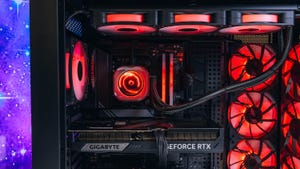

The Origin PC Millennium makes some unusual choices, but its solid foundation and extensive customization options let you make smarter ones. This large gaming desktop starts at $3,139 (discounted to $2,986 at the time of this review), but as our review unit was configured, it’s not a particularly smart buy against RTX 5080-powered machines like the Starforge Explorer III Elite or Lenovo Legion Tower 7 Gen 10. It’s also dramatically more expensive than the Lenovo Legion Tower 5 Gen 10 without offering much additional performance.
Make no mistake — it’s a capable machine. But spending close to $4,000 for solid 1080p gaming with lagging 4K performance is not a compelling proposition. Still, there’s room to improve here with plenty of upgrade options. That may not push the Millennium deep enough into value territory to compete against the Lenovo Legion Tower 5 Gen 10, but Origin is a solid, well-built (if oversized) PC that should be much easier to upgrade than any Lenovo desktop. That’s a long-term value that can add up. With PC component pricing being as volatile as it has been lately, the Origin PC Millennium at least manages to stack up well against the cost of building a similar machine yourself.
| Spec | Details |
|---|---|
| Price as reviewed | $4,196 |
| Size | 100.2 liters (21.5 x 12.5 x 22.8 in), 51 lbs |
| Motherboard | Gigabyte X870E AORUS ELITE Wi-Fi |
| CPU | AMD Ryzen 7 9800X3D (4.7 GHz) |
| Memory | 32 GB DDR5-6000 |
| Graphics | Nvidia GeForce RTX 5070 Ti |
| Storage | 2 TB NVMe M.2 PCIe Gen 4 SSD (Corsair MP600 Core XT R2) |
| Networking | 2.5 GbE, Wi-Fi 7, Bluetooth 5.4 |
| OS | Windows 11 Home |
Our review unit came with the configuration above, including a motherboard that is no longer offered in Origin PC’s configuration options, having since been replaced by an Asus ROG board. At the time of writing, this configuration had a listed price of $4,196, but an ongoing sale through July 31 lowers that to $3,693. That would be a meaningful discount, as the Origin PC Millennium otherwise costs nearly as much as many RTX 5080-packed systems while only carrying an RTX 5070 Ti itself.
Making the most of 3D V-Cache
The Origin PC Millennium delivers impressive performance in several key areas. For one thing, it doesn’t struggle with heat. Six intake fans provide plenty of fresh air for the graphics card and the CPU’s 360-millimeter radiator. Under a heavy gaming load, the system barely produces more than a faint hum. With so many fans, none of them has to work too hard.
For general computing, the Millennium has more than enough power. It scored 11,502 points in PCMark, the highest score I’ve ever recorded on that benchmark. Scores above 5,000 are generally considered a good sign for a PC, so 11,000-plus points suggest the machine won’t struggle at all with everyday office work.
The AMD Ryzen 7 9800X3D isn’t the be-all and end-all of CPUs, but it has some distinct advantages. Multicore performance is mid-range for high-end gaming CPUs, while single-core performance proves more competitive. The real edge this CPU offers is in 1080p gaming. Its 3D V-Cache technology works almost like magic at that resolution. Despite using an RTX 5070 Ti, the Millennium can outperform RTX 5080-powered systems at 1080p — sometimes by significant margins. It blew past the Alienware Area-51, Starforge Explorer III Elite, and Lenovo Legion T7 in Guardians of the Galaxy and Shadow of the Tomb Raider benchmarks.
However, those systems regain their lead when you bump the resolution up to 4K. They also outshine the Millennium in 3DMark’s synthetic benchmarks. Looking at the Falcon Micro SX3 Raptor Z95A (which pairs the same Ryzen 7 9800X3D with an RTX 5080) as a reference, the Millennium would jump right back into the lead if it also had an RTX 5080.
The RTX 5070 Ti’s advantages over the non-Ti variant are clear, but strictly looking at frames-per-dollar value, Origin PC may be asking too high a price. The Lenovo Legion Tower 5 Gen 10 costs roughly half as much, takes up half the space, and uses an AMD Ryzen 7 7800X3D with an RTX 5070 to get within about 10% of the Millennium’s 1080p performance.
The included Corsair MP600 Core XT R2 SSD isn’t a standout either. It lags behind what’s packed into many systems I’ve tested over the past year, including more affordable ones. It’s fine, but I’d recommend choosing the minimum storage option from Origin and upgrading with better drives afterward.
Large and roomy, with some smart (and not-so-smart) choices
The Millennium’s case is interesting. It measures 21.5 by 12.5 by 22.8 inches, totaling roughly 100 liters of volume, but those dimensions include fairly large corner pieces that extend the width. Without them, the case becomes a more reasonable 9.8 inches wide, bringing the volume down to 78.6 liters. You’ll still need to find space for a 100-liter desktop, but you’ll be placing a smaller actual case into that space.
The metal corner pieces are handy for lifting this heavy machine around — there’s really nowhere else to grab it. A small hand strap is included on the rear for carrying, but a clean break before it even reached me for testing was sufficient indication that it wasn’t up to the task.
Overall, the case design earns praise. It has plenty of room, as you’d hope for such a large machine, and it makes good use of that space. The power supply sits sideways in the bottom, providing easy access to its modular ports. The front has deep air scoops, so the three 120 mm intake fans aren’t starved for fresh air despite sitting behind a glass panel. There’s also room for three additional 120 mm intake fans on the side of the machine. Both of these inlets (as well as the bottom grille) are covered with a fine metal mesh that filters out dust, and these filters are easy to remove and rinse when they get dirty.
With six intake fans, one rear exhaust fan, and three radiator fans pushing air out through the top of the case, there should be good positive pressure inside to keep dust out of unfiltered openings. The top is one such unfiltered opening, so it may see some slow buildup when the machine is powered down, but the Millennium shouldn’t actively suck dust into itself.
There are also some awkward choices inside the Millennium. Perhaps the worst offender is the approach to the 2.5-inch drive bays. Behind the motherboard, there are four holders for 2.5-inch drives, but Origin has nullified three of them. One is occupied by the proprietary fan controller. Two have had their mounting screw holes appropriated to support zip ties that guide some peripheral power cables, leaving just one drive holder actually available. While this might be forgivable in a smaller machine, the Millennium case has more space than nearly anything else on the market.
The side panels have their drawbacks too. The metal ones feel and sound flimsy, which hurts the build’s otherwise premium feel. They could also benefit from some well-placed vibration-damping pads. The glass side panel is genuinely awkward to remove. It has a tool-less design, but because of the metal corner pieces, I inevitably slammed the panel into the corner piece and then dropped it to the floor during removal. Getting it back into place is equally awkward.
It’s hard to be too upset, though, because the interior cable routing is so clean. The machine is tidy. The RGB fans inside don’t illuminate a rat’s nest. There’s also a clean view of the small display on the CPU water pump.
Additional upgrades (aside from 2.5-inch drives) seem fairly straightforward. The machine has two additional RAM slots, two additional PCIe x16 slots, and three additional M.2 slots in our test configuration. The Asus ROG motherboard option can have even more M.2 slots.
Overall, the Millennium is large, highly upgradable, highly customizable, but expensive. Be careful with your build choices.


