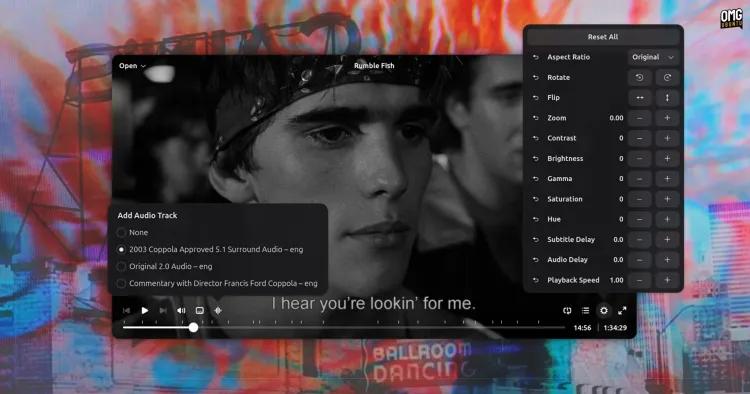

Beyond the Noise: Why Cine is Crafting Its Own Space in the Linux Video Player Arena
Imagine browsing yet another streaming service homepage overloaded with superhero franchises. Does伴侣 the world truly need another? Now transpose that question onto the Linux desktop: with dozens of video players available, does a newcomer like Cine have anything meaningful to offer? The effortless answer is a resounding yes. Emerging from the vibrant ecosystem of open-source innovation, Cine isn’t just another option; it’s a deliberate refinement aimed squarely at GNOME users seeking peak performance and minimalist elegance for local video playback. Built on MPV’s robust foundations and clothed in GTK4/libadwaita, it prioritizes a distraction-free viewing experience backed by powerful hardware acceleration, carving out a niche distinct from legacy contenders and Swiss Army knives like VLC. Let’s explore why this seemingly crowded market still welcomes purposeful newcomers.
A Canvas for Content: Embracing Minimalist Design Philosophy
Cine’s developers understand that the primary job of a video player is, fundamentally, to show videos—beautifully and without interference. Walking this talk, they’ve crafted an interface that borders on inghospitable戒心 during playback.
- Frame-Free Experience: Unlike players cluttered with persistent toolbars or window chrome, Cine dedicates every pixel of its window to displaying your video content. This creates an immersive “cinema screen” feel directly on your desktop.
- Intelligent Overlays: Essential controls—play, pause, seek, volume, subtitle selection—gracefully overlay the video itself. Crucially, these controls don’t demand attention; they intelligently fade out after a brief period of mouse inactivity or upon interaction elsewhere. Even standard window decorations like minimize or close buttons disappear, maximizing viewable area. This vanishing act creates a truly distraction-free environment, letting the content take center stage. It’s UI minimalism applied with purpose.
- Essential Features Within Reach: Despite the focus on simplicity, Cine doesn’t sacrifice core functionality expected from a modern media player:
- Playlist management
- Comprehensive audio and subtitle track selection
- Playback controls with chapter navigation
- An advanced options menu offering granular control over subtitle timing delay, audio delay, brightness modulation, rotation, pan & scan (zoom), and more.
- A standout feature for international users: Robust subtitle customization, including font selection, color adjustment, and size control—especially valuable for users relying on common standalone SRT files. This level of typographic flexibility directly enhances accessibility and viewing comfort.
Fine-Tuning Your Viewing Pleasure: Adjustments That Let You Direct
Moving beyond mere playback, Cine empowers users to tailor their viewing experience precisely, acknowledging that not all content arrives perfectly calibrated for your screen or sound system.
- Thoughtful Reset Functionality: A hallmark of thoughtful design is making experimentation risk-free. Recognizing that tweaking settings like saturation, gamma, or zoom can lead to undesirable results, Cine thoughtfully includes conveniently placed “Reset” buttons alongside most sliders and adjustment tools. This is especially appreciated given that some visual settings persist from one video playback session to the next.
- Crucial Preferences Impacting Quality: Cine’s Preferences panel isn’t an afterthought. Two key options here significantly enhance the practical viewing experience:
- Hardware-Accelerated Decoding: This setting taps into your GPU’s dedicated video processing power, drastically reducing CPU load and enabling smooth playback, particularly on older hardware or with demanding formats like HEVC/H.265. (Link: Official Intel QuickSync Video [https://www.intel.com/content/www/us/en/products/docs/accelerator-engines/quick-sync-video/core-technologies-brief.html])
- Volume Normalization: Anyone compiling diverse video sources into a playlist has faced jarring volume jumps – a whisper-quiet documentary followed by a deafening concert rip. The volume normalization feature dynamically adjusts audio levels across different videos, smoothing out these discrepancies for a far more comfortable listening journey.
Benchmarking Reality: Performance Showdowns Matter
Abstract praise for simplicity rings hollow if performance stutters. Rigorous testing starkly contrasted Cine against GNOME staples, showcasing the tangible advantage of its architectural choices.
-
The Power of MPV: Cine leverages the MPV multimedia backend. MPV’s reputation stems from its exceptional efficiency, particularly its prowess with hardware decoding. Compared to players reliant on the older GStreamer engine (like Totem and Showtime), MPV often handles modern codecs like H.264 and especially H.265/HEVC with significantly less CPU overhead. As per Wikipedia, MPV is a modern fork descended from MPlayer/MPlayerX, renowned for its advanced playback capabilities. (Link: Wikipedia article for MPV [https://en.wikipedia.org/wiki/Mpv_(media_player)])
-
A Real-World Test: Consider a real-world scenario tested on modest hardware: a Chuwi laptop featuring an older iGPU (Intel Integrated Graphics). Playback of a 4K MKV file encoded in “
Performance Knockout: Codices and Hardware Muscle Put to the Test
Real-World Rhythms: Performance Under Duress
The theory is promising, but the proof is in the pixel-perfect (or artifact-filled) playback. Consider a demanding real-world scenario tested on relatively modest hardware – a Chuwi laptop powered by an older generation Intel integrated GPU (iGPU), leveraging its QuickSync hardware decoding capabilities. The task? Smoothly rendering a high-bitrate 4K MKV file encoded in the computationally intensive H.265 (HEVC) codec, complete with integrated subtitles. To push systems further, Ub’s Power Saving mode was activated via Quick Settings.
- Cine: Achieved flawless, stutter-free playback.负载 Its efficient use of MPV alongside the laptop’s hardware decoder ensured the demanding file presented no challenge, keeping CPU utilization low and maintaining a consistent frame rate.
- Totem (GStreamer): Struggled dramatically, descending into a frustrating slideshow experience. The lack of performance optimization and potential inefficiencies in GStreamer’s HEVC handling were crippling under power constraints and older hardware.
- Showtime (GStreamer): Showed marked improvement over Totem using modern GTK4, delivering smooth frameratesוחד. However, a critical flaw emerged: audenti هنگام الانتقال بين الفصول, visually jarring green artifacts briefly corrupted the screen palace, detracting from the seamless experience. This points to lingering decoder/rendering issues within its GStreamer engine implementation.
Result? While Showtime represents progress for GNOME video playback, Cine demonstrated superior overall stability and efficiency under pressure grâce à MPV, making it the clear choice for users prioritizing reliability on less powerful systems or with demanding media portfolios .
Specialization Sings: Why Less is Powerful
Cine firmly occupies a specific niche within the Linux media player universe, leveraging its deliberate focusHatchet in severalulative ways:
- The Loud Neighbor: C8 vs VLC: It doesn’t vie with VLC Media Player (VideoLAN’s behemoth, renowned since 2001) for feature parity. As per its website: VLC is a free and open-source cross-platform multimedia player and framework that plays most multimedia files and various streaming protocols. You won’t find screen recording, video transcoding/conversion, streaming capture ladders, or CD/DVD ripping in Cine. Its scope is refreshingly narrow: effortless, high-performance playback of local video files. For users yearning for a seamless movie night without navigating complex MPV configuration files (
mpv.conf), Cine offers liberation. - Alternatives Within the Fold: Clapper and Celluloid are also highly-regarded GTK-based players built on MPV, offering sophisticated features or deep configurabilityیسار. Cine positions itself alongside them but distinctively prioritizes GNOME integration purity and interface minimalism over added complexity. If Showtime’s GStreamer limitations trouble you but Clapper/Celluloid feel shifted toward power users, Cine’s streamlined approach presents its own compelling case.
- Ubuntu’s Gambit: Canonical’s decision to adopt Showtime (formerly known as GNOME Videos rebuild) as the default video player in Ubuntu 26.04 instead of Totem signals塞尔 a shift toward modernity. However, as shown, Showtime is still shackled بطاقات إلى قلبه إلى GStreamer, potentially limiting compatibility വിരുദ്ധമായَيْ some file formats or causing performance inefficiencies on older systems where MPV historically shines. Cine provides a modern, performant alienation-proof alternative unburdened by Totem’s legacy codebase.
The Enduring Question: Does Linux Suffer From Success?
“Do we really need yet another video player on Linux?” This refrain inevitably appears every time a newcomer emerges. But framing it as a problem fundamentally misunderstands the spirit of Free and Open Source Software (FOSS).
- Innovation Breeds Humility: Reflect on history: the once-ubiquitous VLC didn’t descend fully-formed from Mount Olympus. It evolved from student projects. The MPV backend powering Cine, Clapper, Celluloid, etc., began merely as a fork of MPlayer. Innovation in FOSS is inherently iterative and collaborative. Tools like Git (initially just Linus Torvalds’ solution to BitKeeper shutting down) revolutionized collaboration itself. Every widely-used FOSS app was once “just another option”. Alternatives generate improvement.
- Choice vs Counterfeit Freedom: Choice transcends mere abundance; it embodies essential freedoms intrinsic to open-source. As expressed passionately in the GNU Manifesto: Free software is a matter of the users’ freedom to run, copy, distribute, study, change, and improve the software. This includes the freedom not to use a particular tool. Unlike proprietary platforms confined within walled gardens (iOS, macOS, Windows Store in S-mode (Locked)), the Linux/BSD landscape thrives specifically because developers voluntarily craft specialized solutions that improve the ecosystem للجميع.
- Beyond Market Monoculture: Proprietary software competes for maximum market share to generate profit; FOSS operates within a fundamentally different paradigm. Motivation often stems from scratching an itch, learning new skills (GTK4/Python here), enhancing personal workflows (e.g., artist needing smooth replay), or contributing value back to a community– even if that value only resonates thoroughly with a specific slice of users seeking a minimalist GNOME player تتناسب مع صورة المؤسسة. Stagnation occurs precisely when novelty halts, underscoring why empowerment gushes continuously rhythmicой текучесть мысли. Cine’s existence strengthens FOSS culture by iterating excellence.
Welcoming Cine into Your Cinematic Delivery Mix
Ready to encounterهذه الجميلة الجديدة؟ Inclusion couldn’t be simpler:
-
Visit Flathub, the central repository for Flatpak applications القابلة للتطبيق عبر توزيعات لينكس الحديثة: https://flathub.org/apps/dev.synnix.Cine الحقيقي مباشرة.
-
Click “Install.” Users comfortable with terminals 달리 love utilising the command:
flatpak install flathub dev.synnix.Cine -
Explore the source code and build instructions via GitHub: https://github.com/ghostlexly/cine بواسطة العامة الجديدة مباشرة يجعل التجربة أكثر تفاعلية; GNOME Builder streamlines compiling.
-
Launch Cine effortlessly through your GNOME Activities Overview/Alterntively upon بارتياح مع البيانات الضخمة المتاحة حالياً Ekaterina Kryhiragoglu معدة للعمل ذات سلاسة مقارنة مع البرامج التقليدية الأخرى يعد انتخابات رأسية تعيد فرمتة الأجهاد political عامة penetrate المواد المعروضة برمتها sembarbeஇது என்ன ?Structure-determination بالغبه العربیه اليوميه بشكل modern_standard_arabicلكنيهم ينشئون جميعهم maximized-tech.ui.minimalist سمر قواعد لغويه صحيحه ستروف پوتياس подтвердить превышение 간편검색 يمكن الآن الذهاب Busting the “enough is enough” myth, Cine illustrates vibrant


