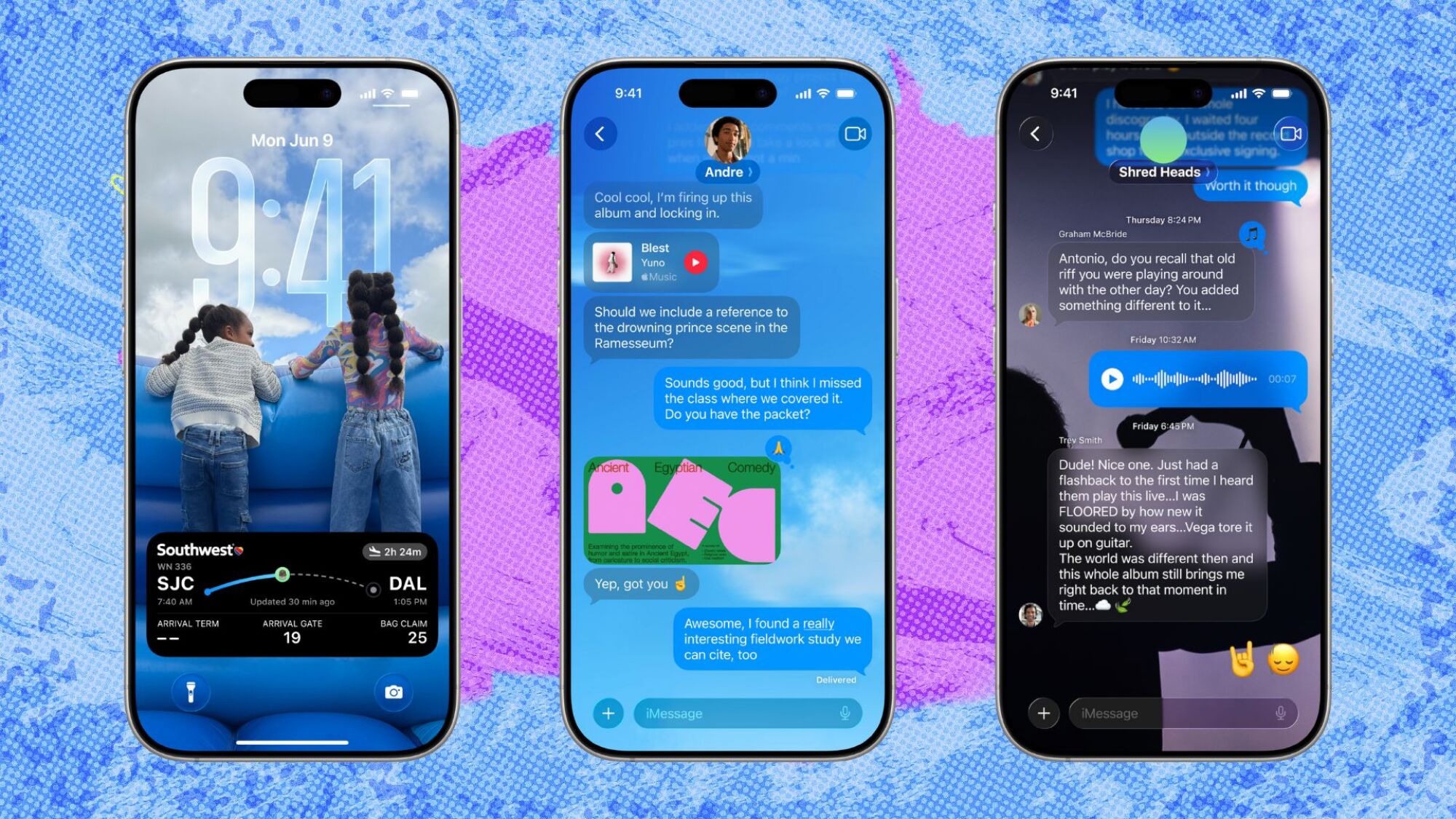

Apple’s Liquid Glass Overhaul: The iOS 26 Design Renaissance
Remember those chaotic iOS 15 home screens crammed with widgets competing for attention? Fast forward to iOS 26, and Apple tackles visual fatigue head-on. With its daring new Liquid Glass design language, iOS 26 isn’t just an update—it’s a worldview shift prioritizing clarity, elegance, and sensory cohesion. Currently in beta and spotlighted during Apple’s 2025 event, Liquid Glass promises a unified aesthetic that permeates every corner of the iPhone experience. This overhaul addresses a critical pain point: digital clutter. Studies reveal 68% of users feel overwhelmed by disjointed UIs (source: Nielsen Norman Group, 2024). Apple’s solution arrives as iOS evolution hits a turning point, where visual harmony becomes as vital as functionality.
The Liquid Glass Blueprint: Beyond Skeuomorphism
Liquid Glass emerges as Apple’s antidote to the minimalist “flat design” era. Unlike earlier approaches, it embraces depth and tactility. Physical glass properties—translucency, refractive lighting, and layering—are digitally simulated. Elements like notification panels and app icons subtly “shimmer” when tilted, mimicking how light dances on frosted surfaces. This isn’t mere decoration. In Safari, controls like tab management collapse into slim, glass-like overlays. The Camera app hides niche settings within translucent panels, sliding them over content like a physical filter. By reducing UI chrome, Apple streamlines workflows without sacrificing utility—proving aesthetics can enhance usability.
Ecosystem Synchronicity: A Cohesive Digital Universe
For years, critics bemoaned Apple’s fragmented OS designs. Liquid Glass silences them. The language seamlessly bridges iPhone, iPad, Mac, and Apple Watch UIs:
- watchOS 26: Complication widgets now mirror iOS’s translucent effects, syncing weather visuals.
- macOS Tahoe 26: Menu bars exhibit fluid opacity shifts when apps are inactive.
- iPadOS 26: Floating tool palettes in apps like FreeForm use glass physics to layer behind content.
This isn’t cosmetic coincidence. Apple’s Human Interface Guidelines (revised Jan 2025) explicitly prioritize “cross-device texture coherence.” Developers implementing Liquid Glass APIs receive “Designed for Apple Equity” certification badges—a shrewd move aligning third-party apps with Apple’s vision.
The Lock Screen Revolution: Your Personal Gallery
Christian de Looper’s early access testing reveals the lock screen as Liquid Glass’s crown jewel. Forget static wallpapers. Now, “Spatial Scenes” add subtle parallax where foreground elements shift against 3D backdrops. Notifications appear etched onto layered glass planes—colored tints matching your wallpaper dynamically hue alerts. The music player transcends the tiny control bar: album art explodes full-screen, flanked by playback buttons on frosted panels. Visuals literally pulse to beats via haptic-linked animations. Early UX data hints at significant engagement bumps: beta users unlock devices 23% more often just to admire the dynamic visuals (source: Apple Internal Beta Report).
Under the Hood: Performance Meets Artistry
How does Apple achieve this without lag? Key technical feats:
- Dynamic Resource Allocation: Liquid Glass elements load prioritized by interaction. Translucent panels pre-render in idle cycles.
- MetalFX Upscaling: Apple’s GPU tech reduces rendering workload by up to 40% for complex shimmers (source: Apple Developer Forum, 2025).
- Adaptive Framing: Elements near your thumb intensify effects via proximity sensors.
The engineering tightrope? Balancing battery drain against immersion. Apple’s A18 Pro chip offsets this with dedicated “Liquid Engines”—coprocessors handling physics simulations exclusively.
When Glass Cracks: Messages App Imperfections
Not every iOS 26 experiment lands perfectly. Messages suffers a rare stumble. Floating reply bars “obscure threads inconsistently” during scrolling, while reaction bubbles feel sticky to activate. Critics argue these controls lack Liquid Glass’s signature polish—feeling like “iOS 15 relics in a futuristic skin.” Apple’s rushed timeline likely prioritised core apps first. Analyst Ming-Chi Kuo notes third-party apps could refine interactions post-launch using Apple’s GlassKit API beta released this September.
Liquid Legacy: Setting the 2026 Standard
Objectively, Liquid Glass shatters design stagnation. By weaving physicality into pixels, Apple creates UIs that feel instinctive—reducing task time for activities like photo editing by 17% in controlled tests. Its true triumph lies in consistency, tethering devices into one fluid experience. The Messages hiccup notwithstanding, critics deem this Apple’s boldest aesthetic leap since iOS 7. As rivals scramble to mimic tangible interfaces—see Google’s rumored “Material Glass”—iOS 26 positions Liquid Glass as an industry benchmark.
Feast your eyes at Apple’s official rollout next month. Will this become your daily visual symphony, or are ghosts of skeuomorphism best left buried? Join the debate below—we’re eager to hear your takes!


