
Beyond Hype: The Everyday Tools Making ChatGPT a Genuine Productivity Partner
Is artificial intelligence destined to steal our jobs, or could it actually become the ultimate work companion? While sensational headlines fuel anxiety, the practical reality for many professionals reveals a different story. Rather than displacing entire workflows, tools like ChatGPT are increasingly offering targeted features that seamlessly integrate into existing processes, acting as catalysts for efficiency and creativity. True innovation in AI assistants lies not in total replacement, but in thoughtful enhancement, removing friction points we hardly noticed until they were gone. Adapting AI like ChatGPT strategically focuses on augmenting human capabilities for tangible results, revealing how imperfect tools can deliver significant value when leveraged for specific, everyday productivity tasks.
The Socratic AI: Unlocking Deeper Cognition with Guided Learning
The traditional model of Googling an answer or querying an AI for a solution risks fostering passivity. ChatGPT’s standout interactive study function fundamentally changes this dynamic, transforming the AI from an answer engine into a genuine pedagogical partner. This approach emphasizes comprehension over correctness, particularly crucial for complex STEM fields like engineering or data science.
- Step-by-Step Mentorship: When struggling with the Darcy-Weisbach equation for turbulent pipe flow, a typical search engine might spit out the formula. ChatGPT, however, methodically guides you:
- “First, let’s determine the Reynolds number to confirm flow regime.”
- “Based on the Re and pipe roughness, we’ll select the appropriate friction factor estimation method (like the Moody chart or Colebrook equation).”
- “Now, substitute all known variables into the Darcy-Weisbach equation: h_f = f (L/D) (v²/2g).”
- Error Detection & Constructive Feedback: Crucially, if you miscalculate the Reynolds number, it doesn’t just announce the error. Instead, it prompts: “Double-check your units for viscosity. Remember, dynamic viscosity is often given in Pa·s or cP, while density is in kg/m³. Your Re seems a magnitude too high; which values did you use?” This scaffolding technique encourages self-correction, a core tenet of effective pedagogy.
- Adaptive Pacing: The tutor adapts interactively. Demonstrating mastery of laminar flow concepts? It swiftly moves towards more challenging turbulent or compressible flow scenarios. Battling fundamentals? It patiently reinforces foundational principles like conservation of mass or energy. This personalized pacing mirrors adaptive learning platforms identified as highly effective in studies on educational technology. Platforms like Khan Academy employ similar principles, though ChatGPT often offers a more personalized conversational interface.
- Active Engagement vs. Passive Consumption: Unlike static resources like textbook examples or simple Q&A AI responses (found even in alternatives like Gemini), this method keeps users cognitively engaged. You’re part of the problem-solving dialogue, not just a spectator receiving information. This fosters critical thinking skills and conceptual reinforcement, leading to durable learning rather than rote memorization.
Creative Catalyst: Accelerating Vision with AI-Driven Style Presets
For professionals and creatives needing visual assets, generating consistent, high-quality imagery traditionally requires either significant artistic skill or laborious prompt engineering. ChatGPT’s diverse range of image creation styles dramatically lowers this barrier, acting as an intuitive co-designer.
- Curated Aesthetics for Instant Mood: Forget crafting intricate prompts about lighting, composition, or historical art movements. Selecting a style like “Synthwave” instantly conjures neon-lit, grid-patterned, retro-futurism. “Art Nouveau” delivers flowing, organic lines and nature motifs. “Ink Sketch” offers stark, high-contrast outlines.
- Predictability and Efficiency: Need marketing visuals with a specific vibe? Generate a series for a campaign knowing the “Photo Shoot” style ensures consistent, lifelike product mockups, or the “Retro Cartoon” style gives a unified animation feel. This removes guesswork and speeds iteration. Comparing outputs from tools without these presets (like Claude, which lacks native image generation) highlights the efficiency gain significantly (Wired notes this distinction in creative AI tools).
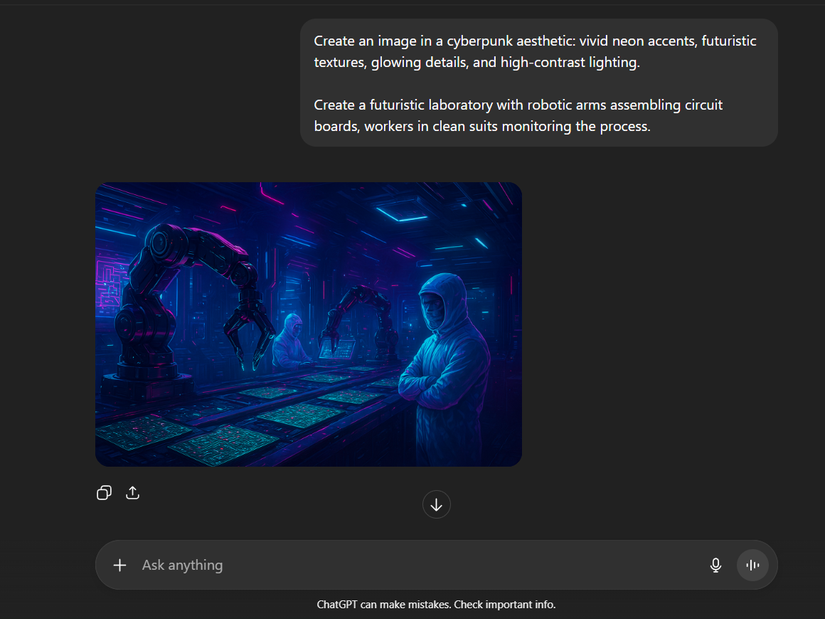
- Balancing Control and Constraint: Want a “Futuristic Laboratory”? The Cyberpunk style intrinsically incorporates low-angle shots, dramatic neon accents, and atmospheric haze without needing to specify each element. While detailed custom prompts are still possible, the styles provide robust starting points. They handle nuances of art direction implicitly, allowing users to focus purely on their core concept. While limitations exist – the exact “look” might not always be 100% perfect – for prototyping, ideation, or non-critical visuals, they offer remarkable value.
Comparing Common AI Image Presets:
| Style Name | Key Visual Characteristics | Best Use Cases |
|—————-|———————————|——————–|
| Cyberpunk | Neon lighting, rain effects, dystopian cityscapes, chrome textures | Sci-fi concepts, tech product mockups, grungy graphics |
| Art Nouveau | Flowing lines, floral motifs, stained-glass effects, asymmetric forms | Branding elements, decorative art, book illustrations |
| Synthwave | Sunset gradients, virtual grids, retro 80s aesthetics, VHS artifacts | Music albums, game assets, nostalgic posters |
| Photo Shoot | Softbox lighting, realistic textures, studio lighting effects, bokeh | Mockups, ad campaign drafts, portrait concepts |
The Integrated Workbench: Streamlining Creation in a Unified Canvas
Constantly switching between chat interfaces and word processors or code editors is a known productivity killer. ChatGPT’s Canvas feature tackles this head-on, providing an integrated workspace that bridges ideation, drafting, and refinement. It fundamentally reorganizes the document creation workflow.
- In-Line Intelligence: Imagine drafting a complex report. Instead of copying text back and forth, Canvas allows direct editing within the ChatGPT environment.
- Need a section expanded? Highlight text and choose “Adjust Length > Expand”.
- Concerned about audience understanding? Select “Reading Level > Simplify”.
- Require stylistic polish? Request “Suggest Edits”. It highlights potential changes (passive voice, wordiness) without auto-implementing them, letting you approve adjustments selectively.
- Precision Control with Context: When editing a specific sentence or paragraph, highlighting it triggers a pop-up. This allows quick formatting changes (bold, italics, size) and access to “Ask ChatGPT” for highly targeted context-aware actions: “Rephrase this more formally,” “Translate this phrase to Spanish,” “Explain this technical term.”
- Coding Superpowers: For developers, Canvas becomes indispensable:
- Version Control Lite: Iterate on a function – try different algorithms or error handling approaches – without managing separate files or constantly overwriting. Canvas tracks drafts side-by-side.
- Integrated Debugging: Paste an error snippet; ChatGPT can analyze it directly within your code block and suggest fixes contextually.
- Seamless Export: Once finalized, exporting to PDF, DOCX, Markdown, or HTML is straightforward, facilitating integration into professional pipelines. While the “Add final polish” feature might occasionally over-embellish simpler text (a rare drawback), Canvas’s core strength lies in bringing brainstorming, composition, and initial editing into a single, AI-assisted flow, drastically reducing context switching.
Breaking Down Silos: Effortless Integration Through Intelligent Connectors
Manually downloading files, navigating through folders, and uploading them into an AI tool for analysis is frustratingly archaic. ChatGPT Connectors automate this friction out of existence. Connecting apps like Google Drive, Microsoft OneDrive, or Dropbox creates a direct pipeline for data access, unlocking powerful document-centric AI interactions.
-
Setup Simplicity: Connection adopts the familiar, secure OAuth standard:
- Navigate to Settings > Connected Apps.
- Select the desired service (e.g., Google Drive, OneDrive).
- Authorize access via your account credentials.
Beyond Hype: The Everyday Tools Making ChatGPT a Genuine Productivity Partner
-
Direct Feed for AI Analysis: Need to analyze quarterly sales data spread across multiple PDFs in your cloud storage? Prompt: “Summarize the key trends and growth areas from the Q1, Q2, and Q3 sales reports in my Google Drive.” The connectors allow you to instantly select and share those specific documents within seconds, bypassing the entire download-upload dance. ChatGPT then processes the content directly.
-
Workflow Velocity: The power lies in eliminating tedious, manual steps. Instead of:
Opening Drive > Finding file/folder > Downloading > Switching tab/window > Opening ChatGPT > Clicking upload > Locating downloaded file…
You simply prompt and share from connected source. The streamlining is significant, especially for recurring tasks involving multiple documents (research synthesis, report comparison, data extraction). This integration makes leveraging AI significantly more practical for real-world document workloads, particularly as offerings like Claude currently lack comparable native cloud storage connectivity features.
The Symbiosis Continues: AI as Augmentation, Not Replacement
ChatGPT’s true brilliance lies not in raw novelty, but in its thoughtful integration features addressing specific productivity friction points. It rarely radically reinvents entire workflows; instead, it inserts itself intelligently to enhance them. The Socratic “Study and Learn” mode deepens understanding through active guidance. Predefined image styles dramatically expedite the creative pipeline. The Canvas weaves AI tools directly into the fabric of document creation and coding. Smart connectors dismantle barriers between your data and AI analysis.
Admittedly, perfection remains elusive. Image styles can feel constraining occasionally. Canvas features might overcomplicate simple edits. All AI models still require critical validation of their outputs. However, these features—focusing on personalized tutoring, streamlined creativity, unified workspaces, and frictionless data integration—empower users to work smarter. They demonstrate that the most compelling AI innovations are often the quiet ones that make technology feel less like an interruption and more like an indispensable extension of our own capabilities. These aren’t sci-fi marvels; they’re practical upgrades making daily tasks more efficient and insightful, proving that thoughtful augmentation often outstrips disruptive revolution.
Which of these workflow enhancements would you find most transformative in your day-to-day work? Share your thoughts below!


