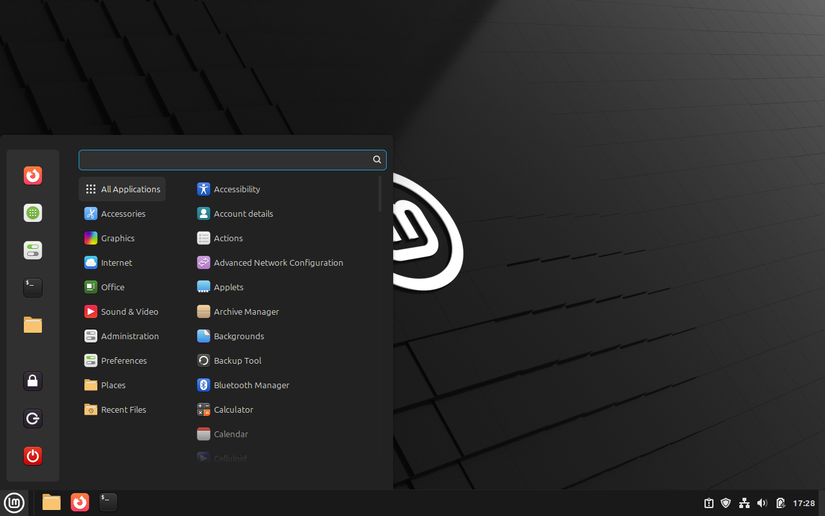

Your First Linux Home: Finding Comfort in the Cinnamon Desktop Environment
Have you ever stared at a computer screen feeling utterly lost? For millions considering the switch from Windows or macOS to Linux, that moment of daunting unfamiliarity is real. Yet, what if you could step into the open-source world without sacrificing the comfort of a recognizable interface? The Cinnamon desktop environment, originally crafted by Linux Mint, solves this exact problem. Born from a desire to blend modern functionality with classic usability, Cinnamon prioritizes immediate comfort and intuitive navigation. This isn’t another experimental interface demanding you relearn computing basics—it’s a welcoming doorway into Linux. With its traditional layout and thoughtful design, Cinnamon redefines accessibility, making it the ideal starting point for newcomers intimidated by Linux’s reputation for complexity.
The Genesis of Cinnamon: Purpose Over Novelty
Cinnamon emerged in 2011 when Linux Mint developers grew frustrated with GNOME 3’s radical redesign. Users craved a traditional workflow, not a paradigm shift. The solution? Fork GNOME Shell and rebuild it around familiarity. Unlike environments prioritizing innovation (like GNOME’s Activities Overview) or extreme customization (KDE Plasma), Cinnamon’s philosophy is unapologetically pragmatic. Its goal: minimize learning curves. By retaining the “taskbar + start menu + system tray” paradigm dominant since Windows 95, Cinnamon speaks a visual language billions already understand. This user-centric focus fuels its rise—Linux Mint, its flagship distro, consistently ranks among the top 3 most popular on DistroWatch.
A Lifeline for Windows Migrants: Why Layout Matters
Imagine moving to a new country where street signs look alien. For Windows expats exploring Linux, a non-traditional interface creates this disorientation. Cinnamon eliminates it. Key alignments:
- Taskbar Anchored Bottom: Icons for open apps, clock, and system tray stay predictably positioned.
- Start Menu Logic: A single-click menu categorizes apps (Accessories, Graphics, Office), mirroring Windows’ organizational logic.
- System Tray Utility: Wi-Fi, sound, notifications, and power options cluster accessibly.
This subverts the “Linux Shock” so effectively that even macOS users find transitions easier. As Stack Overflow’s 2023 survey notes, 24% of professional developers use Linux—many attribute their smooth onboarding to beginner-friendly environments like Cinnamon.
Effortless Mastery: Design That Stays Out of Your Way
Cinnamon’s elegance lies in avoiding complexity traps. Settings are centralized in one cohesive control panel, avoiding the fragmentation seen in GNOME’s Tweaks + Settings duality. For example:
- Display Configuration: Adjust resolution or scaling under Hardware → Display.
- Printer Setup: Navigate directly via Administration → Printers.
- Keyboard Shortcuts: Rebind keys visually without terminal commands.
Unlike KDE Plasma—where settings sprawl across 30+ modules—Cinnamon consolidates options into six primary categories, all searchable. Menus adopt progressive disclosure: show essentials first, reveal advanced choices only when needed. This approach reduces cognitive load for those already adapting to Linux’s package managers or security models.
Performance: Where Polish Meets Practicality
Lightweight environments like LXQt save RAM but often skimp on modern UI/UX. Heavyweights like GNOME offer fluid animations but choke on older hardware. Cinnamon targets the middle ground, balancing visual polish with efficiency. Resource comparisons are telling:
| Desktop | Idle RAM Use | CPU Load (Idle) | Suitable For |
|---|---|---|---|
| Cinnamon | 500-700 MB | 0.5-1% | Mid-range PCs (5-10 yrs old) |
| GNOME | 800 MB-1.2 GB | 2-4% | Modern systems |
| XFCE | 300-450 MB | 0.5% | Legacy hardware |
| KDE Plasma | 700-900 MB | 1-2% | High-end setups |
Data sourced from Phoronix benchmarks (2023) across Debian-based distributions.
Cinnamon leverages hardware acceleration (via Mutter) for compositing effects without excessive overhead. Result? Blur effects and window transitions feel polished on a decade-old Intel i3 processor but won’t overheat a modern Ryzen laptop. This flexibility lets users prioritize productivity over troubleshooting.
Customization: Personal Touch Without Pitfalls
Linux customization often intimidates—editing config files, installing unstable themes, or breaking window managers. Cinnamon circumvents this through its built-in Settings manager:
- Themes: Switch light/dark modes globally with one click.
- Applets: Add system monitors, weather feeds, or clipboard managers via drag-and-drop.
- Extensions: Enhance functionality without terminal use (e.g., window tiling or desktop widgets).
While less expansive than KDE’s Plasma store, Cinnamon’s vetted repositories ensure stability critical for novices. Community themes and “Spices” (applets/extensions) undergo Linux Mint’s moderation, minimizing crash risks. It’s freedom—within guardrails.
Reliability: Updates Without Anxiety
Stability remains Linux Mint’s—and thus Cinnamon’s—hallmark. Updates follow a staggered model:
- Tested by Linux Mint’s internal team.
- Released to dedicated Edge users for validation.
- Rolled out to all users only after bug fixes.
This explains why major Cinnamon releases lag upstream components slightly. The trade-off? Fewer surprises. Unlike rolling-release distros (e.g., Arch), Cinnamon prioritizes “it just works” predictability. For students or remote workers, this reliability is invaluable, cementing Linux Mint’s status as a gateway distro.
Community: Your Safety Net
Beyond software, Cinnamon’s adoption by Linux Mint grants access to one of the most accessible communities. Key resources:
- Official Forums: Over 100,000 threads tackling issues from driver quirks to theme customization.
- YouTube Tutorials: Channels like “Linux Mint Community” offer click-through guides for complex tasks.
- Documentation: Prose-style docs on the Linux Mint wiki replace jargon with plain language.
When Ubuntu’s Snap adoption controversy alienated users, many migrated to Linux Mint—a testament to its reputation for community-centered decisions. For newcomers, forums assure that “someone solved this before you.”
Cinnamon vs. Alternatives: Finding Your Fit
How does Cinnamon contextualize against top Linux environments?
- GNOME: Cutting-edge design with gesture navigation and vertical workflows. Best for: Touchscreen users wanting modernist minimalism.
- KDE Plasma: Endless customization from window effects to scripting. Best for: Tinkerers comfortable with complexity.
- XFCE/LXQt: Ultra-light resource profiles. Best for: Aging hardware or servers needing GUIs.
- Cinnamon: Preserves desktop metaphors while adding sensible upgrades (e.g., grouped windows). Best for: Migrants from Windows/macOS seeking immediate productivity.
Cinnamon excels by resisting extremes—it’s neither spartan nor overwhelming. Its innovation is subtle: retained conventions refined for reliability.
Begin Your Open-Source Journey Here
Choosing Cinnamon isn’t settling—it’s strategically minimizing friction. By mirroring the interfaces users already know while honoring Linux’s flexibility, it transforms apprehension into empowerment. You’ll spend less time configuring menus and more time writing documents, coding, or exploring Linux’s vast software repositories—secure in an environment designed for humans, not hackers. Ready? Download Linux Mint’s Cinnamon Edition, follow installation guides, and join millions who discovered Linux can feel like home from day one. What convinced you to try—or avoid—Cinnamon? Share your experience below!


